Hello Fellow Yuneec Pilot!
Join our free Yuneec community and remove this annoying banner!
Sign up

CGO-ET journey

h-elsner

Premium Pilot
Joined
Mar 23, 2016
Messages
2,677
Reaction score
2,541
Location
Bavaria / Germany
Website
h-elsner.mooo.com
Step 1:
At Enrico's workshop: We have two CGO-ET, one with broken WiFi, another with defect gimbal. Exchanged the WiFi board, calibrated the gimbal and we have a working H520 CGO-ET. The other, now with the broken WiFi board and the not proper working gimbal I kept with me.
At home I repaired the gimbal and calibrated the camera with the calibration tool for the CGO3+, 115200 baud. Gimbal works perfect, it has a version V1.27 with the black box IMU. It is a GCO-ET for H480. Boot-up stuck in initialization, white LED solid.

Step 2:
Got a CGO-ET H520 from Enrico in fair condition: The light section lens war broken out, camera frame broken, and the gimbal was heavily bent but surprisingly working - you don't believe what calibration can do. WiFi was working, we have thermal videostream. I was happy and took it back home.
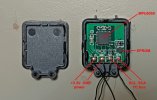
My idea was simply exchange the WiFi board and I have a working thermal camera. Wrong! Unexpected effect: White smoke from gimbal board. That doesn't mean we have a new pope but a very hot step-down converter for the 5V power supply for the camera. What the f...? Take all the stuff apart and start to test all four components of the camera:
- gimbal board
- WiFi board
- Ambarella main bord
- camera lens board.
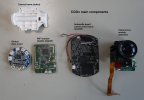
Camera_main_components.JPG
 
  • Like
Reactions: Steve Carr
Step 3:
In the first moment it looks like a short cut at the 5V power of the Ambarella board. At the end (and don't ask me what exactly I have done) I have had a working combination of all four components. I started to to build a new CGO-ET camera from the components of the two old CGO-ET and some mechanical parts of a CGO3+. This step including some tests take three days. Now I tried to calibrate the gimbal. I thought I have a H520 CGO-ET bit with the E90 calibration tool tool no connection. Switched to CGO3+ calibration tool - no connection. The Logic Analyzer said it has 500000 baud and message magic 0xFE like CGO3+. OK, the calibration with CGO3+ tool set to 500000 baud worked and gimbal is calibrated. Now I have a CGO-ET camera with strange behavior: It control is like a CGO3+ but with higher baud rate. The FW versions are:
APP: ETH520
HARD: ETH520
APPV: 1.34
FIREV: 1.00
BLV: 1.20.

EEPROM is OK!
Sixface is OK!
Temperature Offset is OK!
Encode Set is OK!
Motor Zero Set is OK!
Front Set is OK!
Acc Offset is OK!
machine test is OK!

I know that is not the latest FW. This may be the reason why it could not calibrated by E90 calibration tool. Another CGO-ET from a H520 with APP:V2.40.3, HD:V1.00, BL:V1.19 I could calibrate with E90 calibration tool.

I have updated the ESP32 FW for the Thunderbird to switch between CGO3+ and this CGO-ET. Gimbal is not working on a Typhoon H but this also could be solved with a ESP32 between drone and camera.
I have learned a lot during those three days. One outcome is that the white IMU in the camera has no EPROM, the black box IMU has an EPROM. What the EPROM is for I don't know. Possibly the calibration data (temp calibration?) are stored there. Handling the EPROM may be the difference between the gimbal FW 1.25 and 1.27.

backboxIMU_info.jpg
 
  • Like
Reactions: Steve Carr
Step 4:
What do do with the remaining rest of the stuff? The camera lens I could repair. Only the focus needs improvement. A big surprise: The WiFi module from that I thought that it is defect works. The gimbal board as well as the gimbal itself from the H480 CGO-ET is also still working.
APP: CGO3 PLUS
HARD: CGO3 PLUS
APPV: 1.27FIREV: 2.00
BLV: 1.18

EEPROM is OK!
Sixface is OK!
Temperature Offset is OK!
Encode Set is OK!
Motor Zero Set is OK!
Front Set is OK!
No Acc Offset!

Remains the Ambarella board which is one for the H520 I think. The shortcut on the 5V rail disappeared, don't know why. May be it has something to do with one of the ribbon cables. If I put the four components together the camera is powered on, starts to boot but stuck with white LED solid. FW update didn't start at all.
All Ambarella boards no matter for what have imprint "Cgo3+_MB_v2.1". The CGO3+ boards have microphones connected, the CGO-ET boards not. Thus, I replaced the Ambarella board with one of a CGO3+. Still the same behavior. Then I replaced the camera lens module with one of the CGO3+ and it works perfectly, it boots up, WiFi is on and video stream is available. That means, all components and cables are working. But not with the CGO-ET lens that worked before in the H520 camera I got from Enrico.
I tried a FW update for the camera from EU version to US version. That worked. I tried a FW update to a CGO-ET H480 (cgoet_gb_0.0.35_A_firmware.bin) and CGO-ET H520 (CGOET H520 EU 0.2.14_firmware.bin). Both did not working (also when I connect the CGO-ET camera lens module).

Any thoughts what I can do/test else to bring the second CGO-ET at work?
Remark: I don't want to deal with the other CGO-ET because it is the only one I have that is working - and it is a nice toy to play with thermal imaging.
 
Hello,
Wow what a journey you’ve been through, I was wondering with your vast knowledge if you could guide me on mine. I have a CG0-ET that came with an H480. It has a good image and control as long as you hold the gimbal to keep it from continuously rotating. To clarify, good image but the gimbal spins continuously, I’ve tried the onboard gimbal calibration tool with no changes. I’ve been told a firmware update may be in order but the online update tool doesn’t work, I’ve been told there’s a method downloading the firmware directly to a memory card an inserting it into the camera and or the controller.
Are you familiar with this method enough to guide me to the firmware file and the process to update it?
Thanks in advance, Matt
 

New Posts

Members online

Forum statistics

Threads
21,651
Messages
248,877
Members
28,917
Latest member
cpassenheim