Hello Fellow Yuneec Pilot!
Join our free Yuneec community and remove this annoying banner!
Sign up

Q500 4K Initialization Failed

Joined
Sep 20, 2025
Messages
7
Reaction score
3
Age
59
Complete newbie here.

I just got Q500 4k from a garage sale. It looks like it's brand new. The seller flew it a few times and crashed it. Yuneec (when they were in business) sent him a new part at no cost. He made the repair, but he indicated that it has a firmware issue. I'm not sure if it flew or not after the repair. I watched a bunch of videos and did some AI troubleshooting. Here's my status:

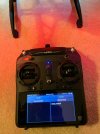
1) The camera binds. The display on the remote shows the camera view. If I try to move the camera using the switch on the left side of the remote, I hear a beep, but the camera doesn't move.
2) The drone's main LED blinks red and beeps about twice a second. I believe this means the initialization failed. I've tried outside and inside, but it will not go into bind mode when I tip it twice to 45 degrees. I'm assuming it must need to complete initialization before it can go into bind mode.

From what I'm reading, I may want to use the GUI to help troubleshoot. Is there a document I can reference for basic troubleshooting, firmware upgrades, GUI installation, and operation?
 

Attachments

  • st10.jpeg
    st10.jpeg
    1.4 MB · Views: 5
Thread 'Way To Fix Drones project'
Way To Fix Drones project

Download the attached ToC and you will find a lot of guidance for the Q500, cameras it uses, and controllers.

It is rare to have a firmware issue. Install the GUI, then use the USB adapter to connect the aircraft to your computer.
 
From what I'm reading, I may want to use the GUI to help troubleshoot. Is there a document I can reference for ......, GUI installation, and operation?
IMPORTANT!! You have a hardware issue. Do not try to fix it using a firmware update. Get the drone flying first, then worry about firmware.


1.)You will need the GUI for your operating system
Q500 GUI Downloads

2.) You will need a YUNA100 adapter:

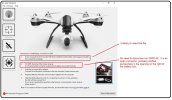
3.) The first screen when you install the GUI has the basic guidance for connecting the Q500 to the GUI. It is very unlikely you will need the additional files mentioned in the instructions if your computer was built anytime in the last decade or so.
Q500.jpg
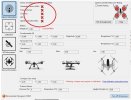
4.) Look for issues on the "Sensor Information" screen. Your issue will likely show as a heavy red "X". There may be more than one
red X.jpg
 
  • Love
Reactions: DoomMeister
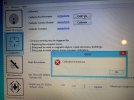
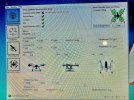
The GUI Sensor Information indicates that the Orientation Sensor (IMU) has an "Accelerometer bias out of range" error. When I try to calibrate the accelerometer, I get an error "Calibration timed out" after a 5-second countdown. The main LED blinks Blue, Red, Green.

ChatGPT tells me it could be "drift" from sitting around for years. I don't see too many good alternative options for getting this working. Any suggestions for diving deeper into troubleshooting?
 

Attachments

  • IMG_7702.jpeg
    IMG_7702.jpeg
    4 MB · Views: 6
  • IMG_7695.jpeg
    IMG_7695.jpeg
    5.7 MB · Views: 8
You can try to knock on the IMU chip MPU6050 (it is the diagonal sitting chip on the mainboard). There is a tiny mechanical part in it for the accelerometer that may hang. I have heared that this helped but in rare cases.
Another try is to start calibration with drone flipped 90° or 180°. If it comes to work, recalibrate in normal position.

However, in mosr cases a new mainboard is needed or if you have a repair shop that can deal with SMD parts a new MPU6050.
But used Q500 on the market are cheap and you can keep yours for parts.
 
No luck after trying to calibrate tipping in all directions. The compass values change when I tip it, but the Accelerometer and gyro numbers all stay at zero. As you suggest, I'll try opening it up and knock on the IMU chip.
 
  • Like
Reactions: Steve Carr
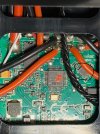
No luck tapping on the MPU6050.

I also tried flashing the firmware—no luck there either. I didn't change the version, but the "update" was successful.

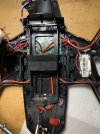
Can this issue be isolated to a single connector? If so, I could try reseating it. Other than that, I'm probably at the end of the line since I have no experience replacing this type of part. it looks like if would require plugging in several connectors and soldering several wires. There's also a connection made with a big glob of hot glue in the top left corner. Was that done at the factory?
 

Attachments

  • IMG_7728.jpeg
    IMG_7728.jpeg
    2 MB · Views: 4
......at, I'm probably at the end of the line since I have no experience replacing this type of part. ...............There's also a connection made with a big glob of hot glue in the top left corner. Was that done at the factory?
Yeah, the cost of repairs and shipping for this job would probably outweigh the cost of a replacement drone. The consolation is that if you go that route, your current Q500 will be a great source of spare parts.

The big glob of hot glue came from the factory. It is not part of the problem. It is there to hold the GUI /receiver cables out of the way .
 
  • Like
Reactions: h-elsner

New Posts

Members online

Forum statistics

Threads
21,651
Messages
248,877
Members
28,917
Latest member
cpassenheim