Hello Fellow Yuneec Pilot!
Join our free Yuneec community and remove this annoying banner!
Sign up

Typhoon H drone problem with CGO3+ camera

Joined
Mar 5, 2024
Messages
99
Reaction score
20
Age
27
The problem concerns the camera, which has an image but unfortunately does not move.
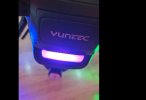
When the drone is turned on, the light on the back of the drone first flashes green and then switches to purple.
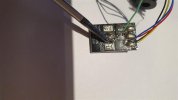
Attempting to bind the drone does not cause any reaction, i.e. the rear LED continues to flash purple (foto).
What should I do to make the camera rotate?
Thank you for your assistance.
 

Attachments

  • H.jpg
    H.jpg
    42.6 KB · Views: 3
Did you crash the drone at all? Make sure the camera is being mounted to the drone and clear off the pads.
This video always helped me with binding issues, but its odd youre getting a video feed and no pan/tilt ability.
To view this content we will need your consent to set third party cookies.
For more detailed information, see our cookies page.
If you'd like some help with this shoot me an email.
 
Please help us understand the status:

1.) Does the drone rear LED change color when you cycle the controller flight mode switch (S4)?
2.) Are there any beep codes from the camera?
3.) Does the camera remain stabilized front and center when powered on?
4.) Does the camera pitch work normally (nose up and down) when cycled with the controller's left slider (K2)?
5.) Does the "Pan Mode" (yaw) switch move freely to all three positions? Shows on Hardware Monitor (S2)? Shows on "Final Output Display" CH10?
6.) Does the "Pan Control" knob move freely? Shows on "Hardware Monitor" (K1) ?
Shows on "Final Output Display" CH08?
7.) Does the camera yaw work normally (rotates in a circle) when the Yaw potentiometer (K1) is operated?
8.) Have you run continuity checks between the drone main board connector and the camera gimbal board connector?
 
Please help us understand the status:

1.) Does the drone rear LED change color when you cycle the controller flight mode switch (S4)?
2.) Are there any beep codes from the camera?
3.) Does the camera remain stabilized front and center when powered on?
4.) Does the camera pitch work normally (nose up and down) when cycled with the controller's left slider (K2)?
5.) Does the "Pan Mode" (yaw) switch move freely to all three positions? Shows on Hardware Monitor (S2)? Shows on "Final Output Display" CH10?
6.) Does the "Pan Control" knob move freely? Shows on "Hardware Monitor" (K1) ?
Shows on "Final Output Display" CH08?
7.) Does the camera yaw work normally (rotates in a circle) when the Yaw potentiometer (K1) is operated?
8.) Have you run continuity checks between the drone main board connector and the camera gimbal board connector?
It seems the user has both the camera issue, and a binding issue, hopefully he can provide the status as well as hardware monitor information when successfully bound.
 
1. Yes, it changes colour to green.
2. Not only the drone from time to time.
3. Yes, when I check it manually, there is resistance and it returns to level on its own.
4. Yes, the slider works and the camera does not move.
5. Yes, it is visible in the ‘equipment monitor’, but I do not know where to find the ‘Final Output Display’.
6. Yes, the knob moves normally and is visible in the ‘equipment monitor’, but as above, I don't know where the ‘Final Output Display’ is.
7. The potentiometer works normally, the camera doesn't move at all.
8. The connections are there, only the camera cable was soldered because it is insulated.
 
The serial connection between the drone and the camera is disconnected, most probably the PWM/Tx (the white wire between contact plate and slip ring) line or both.
Do a visual check of the white and the green wiring.
 
  • Like
Reactions: WTFDproject
The serial connection between the drone and the camera is disconnected, most probably the PWM/Tx (the white wire between contact plate and slip ring) line or both.
Do a visual check of the white and the green wiring.
The white wire and green wire must both have continuity. Ultimately all the way between the drone main board connection and the gimbal board connection. But there are a couple of common places that problems occur:
1.) Stuck contact springs on the mount plate. If any of the contact springs are lower than the others, pop it back out to the normal position.
2.) Broken wire between the top of the slip ring and the camera side contact plate. It is obvious if wire is in two pieces. But the insulation is very flexible. The wire inside can be broken but the break is hidden because the insulation stretched instead of breaking. If there has ever been an event where the dampers pulled out, a broken slip ring wire (visible or not) becomes a higher possibility.
3.) Bad slip ring. This one is normally easy to find by checking the continuity of each wire going in and coming out. There are two pairs of wires that are soldered to the same pad contacts. Those two are not likely to be the issue in your camera, but they should be checked anyway. Ensure they have continuity between them on the gimbal board end. (Again, the issue is likely either the green or white wire). Also be aware the slip ring rotates. It can check good in one position, but fail in another.
4.) Pin(s) not fully inserted in the connector on the gimbal board end. If there is ANY amount of the metal pin exposed on the back side of the connector, push the pin back in and make sure it engages the little plastic latch tap for it on the connector.

These are only the most common. There are more connectors, two connector boards, more opportunities for broken/ crushed wires, slipped pins, bad solder joints and general mayhem. They key is the full continuity check between the main ESC board on the drone and the gimbal board must be good.

 
Attempting to bind the drone does not cause any reaction, i.e. the rear LED continues to flash purple (foto).

Please help us understand the status:
1.) Does the drone rear LED change color when you cycle the controller flight mode switch (S4)?
1. Yes, it changes colour to green.
Assuming the LED also changes to flashing red when the switch is moved to the bottom position, this confirms the drone is already bound. Please be aware that continuing attempts to fix a problem that does not exist (binding) may complicate resolution of the real problem.
The continuity of the wires is needed whether the camera control is coming from SR24 or from WiFi. I think the gimbal board has to get a permissive to operate via the wires, regardless of control source.
 
Please help us understand the status:

1.) Does the drone rear LED change color when you cycle the controller flight mode switch (S4)?
2.) Are there any beep codes from the camera?
3.) Does the camera remain stabilized front and center when powered on?
4.) Does the camera pitch work normally (nose up and down) when cycled with the controller's left slider (K2)?
5.) Does the "Pan Mode" (yaw) switch move freely to all three positions? Shows on Hardware Monitor (S2)? Shows on "Final Output Display" CH10?
6.) Does the "Pan Control" knob move freely? Shows on "Hardware Monitor" (K1) ?
Shows on "Final Output Display" CH08?
7.) Does the camera yaw work normally (rotates in a circle) when the Yaw potentiometer (K1) is operated?
8.) Have you run continuity checks between the drone main board connector and the camera gimbal board connector?
Exactly! Beep codes are going to tell you a lot, if you have any.
Is there a video of this, from the poster? I'd like to visually see what this thing is doing.
 
1. Yes, it changes colour to green.
2. Not only the drone from time to time.
3. Yes, when I check it manually, there is resistance and it returns to level on its own.
4. Yes, the slider works and the camera does not move.
5. Yes, it is visible in the ‘equipment monitor’, but I do not know where to find the ‘Final Output Display’.
6. Yes, the knob moves normally and is visible in the ‘equipment monitor’, but as above, I don't know where the ‘Final Output Display’ is.
7. The potentiometer works normally, the camera doesn't move at all.
8. The connections are there, only the camera cable was soldered because it is insulated.
 
Unfortunately, I still don't know where to look for point 6. As for the connection from the board to the slip ring, it is connected correctly, there is still an image but no camera control.
 
Unfortunately, I still don't know where to look for point 6. As for the connection from the board to the slip ring, it is connected correctly, there is still an image but no camera control.
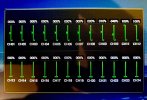
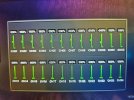
The final output display is accessed by double tapping the Volts readout at the upper left of the ST16 main screen. It looks like this:
IMG_0514.jpeg
 
......
8. The connections are there, only the camera cable was soldered because it is insulated.
"The connections are there,....."
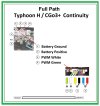
Please confirm you have continuity all the way from each of the four wires at the main board end to either one or two wires at the gimbal board end and the color pattern is correct at the gimbal board end.
Full Path Continuity.jpg

"...only the camera cable was soldered because it is insulated."
Please clarify or post a snap shot to help us understand what you mean.
 
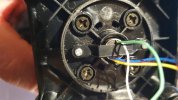
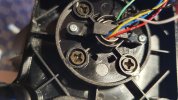
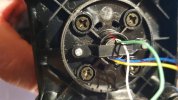
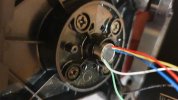
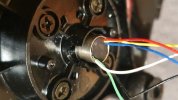
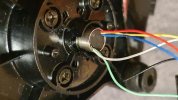
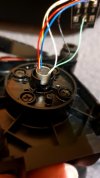
Unfortunately, I caught a cold, which is why it took a while. Nothing has changed yet, and I am sending photos of the controller and the gimbal with wires in the attachment. The green wire was torn out and is soldered. Which of the wires is responsible for the vertical movement of the camera?
 

Attachments

  • 20250925_190802 (Medium).jpg
    20250925_190802 (Medium).jpg
    170.2 KB · Views: 6
  • 20250925_191828 (Medium).jpg
    20250925_191828 (Medium).jpg
    102.3 KB · Views: 7
  • 20250925_191845 (Medium).jpg
    20250925_191845 (Medium).jpg
    183.4 KB · Views: 7
  • 20250925_191902 (Medium).jpg
    20250925_191902 (Medium).jpg
    197.2 KB · Views: 7
Green receives data from camera,
White sends data to camera.
Both together are the UART that needs to yaw and tilt the camera. If the UART is not able to establish a bidirectional connection between drone and camera the flight controller will fallback to PWM after 10s. In this case the white wire should be enough to tilt the camera. Yaw will no more work in fallback mode.
So, white is my favorite for being the source of this problem.
 
  • Like
Reactions: Steve Carr
.....;. Which of the wires is responsible for the vertical movement of the camera?
The green and the white are both involved with both pitch and yaw.

One of your pictures seems to show damaged insulation and perhaps a short circuit between the green wire and the barrel of the slip ring. Be sure to do a continuity check to ensure there is no short between any wire and the barrel or between any wires that do not share a solder pad.

wires.jpg
 
  • Like
Reactions: Steve Carr
I am sending photos of the cables; they do indeed look damaged. Is it necessary to replace the entire rotating mount of the camera gimbal arm, or can it be repaired somehow? Could this damage be the reason why the camera cannot be controlled despite the image from the camera?
 

Attachments

  • 20250927_193311 (Medium).jpg
    20250927_193311 (Medium).jpg
    142.3 KB · Views: 6
  • 20250927_193345 (Medium).jpg
    20250927_193345 (Medium).jpg
    163.6 KB · Views: 6
  • 20250927_193355 (Medium).jpg
    20250927_193355 (Medium).jpg
    197.3 KB · Views: 6
  • 20250927_193433 (Medium).jpg
    20250927_193433 (Medium).jpg
    84.3 KB · Views: 6
Could this damage be the reason why the camera cannot be controlled despite the image from the camera?
Yes
Is it necessary to replace the entire rotating mount of the camera gimbal arm, or can it be repaired somehow?
it depends on where the damage is. If it is too close to the slip ring barrel or internal to the barrel then the slip ring needs to be replaced.

The power is good since the camera is functional as well as the gimbal stabilizing the camera, but the issue is in the UART communication that controls the tilt and pan.

A good test for the UART communication is to access the screen that shows the firmware versions for the camera, gimbal, and autopilot. If all or part are missing then there is a UART issue.
 
  • Like
Reactions: WTFDproject

New Posts

Members online

No members online now.

Forum statistics

Threads
21,651
Messages
248,877
Members
28,917
Latest member
cpassenheim