Hello Fellow Yuneec Pilot!
Join our free Yuneec community and remove this annoying banner!
Sign up

C23 Camera – Gimball Calibration Problems

Joined
Sep 2, 2025
Messages
12
Reaction score
1
Age
40
  1. A drone was brought in for repair with the issue “the gimbal shakes and won’t calibrate.”
  2. Inspection of the ribbon cables, wires, motors, and encoders shows everything is working.
  3. The camera’s position data is correctly displayed on the remote controller screen (so the magnet provides a sufficient field for the encoder to read).
  4. I tried rolling back and updating the firmware—no change.
  5. I used the “global fix” file from this thread: C23 Gimbal Fix for Vibration
  6. Now the gimbal attempts to initialize and then beeps an error: two long beeps and one short. According to the forum, that indicates a PITCH encoder error.
    BUT ITS DATA IS COMING THROUGH FINE.

How do I fix this thing????
 
  1. A drone was brought in for repair with the issue “the gimbal shakes and won’t calibrate.”
  2. Inspection of the ribbon cables, wires, motors, and encoders shows everything is working.
  3. The camera’s position data is correctly displayed on the remote controller screen (so the magnet provides a sufficient field for the encoder to read).
  4. I tried rolling back and updating the firmware—no change.
  5. I used the “global fix” file from this thread: C23 Gimbal Fix for Vibration
  6. Now the gimbal attempts to initialize and then beeps an error: two long beeps and one short. According to the forum, that indicates a PITCH encoder error.
    BUT ITS DATA IS COMING THROUGH FINE.

How do I fix this thing????
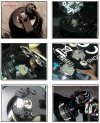
Also remove the cover on the right-hand side of the camera, lift the encoder, and check the encoder magnet. Degraded encoder magnets are behind many problems with the CGo3 and later camera models. The issues start when the magnet begins to loose magnetism. It may still look completely normal.
The data may be present, but if the magnetic poles are shifted or weak it may be inaccurate. The same could be said if the magnet was somehow rotated on the axis. If the magnet is early in the degradation process, calibration may temporarily restore the unit to service. It will fail again. And eventually physically crumble into a gray magnetic powder.

Examples.jpg
 
  • Like
Reactions: MountainDroneTN
Also remove the cover on the right-hand side of the camera, lift the encoder, and check the encoder magnet. Degraded encoder magnets are behind many problems with the CGo3 and later camera models. The issues start when the magnet begins to loose magnetism. It may still look completely normal.
The data may be present, but if the magnetic poles are shifted or weak it may be inaccurate. The same could be said if the magnet was somehow rotated on the axis. If the magnet is early in the degradation process, calibration may temporarily restore the unit to service. It will fail again. And eventually physically crumble into a gray magnetic powder.

View attachment 32640
The magnet is clean, the encoder data is accurate (the camera tilt angles in all axes are displayed on the hardware screen).
 
  1. A drone was brought in for repair with the issue “the gimbal shakes and won’t calibrate.”
  2. Inspection of the ribbon cables, wires, motors, and encoders shows everything is working.
  3. The camera’s position data is correctly displayed on the remote controller screen (so the magnet provides a sufficient field for the encoder to read).
  4. I tried rolling back and updating the firmware—no change.
  5. I used the “global fix” file from this thread: C23 Gimbal Fix for Vibration
  6. Now the gimbal attempts to initialize and then beeps an error: two long beeps and one short. According to the forum, that indicates a PITCH encoder error.
    BUT ITS DATA IS COMING THROUGH FINE.

How do I fix this thing????
"How do I fix this thing????"
We each have our ways of thinking. If this were me, I would try to look past the evidence that there is no problem and change both the encoder and the magnet. If parts are not immediately available or if no change is seen with different parts installed, I would look to the roll encoder and/or the IMU.

The ribbon remains a possibility unless you have testing equipment beyond most. The ribbons have issues that do not show up on continuity or visible checks.

Edited to remove general symptoms of failing ribbons to avoid confusion between main ribbon and pitch encoder ribbon.
 
Last edited:
"How do I fix this thing????"
We each have our ways of thinking. If this were me, I would try to look past the evidence that there is no problem and change both the encoder and the magnet. If parts are not immediately available or if no change is seen with different parts installed, I would look to the roll encoder and/or the IMU.

The ribbon remains a possibility unless you have testing equipment beyond most. The ribbons have issues that do not show up on continuity or visible checks. However, most issues at that level of ribbon degradation are more of a "buzzing" effect than a shake. There are also often problems with inability to perform drone updates or absence of the drone firmware revision on the controller screen if the ribbon is failing.
If the angle data goes to the controller
If the camera angle data is displayed on the hardware screen
But calibration does not work
Then the problem is not in the sensor, but in the crooked hands of the software developer.

And no, there is no "magic" in flat loops, they are also checked for line breakage and resistance, if the resistance is within the permissible limits, the loop is intact.
And I'll remind you that the data is coming!

It's just that this whole design is poorly thought out and poorly implemented
And the software for maintenance is hidden.

Even dji and autel hangers are much easier to repair than this rubbish.
 
"How do I fix this thing????"
We each have our ways of thinking. If this were me, I would try to look past the evidence that there is no problem and change both the encoder and the magnet. If parts are not immediately available or if no change is seen with different parts installed, I would look to the roll encoder and/or the IMU.

The ribbon remains a possibility unless you have testing equipment beyond most. The ribbons have issues that do not show up on continuity or visible checks. However, most issues at that level of ribbon degradation are more of a "buzzing" effect than a shake. There are also often problems with inability to perform drone updates or absence of the drone firmware revision on the controller screen if the ribbon is failing.
And as for the approach to upgrading the drone and camera, for such a decision should be beaten with sticks, this is not a commercial product this junk is a children's toy from the toy shop with a price tag more expensive than the real drones
 
OK, I found it, thanks. And yes, this shows the camera angle sent by the gimbal via WiFi. I have tested this with my E90 Demo app (because I have no H Plus). So, this is independent from the controller's slider position.

What text messages sent the camera during calibration?
 
Last edited:
If the angle data goes to the controller
If the camera angle data is displayed on the hardware screen
But calibration does not work
Then the problem is not in the sensor, but in the crooked hands of the software developer.

And no, there is no "magic" in flat loops, they are also checked for line breakage and resistance, if the resistance is within the permissible limits, the loop is intact.
And I'll remind you that the data is coming!

It's just that this whole design is poorly thought out and poorly implemented
And the software for maintenance is hidden.

Even dji and autel hangers are much easier to repair than this rubbish.
Ignore advice from a person that has repaired more Yuneec cameras than you have likely seen if you wish, but if it were me I would take advantage of his experience.

As for DJI and Autel I see enough posts about their gimbal issues every week in our sister forums that they are every bit as troublesome as Yuneec.
 
OK, I found it, thanks. And yes, this shows the camera angle sent by the gimbal via WiFi. I have tested this with my E90 Demo app (because I have no H Plus). So, this is independent from the controller's slider position.

What text messages sent the camera during calibration?
What other text messages?
 
Ignore advice from a person that has repaired more Yuneec cameras than you have likely seen if you wish, but if it were me I would take advantage of his experience.

As for DJI and Autel I see enough posts about their gimbal issues every week in our sister forums that they are every bit as troublesome as Yuneec.
Anyone who can move their hands can mechanically swap components; you don’t need to think for that. And you shouldn’t call that “repair” either—repair is when the root cause is identified and fixed, not mindlessly swapping parts until the problem fixes itself.
And yes, problems with DJI and AUTEL are often bent gimbal arms or a PHYSICALLY TORN CABLE, not those dumb designs with separate magnets for encoders that somehow produce the wrong magnetic field (a convenient excuse for ham-fisted programmers).
And yes, don’t ascribe magical properties to flat ribbon cables (FFC). If the position signal is getting through, and the lines from the MOSFET to the motor are intact, then that’s it—the cable is fine and working. Everything else is the silly fantasy of humanities types.

 
Anyone who can move their hands can mechanically swap components; you don’t need to think for that. And you shouldn’t call that “repair” either—repair is when the root cause is identified and fixed, not mindlessly swapping parts until the problem fixes itself.
And yes, problems with DJI and AUTEL are often bent gimbal arms or a PHYSICALLY TORN CABLE, not those dumb designs with separate magnets for encoders that somehow produce the wrong magnetic field (a convenient excuse for ham-fisted programmers).
And yes, don’t ascribe magical properties to flat ribbon cables (FFC). If the position signal is getting through, and the lines from the MOSFET to the motor are intact, then that’s it—the cable is fine and working. Everything else is the silly fantasy of humanities types.

Okay, I bow to your superior knowledge since you are a DJI repair guru. Good luck fixing the C23 with your surgical precision hands. I guess Yuneec programmers were those fired by DJI for being too ham fisted with their logic.
 
Okay, I bow to your superior knowledge since you are a DJI repair guru. Good luck fixing the C23 with your surgical precision hands. I guess Yuneec programmers were those fired by DJI for being too ham fisted with their logic.
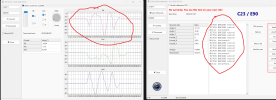
1757497680417.png


Let's just admit that your developers really messed up.
Here's a screenshot: in the diagnostics, the encoder data is there, but in the calibration utility, there's no encoder data.
So who's the fool here?

Go on, say something about this — how come, as if by magic, the encoder data gets passed through to the output, yet the controller doesn’t see it? What kind of sorcery is that?

And while you're at it, maybe you can also tell me where to even find spare parts for this ancient junk now — and, more importantly, which ones?
Should I replace the entire encoder–ribbon–controller line just to “fix the issue” the way you guys do — by basically swapping out everything?
 
View attachment 32653


Let's just admit that your developers really messed up.
Here's a screenshot: in the diagnostics, the encoder data is there, but in the calibration utility, there's no encoder data.
So who's the fool here?

Go on, say something about this — how come, as if by magic, the encoder data gets passed through to the output, yet the controller doesn’t see it? What kind of sorcery is that?

And while you're at it, maybe you can also tell me where to even find spare parts for this ancient junk now — and, more importantly, which ones?
Should I replace the entire encoder–ribbon–controller line just to “fix the issue” the way you guys do — by basically swapping out everything?


The tests showed that your magnet is dead.
If I add an external magnetic field, the PWM+GND voltage comes up normally, and the error “moves” accordingly.


So please, enlighten me — where am I supposed to find spare parts for this junk, especially the magnets?
Or at least a motor with the built-in magnet?
 
The tests showed that your magnet is dead.
If I add an external magnetic field, the PWM+GND voltage comes up normally, and the error “moves” accordingly.


So please, enlighten me — where am I supposed to find spare parts for this junk, especially the magnets?
Or at least a motor with the built-in magnet?
Somehow I don't like the tone you are using here.
None of us are Yuneec.... but we help many pilots get their aircraft back in the air.
We are here to help where we can, not to be insulted.
If you're pissed off with Yuneec, I can kind of understand that... but please don't take your frustration out on us here.
Thank you very much.
 
Somehow I don't like the tone you are using here.
None of us are Yuneec.... but we help many pilots get their aircraft back in the air.
We are here to help where we can, not to be insulted.
If you're pissed off with Yuneec, I can kind of understand that... but please don't take your frustration out on us here.
Thank you very much.
I assumed this was the official forum and that I was getting a response from an official representative.
My apologies.
 
  • Like
Reactions: Enrico Jorysch
X, Y, Z angle are coming from IMU, not from encoder. You can see from the screnn where is the defect. You can try with a paper clip if the magnet still has magnetic power or not. Easy to do.
There is and was no official source for spare parts like the magnets. Yuneec (as they were still active in the past) would also exchange the whole motor.
I have taken magnets from older, defect cameras like CGO3 or GB203 that fits to the C23 motors too. But be careful, it depends how tight they are, to get it in one piece apart from the motor.

Only a hint: In many cases the problem is before the keyboard not behind the screen....
 
I assumed this was the official forum and that I was getting a response from an official representative.
My apologies.
If you bothered to read the Community Rules when you joined the forum the following is the first paragraph:

YuneecPilots.com Community Rules
Registering and participating in the YuneecPilots community constitutes agreement to abide by the Drone Pilots Network Terms of Service. We reserve the right to modify these rules at any time without prior notice. There is no charge for joining this community. This is a community of individuals who share a common interest in Yuneec drones and uavs. Please think before you post and keep your comments limited to the topic at hand and above all - be nice. If you come across any violations to these guidelines or have any problems navigating the site, do not hesitate to let us know.
 
Last edited:
  • Like
Reactions: madatme1

New Posts

Members online

No members online now.

Forum statistics

Threads
21,651
Messages
248,877
Members
28,917
Latest member
cpassenheim