Hello Fellow Yuneec Pilot!
Join our free Yuneec community and remove this annoying banner!
Sign up

CGO3 cam motherboard fried.....

Joined
Jul 16, 2025
Messages
6
Reaction score
0
Age
55
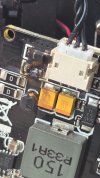
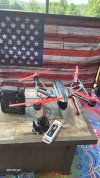
just bought this for 50 bucks. Its been crashed and fried the mother board on the cam. Is it possible to just get a motherboard or do I need a whole new cam? Flies great, just can't see, 😆 Thanks.
 

Attachments

  • 17526841032064433558804757049010.jpg
    17526841032064433558804757049010.jpg
    925.9 KB · Views: 20
  • 17526841346098352963757945439673.jpg
    17526841346098352963757945439673.jpg
    1.5 MB · Views: 19
just bought this for 50 bucks. Its been crashed and fried the mother board on the cam. Is it possible to just get a motherboard or do I need a whole new cam? Flies great, just can't see, 😆 Thanks.
It looks like that board can be fixed. Are you able to solder it yourself? Is that the only place the board burned?
 
The burned part and the one beside it sometimes wind up acting a lot like fuses. One is battery positive, the other is battery ground. It is fairly likely the board will work again by replacing the burned components.
As with an actual fuse, if you try to jumper the burned component and there is a problem somewhere else on the board, you can destroy the board in a heart beat.

But to answer your question;
Yes. The board can be replaced. The replacement board, either new or salvage, will need to be calibrated to your camera. It's a pretty big prep and learning curve for a single repair job, but the answer is technically "Yes".
 
The burned part and the one beside it sometimes wind up acting a lot like fuses. One is battery positive, the other is battery ground. It is fairly likely the board will work again by replacing the burned components.
As with an actual fuse, if you try to jumper the burned component and there is a problem somewhere else on the board, you can destroy the board in a heart beat.

But to answer your question;
Yes. The board can be replaced. The replacement board, either new or salvage, will need to be calibrated to your camera. It's a pretty big prep and learning curve for a single repair job, but the answer is technically "Yes".
I did get a new board, just not sure if I use all those cables that control pitch, yaw ect will work with just useing the 1 wire from board to drone, how does it control the gimble with just that 1 plug that goes in, and nothing else plugging into it, I just don't get it, sorry, very new to this brand.
 
The gimbal board is a little computer. It gets information about the attitude of the camera in all 3 directions x, y, z by an IMU chip that is located inside the camera and sends its data via I²C connection to the gimbal board. Also every motor has an angle sensor (roll, pitch, yaw) that tells the gimbal in wich angle the motor stays. All those data will be computed to hold the camera still.
The only external control comes from the drone which says the gimbal in what angle the camera should tilt. This signal is a PWM signal. The length of the pulse represents the requested tilt angle. The gimbal computer put this together and sends power to the motors.

Thus, you need following connections:
- in power Vbatt
- input PWM from flight controller
- input pitch, roll, yaw sensor
- input from camera connection to IMU
- out to camera +5V power
- out to motors 3-wire for each motor pitch, roll, yaw.

That's why the many connections on the board.
 
The gimbal board is a little computer. It gets information about the attitude of the camera in all 3 directions x, y, z by an IMU chip that is located inside the camera and sends its data via I²C connection to the gimbal board. Also every motor has an angle sensor (roll, pitch, yaw) that tells the gimbal in wich angle the motor stays. All those data will be computed to hold the camera still.
The only external control comes from the drone which says the gimbal in what angle the camera should tilt. This signal is a PWM signal. The length of the pulse represents the requested tilt angle. The gimbal computer put this together and sends power to the motors.

Thus, you need following connections:
- in power Vbatt
- input PWM from flight controller
- input pitch, roll, yaw sensor
- input from camera connection to IMU
- out to camera +5V power
- out to motors 3-wire for each motor pitch, roll, yaw.

That's why the many connections on the board.
Is their ANYWAY to tell which plug is which and what goes where on the board??
 
I did get a new board, just not sure if I use all those cables that control pitch, yaw ect will work with just useing the 1 wire from board to drone, how does it control the gimble with just that 1 plug that goes in, and nothing else plugging into it, I just don't get it, sorry, very new to this brand.
WTFDproject has all the information about this.
[/QUOT
Umm, not really. Im looking to know WHICH CABLE GOES WHERE ON THE BOARD??
 
Did you forget to label them as you removed them from the old board?

If you use the document titled CGO3 Gimbal Board Connectors, you will be able to know where each wire goes to. You may have to disassemble the camera/gimbal more to determine what each cable bundle attaches to.
 
  • Like
Reactions: jdinvt
Did you forget to label them as you removed them from the old board?

If you use the document titled CGO3 Gimbal Board Connectors, you will be able to know where each wire goes to. You may have to disassemble the camera/gimbal more to determine what each cable bundle attaches to.
I bought it like that, not marked at all, that's what I NEED to find out, is what goes to what?
 
You will have to disassemble the covers from the gimbal and trace the wire bundles. The pitch motor and sensor are in the right arm of the gimbal as you look from above or behind, the roll motor and sensor are in the rear where the vertical and yoke meet. The yaw motor and sensor are at the top of the vertical arm. The cables to the camera are in the left arm of the yoke.

The Table of Contents PDF in this link
Thread 'Way To Fix Drones project'
Way To Fix Drones project will have the instructions for disassembling the CGO3 and reassembling it.

The alternative is to send it for repair. In the US you can contact @MobileTechSpecialists a new approved vendor.
 
You will have to disassemble the covers from the gimbal and trace the wire bundles. The pitch motor and sensor are in the right arm of the gimbal as you look from above or behind, the roll motor and sensor are in the rear where the vertical and yoke meet. The yaw motor and sensor are at the top of the vertical arm. The cables to the camera are in the left arm of the yoke.

The Table of Contents PDF in this link
Thread 'Way To Fix Drones project'
Way To Fix Drones project will have the instructions for disassembling the CGO3 and reassembling it.

The alternative is to send it for repair. In the US you can contact @MobileTechSpecialists a new approved vendor.
I have multiple CAMERA donor boards available, CGO3, the +, as well as a few other models not related.

as far as the Q500 I am lacking replacement parts for the drone itself but I have controllers and i’m working on finding some replacement arms motors etc for this model.

We have the camera diagnosis and repair available on our website and on sale until the end of august
 
I did get a new board, just not sure if I use all those cables that control pitch, yaw ect will work with just useing the 1 wire from board to drone, how does it control the gimble with just that 1 plug that goes in, and nothing else plugging into it, I just don't get it, sorry, very new to this brand.
Some people have had issues with the camera after replacing the board, you may need to do a calibration via UART if needed. H-Elsner has made some guides and software
 
as far as the Q500 I am lacking replacement parts for the drone itself but I have controllers and i’m working on finding some replacement arms motors etc for this model.
There was a frame mod from Rakon heli. I don't know if this is still available.
 

New Posts

Members online

Forum statistics

Threads
21,651
Messages
248,878
Members
28,919
Latest member
vssnsw