Hello Fellow Yuneec Pilot!
Join our free Yuneec community and remove this annoying banner!
Sign up

cgo3+ not connecting to st16 and has solid white status light

Joined
Sep 12, 2025
Messages
4
Reaction score
0
Age
21
Good day everyone.

I pulled out a typhoon h I have not flown for a while to prepare it for sale. Unfortunately, the camera is no longer functional after being disconnected from the drone for a few months (drone was in a box, camera was on top of the box).

The camera is not being detected by the st16 and I do not see its wifi network. The status light is solid white (never any other color).
I looked at the forum a bit and it sounds like this might be a wifi board failure.
I tried resetting the camera using the reset buttons but that does not seem to have done anything.
The gimbol is still fully functional in case that matters.

Is there anything else I can try? I'm trying to avoid having to take apart the camera but that is looking less possible as I read.

Thanks in advance.

(I just realized white light of death is a tag, I don't think I'm in for a fun time.)
 
WiFi module was also my first thought. All symptoms point to that.
The white light indicates boot process and if the FW hangs during boot a HW error is the most probable.

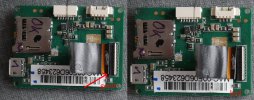
Defect WiFi is unfortunately a common fault. But it is agood idea to check the black ribbon cable first. There is a white line on the cable that has to be parallel to the black part at the connector (the white part is the lock mechanism - it must be down, in the picture it is up = unlocked).

Ribbon_cable.jpg
 
Last edited:
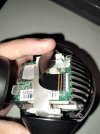
I tried reseating the ribbon cable.

Does this look correct (image below) (the ribbon cable does not seem to go in any further):

In the event that the Wi-Fi board is unfixable, would it be easier to try and fix the camera or sell the otherwise functional drone without a camera (or with the borked camera mentioned clearly in the listing).
I'm not sure who is buying this drone these days due to its age so idk what audience I need the drone to appeal to in order for it to sell. (Sorry if I'm a bit hung up on the sale part but as much as I love the drone, it has been replaced for some time and I am trying to get it in the hands of someone who will get more use out of it and hopefully get a bit of the money I spent on it back),

Thanks again!

20250913_112205.jpg
 
This looks not good. Try to lift the white lock and bring the white line near the black connector part. The lock down the white part.
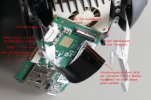
Not good explained, I know. Hope this picture helps although the text is in german.
WiFi-Modul01.JPG

In this picture the connector is unlocked an ready to connect the ribbon. The small round arrows show unlock left and lock on the right.
 
(One math exam induced delay later)

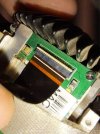
Does this look better? I feel like it should go in further, but this is as far as it seems to go. Do I just need to put more force on the ribbon cable?

20250914_142758.jpg
 
It still looks a little loose to me. But please don't use too much force. Maybe it was stuck somewhere, or it's fine and it's just manufacturing tolerances.
Power it one and look if boot process is going farther.
Unfortunately, it does not seem to be moving further in the boot process.

Any ideas on what to do now?

The options I'm seeing right now are:
Sell it without the camera.
Buy a new Wi-Fi board and hope it works.


Once I have a little more time I'm going to try seeing if there is any debris in the ribbon cable port, but I somewhat doubt it.
 

New Posts

Members online

No members online now.

Forum statistics

Threads
21,651
Messages
248,877
Members
28,917
Latest member
cpassenheim