Hello Fellow Yuneec Pilot!
Join our free Yuneec community and remove this annoying banner!
Sign up

H520E RTK drone – problem with switching on

Joined
Aug 15, 2021
Messages
66
Reaction score
26
Age
55
I have two problems with the drone, as described in the title.
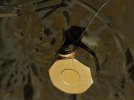
1. The RTK antenna is detached from the upper casing. Can it be repaired somehow, or does the entire upper casing, including the antenna cable, need to be replaced?
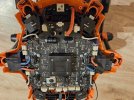
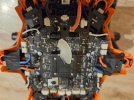
2. The drone does not want to ‘start up’ when I press the power button, and when I release it, it turns off immediately. However, when I hold it down, there is no problem with the camera connection, which calibrates normally, but as soon as I release the power button, it immediately turns off. I replaced the power switch, but it did not help. How can I fix this?
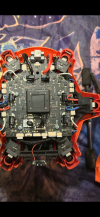
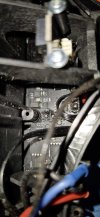
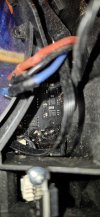
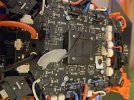
I am attaching photos of the motherboard and the torn antenna. Thank you for your repair tips.
 

Attachments

  • 20251206_152818 (Medium).jpg
    20251206_152818 (Medium).jpg
    187.1 KB · Views: 11
  • 20251206_154636 (Medium).jpg
    20251206_154636 (Medium).jpg
    115.6 KB · Views: 11
  • 20251207_172130 (Medium).jpg
    20251207_172130 (Medium).jpg
    191.3 KB · Views: 11
  • 20251207_172142 (Medium).jpg
    20251207_172142 (Medium).jpg
    146.3 KB · Views: 11
  • Like
Reactions: Steve Carr
Hello. If I have a motherboard from H520 E and the motherboard from H520E RTK is damaged, is it sufficient to just install different software when replacing it, or is there another method required? Thank you for your assistance.
 
  • Like
Reactions: Steve Carr
I am uncertain if there is a difference in the motherboard. And I can't see where the antenna is connected from your pictures.
I hope that @WTFDproject can help with the on/off problem.
 
Thank you for the information. Tomorrow I will replace the board because the problem must be with the board, as the drone flew in the rain and unfortunately it is not possible to turn it on without physically holding down the ON/OFF button all the time, so that must be the cause of the problem. I will let you know if replacing the board helped, because it cannot be a software fault.
 
Thank you for the information. Tomorrow I will replace the board because the problem must be with the board, as the drone flew in the rain and unfortunately it is not possible to turn it on without physically holding down the ON/OFF button all the time, so that must be the cause of the problem. I will let you know if replacing the board helped, because it cannot be a software fault.
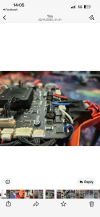
Here is another example of one that few in the rain
 

Attachments

  • IMG_1130.png
    IMG_1130.png
    2 MB · Views: 10
  • IMG_1118.png
    IMG_1118.png
    3.4 MB · Views: 10
  • att._J360qV0q5ExrKHSSVZIc4msNHPcN_n9824995hzIpI.jpeg
    att._J360qV0q5ExrKHSSVZIc4msNHPcN_n9824995hzIpI.jpeg
    322.4 KB · Views: 10
  • att.o9KNsPnvFw3p0jMmervBMMMEAGnlSrSkg3WSbDgyujE.jpeg
    att.o9KNsPnvFw3p0jMmervBMMMEAGnlSrSkg3WSbDgyujE.jpeg
    370.2 KB · Views: 9
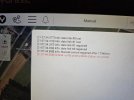
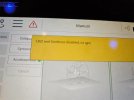
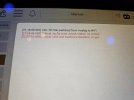
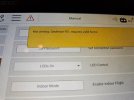
Everything went well, the drone is theoretically working, but I am concerned about messages like the ones in the photos. What do these messages mean? (I will test the drone in the air tomorrow).
 

Attachments

  • 20251214_220859 (Medium).jpg
    20251214_220859 (Medium).jpg
    149.4 KB · Views: 6
  • 20251214_222245 (Medium).jpg
    20251214_222245 (Medium).jpg
    125.1 KB · Views: 7
  • 20251214_222324 (Medium).jpg
    20251214_222324 (Medium).jpg
    137.8 KB · Views: 5
  • 20251214_222422 (Medium).jpg
    20251214_222422 (Medium).jpg
    137.4 KB · Views: 6
You won't be able to get the drone airborne... I wouldn't even try unless you have GPS. Is the GPS module connected? What does the menu show under "Sensors"? The NFZ message is related to the missing GPS. The fact that the drone cannot set a home point is also related to this. Don't take this error message lightly.
 
  • Like
Reactions: Steve Carr
Everything went well, the drone is theoretically working, but I am concerned about messages like the ones in the photos. What do these messages mean? (I will test the drone in the air tomorrow).
The no fly zone status no unlock I got after updating to latest software, are u running all the latest. Also u will get the bug where arms 1 and 6 will blink green no mater what mode ur in, angle , return to home and what ever the 3rd one is called on the h520e. U will also get a message to add ur flyer id . Pretty sure enrico is correct here with it being related to gps. Unfortunately the trigger for the message should come after gps is established if close by or in a no fly zone but it comes before. Pretty easy to forget to re connect the gps wires if u removed the top shell as without disconnecting it the top shell will hang there by that one wire. See is that connected by removing the top shell again and ignore the no fly zone status and flyer if message. If u go back a version on the software u won’t get them messages but definitely investigate the gps like enrico says .
 
Last edited:
The no fly zone status no unlock I got after updating to latest software, are u running all the latest. Also u will get the bug when arms 1 and 6 will blink green no mater what mode ur in, angle , return to home and what ever the 3rd one is called on the h520e. U will also get a message to add ur flyer id . Pretty sure enrico is correct here with it being related to gps. Unfortunately the trigger for the message should come after gps is established if close by or in a no fly zone or in one but it comes before. Pretty easy to forget to re connect the gps wires if u removed the top shell as without disconnecting it the top shell will hang there by that one wire. See is that connected by removing the top shell again and ignore the no fly zone status and flyer if message. If u go back a version on the software u won’t get them messages but definitely investigate the gps like enrico says .
Also I don’t know why the no fly zone status comes up as a critical warning message, if my understanding is correct it’s an info message to the pilot to be aware of no fly zones. I took the h520e directly into the centre of a no fly zone and it still armed and would probably fly but obviously wasn’t going to fly there.
 
Sorry, but I forgot to add that the drone is in ‘indoor’ mode because it is indoors, so I put the propellers on it to turn on only the motors, but unfortunately it did not turn on and I only got these messages. Is this normal indoors?
 
  • Like
Reactions: Steve Carr
Sorry, but I forgot to add that the drone is in ‘indoor’ mode because it is indoors, so I put the propellers on it to turn on only the motors, but unfortunately it did not turn on and I only got these messages. Is this normal indoors?
I’m pretty certain I’ve seen this exact same issue where it wouldn’t arm on indoor mode. Perhaps try deleting all the warning messages, make sure it on angle mode. The blinking arms 1 and 6 are going to be annoying now for this stage as u can’t tell when all is ready to go as the lights never change to a solid colour. Quickest test is to bring it outside and turn off indoor mode, let gps establish and see will it arm then. If we establish that’s all working correctly we can then work out the not arming in indoor mode when we know no other faults are present. Ill try the indoor mode myself tomorrow if u haven’t had any success to see do I get the same result as u with not arming. It’s nearly 1am here now and trying to figure out what to do with the **** elf on the shelf to amuse the kids when they wake 🤣🤣🤣, there was none of these elf’s about when we were kids, if u know u know 🤪, chat 2moro
 

New Posts

Members online

Forum statistics

Threads
21,651
Messages
248,877
Members
28,917
Latest member
cpassenheim