Hello Fellow Yuneec Pilot!
Join our free Yuneec community and remove this annoying banner!
Sign up

Range extender for Camera Wi-Fi

The antennas for the SR24 using Zigbee communication on the aircraft have been modified/upgraded by some achieving some degree of success. Especially using an Itelite or 4Hawks patch antenna on the STxx controller.

The cameras are a little more problematic to modify the antenna. It should still be an omnidirectional design which pretty much limit you to the cloverleaf (mushroom) style or bi-pole (rubber duck) style. The bi-pole would have to point up or down to radiate in the proper plane. This can interfere with rotation of the camera if mounted in the up position, and not have ground clearance if mounted in the down position.

I have found the Itelite patch to greatly enhance video reception of the CGO3+ on my H480’s. Video would get choppy at about 1800’ with the mushroom antenna on the ST16, about 2400’ with the Yuneec patch antenna, and tested to 5300’ with the Itelite (no lag or dropouts).
 
The antennas for the SR24 using Zigbee communication on the aircraft have been modified/upgraded by some achieving some degree of success. Especially using an Itelite or 4Hawks patch antenna on the STxx controller.

The cameras are a little more problematic to modify the antenna. It should still be an omnidirectional design which pretty much limit you to the cloverleaf (mushroom) style or bi-pole (rubber duck) style. The bi-pole would have to point up or down to radiate in the proper plane. This can interfere with rotation of the camera if mounted in the up position, and not have ground clearance if mounted in the down position.

I have found the Itelite patch to greatly enhance video reception of the CGO3+ on my H480’s. Video would get choppy at about 1800’ with the mushroom antenna on the ST16, about 2400’ with the Yuneec patch antenna, and tested to 5300’ with the Itelite (no lag or dropouts).
That’s a big improvement. The halk4 seems to be a popular choice here in Europe as by law our firmware doesn’t seem to give the WiFi signal the camera emits a boost like the US software. The halk4 must make it a bit more simple to receive our weaker WiFi signal. With all the laws in place and trying to meet them I found the original set up was adequate for flying no higher than 120m from the ground and maintaining visual line of sight. My taught was improving the antenna on the camera but a good point you make is the mushroom design of the original is already a good option. If we added something like the square patch antenna to the camera it would only provide a more stable video link when aimed directly at the ground station. No point trying to reinvent the wheel here in this case
 
That’s a big improvement. The halk4 seems to be a popular choice here in Europe as by law our firmware doesn’t seem to give the WiFi signal the camera emits a boost like the US software. The halk4 must make it a bit more simple to receive our weaker WiFi signal. With all the laws in place and trying to meet them I found the original set up was adequate for flying no higher than 120m from the ground and maintaining visual line of sight. My taught was improving the antenna on the camera but a good point you make is the mushroom design of the original is already a good option. If we added something like the square patch antenna to the camera it would only provide a more stable video link when aimed directly at the ground station. No point trying to reinvent the wheel here in this case
"....and maintaining visual line of sight."
Judging by stories I remember from prior to restrictions, line of sight is pretty important. More accurately, "absence of anything in the way".
If you go behind the tree lines, buildings, etc. you don't get much further, and better antennas are not going to help much. If you are flying over a large body of water, the stock antennas will sometimes take you further than your battery will bring you back.
 
Yes, there are definitely antenna upgrades that can improve both range and connection stability — similar idea to controller range extenders.

Telemetry (control link):
The long left/right antennas run on 2.4GHz. There’s a detailed antenna breakdown on the forum somewhere, but in short — upgrading or externalizing them can improve consistency.

Video transmission:
Video runs on 5.8GHz. Most people use either an omnidirectional or a patch antenna. I’ve tested both.
I easily doubled my video range here:
To view this content we will need your consent to set third party cookies.
For more detailed information, see our cookies page.

In this setup I used a dual-band (2.4/5.8GHz) patch + omni mounted on PVC. Personally, I get better overall results with the omni:
To view this content we will need your consent to set third party cookies.
For more detailed information, see our cookies page.
A good budget option (~$20–25) is:
ALFA 9 dBi AOA-2458-79AM 2.4/5 GHz Dual Band Outdoor N-Male WiFi Omni Antenna.
If you upgrade video, make sure you use a high-quality coax from antenna → controller. Cheap or overly long cables will reduce performance and can introduce latency.

I also offer an external antenna mod for the Typhoon H where I replace the two stock telemetry antennas with U.FL → SMA connectors (two small holes in the shell). That lets you run any external antenna you want for telemetry.
Info here:
To view this content we will need your consent to set third party cookies.
For more detailed information, see our cookies page.

Just note — the CGO3/3+ camera has its antenna embedded in the shell, so there’s very limited room for upgrading that side.
 
  • Like
Reactions: Stephen1988
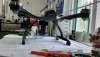
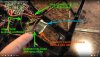
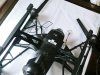
Here is the enhanced antenna setup I've installed on two of my Q500-4K's with good, reliable results. I started out purchasing a "UAV Kit for the Q500" from "Horizon FPV Antennas" on eBay (way back in 2018!). They had a YouTube video with installation instructions. My 5.8 GHz (LHCP quadrifilar antenna) video downlink range increased from around 1,300 feet to about 2,500 feet. The 2.4 GHz (bi-quad antenna) Flight Control link was likely well beyond that. How far beyond I don't know, since 1/2 mile out is virtually BVLOS and battery life for RTH. I've attached a few images FYI. Here's a link to my earlier post on this (w/ pics)
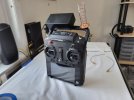
I'm in the process of modifying the ST10+ ground station with better antennas. Something that has much better dB than the stock factory antennas. I want to keep it super-simple and inexpensive, for both the ST10+ and the Q500.2026-02-12 12.45.58.jpg

Another hint for maximum video range and quality: USE A VERY FAST SD CARD in the CGO3 camera!!! The card MUST be minimum "U3" and "C10". The circuitry in the video camera literally CHOKES if you use a slower SD card. The system lag becomes 5 to 7 seconds. The downlink picture is terribly broken up. Gimbal stabilization is crappy. Even the 2.4 GHz link is negatively impacted. I'd accidentally popped in an SD card with a lower speed class. After troubleshooting EVERYTHING and not solving the problem, I changed out the last possible culprit. The results were amazing! I had my good old Q500 back.

Here's an infographic of memory cards:
guide-to-choose-right-sd-card.jpg

Danny J
 
Here is the enhanced antenna setup I've installed on two of my Q500-4K's with good, reliable results. I started out purchasing a "UAV Kit for the Q500" from "Horizon FPV Antennas" on eBay (way back in 2018!). They had a YouTube video with installation instructions. My 5.8 GHz (LHCP quadrifilar antenna) video downlink range increased from around 1,300 feet to about 2,500 feet. The 2.4 GHz (bi-quad antenna) Flight Control link was likely well beyond that. How far beyond I don't know, since 1/2 mile out is virtually BVLOS and battery life for RTH. I've attached a few images FYI. Here's a link to my earlier post on this (w/ pics)
I'm in the process of modifying the ST10+ ground station with better antennas. Something that has much better dB than the stock factory antennas. I want to keep it super-simple and inexpensive, for both the ST10+ and the Q500.View attachment 33292

Another hint for maximum video range and quality: USE A VERY FAST SD CARD in the CGO3 camera!!! The card MUST be minimum "U3" and "C10". The circuitry in the video camera literally CHOKES if you use a slower SD card. The system lag becomes 5 to 7 seconds. The downlink picture is terribly broken up. Gimbal stabilization is crappy. Even the 2.4 GHz link is negatively impacted. I'd accidentally popped in an SD card with a lower speed class. After troubleshooting EVERYTHING and not solving the problem, I changed out the last possible culprit. The results were amazing! I had my good old Q500 back.

Here's an infographic of memory cards:
View attachment 33293

Danny J

Very neat, thank you for the detailed explanation and pictures
 

New Posts

Members online

Forum statistics

Threads
21,651
Messages
248,878
Members
28,919
Latest member
vssnsw