Hello Fellow Yuneec Pilot!
Join our free Yuneec community and remove this annoying banner!
Sign up

Typhoon H IMU related problems

h-elsner

Premium Pilot
Joined
Mar 23, 2016
Messages
2,677
Reaction score
2,541
Location
Bavaria / Germany
Website
h-elsner.mooo.com
During my investigations regarding "Stuck in Aquiring state" the IMU on the Flight controller board got attention as source of different problems.
Details can be found here: http://h-elsner.mooo.com/pdf/GPS_acquiring_problem.pdf

It looks like MPU6050 chip as heart of the IMU has an aging problem when the drone was stored somewhere and not used for some time. That's why my recommendation is to power on the drone from time to time and do a accelerometer calibration. Of course it is best to fly it.

In case the IMU has a problem, usually, only the exchange of the flight controller (MCU-board) will help. But since this is quite expensive, we could try to replace only the IMU (make-one-out-of-two-method).
I added a guide how to replace the IMU on the flight controller of the Typhoon H to the HowTo collection on my homepage.
Here it is: http://h-elsner.mooo.com/pdf/HowTo_Replace_IMU.pdf

The most important part is to find the right place to lever the old IMU to avoid damaging conductive paths on the PCB.
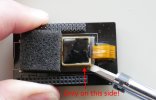
IMU_replace08_en.jpg

br HE
 
I wish I had come across your posting before I started investigating this issue, would have saved me a lot of time; but it was fun so cant complain. A little bit of backstory, I bought a TH from fellow forum member PEVO a few days ago. On arrival, I tested it and it would not fly. This is my first typhoon H and I did not have any knowledge on common issues. I got together with PEVO who walked me through what could possibly be wrong and zeroing in on the FC I decided to get it fixed at a qualified tech and got that sorted out. Unfortunately the GPS module was also weak on this, the received signals were about ~25 db even with clear views of the sky. So thats another thing that got replaced.

My curiosity on the issue grew and the retired engineer in me wanted out over the long weekend. I went hunting on craigslist, bought a Parted out Typhoon for ~50$ and got to experimenting. As rightly pointed out by you, the sensor IC is contained within the brass enclosure and filled with resin is the culprit. The STM32 microcontroller uses a lookup table to correlate GPS positioning data with sensor readings to validate everything. When it does not pass the check, it just assumes the GPS readings are at fault and gets stuck in acquiring. From a safety standpoint, the job is done as the TH is locked out of flying. However, given the contradictory nature of readings, it does stop you from flying out with GPS disabled. I think the engineers at yuneec implemented this considering this situation, only that they did not want to write additional status messages to let us know that it could be either GPS or the positioning sensors that could be bad. Without a third input - a redundant GPS or IMU, it would be impossible for the TH to perform self diagnostics.

I remembered something I used to do to fix robotic arms that were subject to similar malfunctions- bake the PCB. This would reflow the solder taking care of any oxidation that caused issues and the would get the machine running again. I decided to be a bit brash here instead and brought out my blow torch :D heating the enclosure to a 120°C. Once it cooled down a bit, I Installed it and the error went away :) or atleast temporarily coz it came back after a bit. I think baking it at 180°C for 15 minutes should get rid of it for good. Also, once hot, the resin just peels off, so you could take it off and install a new IC in there. To do this however, you would need a SMD solder station. A heat gun might work, but YMMV.
Now im off to restore this craigslist TH480 and maybe install the PX4 firmware. Fun weekend ahead :)
 
I Realize this is an older thread, but where would one get replacement IMU IC's? I doubt Yuneec is gonna let them go. I doubt they're proprietary, but given everything is filled with epoxy it's likely they want to keep the origin of the chips silent. It's common practice among companies to push you into buying the newer products rather than repairing the old.
 
Dude is sending me a board with bad imu. Gonna try the swap. It would be nice if we could get ahold of new IMU chips though instead of $# for a gamble.
 
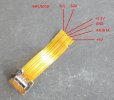
The chip itself is a cheap MPU6050 which is available as sensor in the Arduino world. It is completed with a heater and sealed in the brass housing. I don't believe that this is available as single spare part anywhere. The problem is the tiny connector. I tried to find a place to contact the wires to the IMU just for measurement cases.
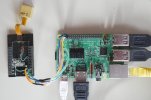
After a lot tries I ended up with a complete destroyed MCU-board but I have now an adapter to test the IMUs at a Raspberry Pi. Nothing for productive usage nor for flying with that construct. :D
Pi_Adapter.JPG
I think the only way is to cannibalize defect MCUs.
 
  • Like
Reactions: 1midniterider
Were you by chance trying to calibrate them with the raspberry pi? I have a few Raspberry pi boards that don't get used all the time. I wouldn't have an issue with grabbing another micro SD for standard red raspberry pi and mucking about(one of them pi3 is a retro pi gaming setup, the other two are pi4 2gig, there I run 2 3D printers with, and those 3D printers are in storage and I'm only running a single resin printer right now due to space.
 
Were you by chance trying to calibrate them with the raspberry pi?
This was my first idea and the reason why I waned to connect them to Raspberry Pi. I wrote an application to access to it. But at the end I understand that calibration means to update correction values in the flight controller (or gimbal) firmware instead of store values in the MPU6050 which is not forseen at all.

Summary: I have learned a lot but external calibration is not possible.

My MPU6050 test tool is here: GitHub - h-elsner/MPU6050-test-tool: MPU6050 test GUI for raspberry Pi
 
This was my first idea and the reason why I waned to connect them to Raspberry Pi. I wrote an application to access to it. But at the end I understand that calibration means to update correction values in the flight controller (or gimbal) firmware instead of store values in the MPU6050 which is not forseen at all.

Summary: I have learned a lot but external calibration is not possible.

My MPU6050 test tool is here: GitHub - h-elsner/MPU6050-test-tool: MPU6050 test GUI for raspberry Pi
Calibration can also be stabilizing drifting values.

Check out this video...
To view this content we will need your consent to set third party cookies.
For more detailed information, see our cookies page.

I realize he is doing this to chips thay aren't embedded but food for thought.
 
This is the same procedure as PX4 autopilot is doing to find the correction values that are used by flight controller.
acc_cali.pnggyro_cali.png

Also in this two videos he only calculates the offset values to use it in the application that the MPU6050 uses for what ever usage. He don't write something to the chip.
The problem is, Typhoon H has no proper calibration for accelerometer (oly one position, not six).
At least, I think it is gyro calibration, not acc. So, if acc z-axis is out of range then the pre-flight check fails and the drone remains in "Acquiring" state.

In customized H480 FW on PX4 base I can use the "defect" IMUs without problems. PX4 does the full spectrum of calibration.
 
Last edited:
  • Like
Reactions: DoomMeister
The chip itself is a cheap MPU6050 which is available as sensor in the Arduino world. It is completed with a heater and sealed in the brass housing. I don't believe that this is available as single spare part anywhere. The problem is the tiny connector. I tried to find a place to contact the wires to the IMU just for measurement cases.
After a lot tries I ended up with a complete destroyed MCU-board but I have now an adapter to test the IMUs at a Raspberry Pi. Nothing for productive usage nor for flying with that construct. :D
View attachment 30674
I think the only way is to cannibalize defect MCUs.
Hello,

First of all, thank you very much for the helpful information and the considerable time invested in addressing the problem with the defective IMUs.
Unfortunately, I now also have two H480s with this problem and am currently working on it. Two new MCUs are already on their way to me from China, but I don't want to simply discard the defective ones.

Now the question: To which solder points are the two wires soldered? It's not clearly visible in the photos I've found so far.

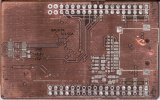
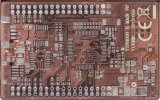
It would be helpful if the connections could be marked on the photos of the cleaned circuit board in this PDF: MCU connector and signals
Or it could also be added to this excellent guide: How to replace the IMU from a Yuneec Typhoon H flight controller :cool:

Thank you very much in advance!
 
Which two wires do you mean?

I mean this wires: ;)
1775680093344.png

But your new photos are exactly what I was looking for. Thank you so much for your quick reply with this helpful information. 😍:cool:

What do you want to do?
I first want to understand exactly what's wrong with my two IMUs. They each have different issues.
  • Drone 1) The altitude reading on the ST16 shows several meters below zero (-4.1m) and no accelerometer data.
  • Drone 2) The altitude reading is changing and is positive, but the accelerometer reading is less than 1G.
Since these drones have been around for so many years, there are now several other sensors available on the market. Therefore, I'd like to find an affordable replacement. So far, I haven't been able to find one.
However, there are many drones with this problem on eBay and Kleinanzeigen.de, which makes sourcing replacement parts from used drones almost impossible. The second drone, for example, was originally rendered unusable by a crash and then sat unused for too long before I recently acquired it.
 
It makes no really sense to build such adapter. This one I made as I thought it's possible to calibrate the MPU6050 itself but this is not possible. The correction values are stored externally at the processor where the IMU is connected to. One exception is the IMU of newer Yuneec cameras. This black box has an EEPROM on its PCB where the correction values are stored (and possibly the temperature calibration too).

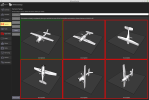
To go into deeper analysis you can use the alternative H480 GUI. It shows the calibration values, temperature chart to check IMU heater and some more status info.
Together with @Enrico Jorysch we found other reasons for the Acquiring problem (AHRS not ready, EKF require first boot initialization, IMU no temperature calibration data). Some of them unfortunately on brand new spare part MCUs from Enricos stock.

You first MCU may be one of them even though I've never seen a case where there are no values from accelerometer are not visible.
 
  • Like
Reactions: Enrico Jorysch
I have the dreaded "Acguiring Problem on my H that I had not flown for a while. I am letting it sit powered up near a big window hoping it is just the GPS battery (it is really a super capacitor, I have changed them on other devices).
I down loaded the GUI and it installed the driver but when I plug in H it does not open a com port. During install the drive said it installed properly. Win 11 here. Is there an updated driver I need>
 
The most common problem is the USB cord type. A common phone charging USB cord will not work.
It has to be a data capable USB cord. The two types are not marked in any way I know of and appear to be visually indistinguishable from each other. If you can use the USB cord to view and transfer data between your android phone and a computer, it is the correct type.
 
  • Like
Reactions: Steve Carr
That fixed the connection to GUI
Yaw value is drifting so I think the IMU has failed!
Expensive brick now :(
 

New Posts

Members online

No members online now.

Forum statistics

Threads
21,651
Messages
248,877
Members
28,917
Latest member
cpassenheim