Hello Fellow Yuneec Pilot!
Join our free Yuneec community and remove this annoying banner!
Sign up

Yuneec tyhoon H 480 drone first flight

Joined
Apr 4, 2026
Messages
4
Reaction score
6
Age
61
Location
Ravenel, SC
I just bought a typhoon H 480 drone that was only flown one time when it was new in 2017. It's been in the original Styrofoam box it was purchased in and the 2 batteries that came with it are swollen so I discarded them along with the st 16 controller battery. I haven't been able to power either one of them on but I should have the batteries I ordered in on Monday. Are there any suggestions on what I should do before I power them up, and what should I do after I first power them up.
Also I am wondering how good of a deal I got by only paying $175. For it ? It only came with the ground station and a charger and the two batteries that are bad. It also has the camera that came with it also. There doesn't seem to be any damage at all and I tend to believe her when she said it was only flown one time. I hope to find out more about it when the new batteries arrive.
Thank you for any help
 
  • Like
Reactions: Stephen1988
You can use the old batteries for tests on the ground:
First let it sit powered on for about 15min at open area to update GPS data. This is needed if it was longer stored without having powered on or if it was moved to another place far away from the last position (i.e. from China to US).
Download the GUI for H480 and do HW check.

How to do this (and a lot of more) you can find here: Repair Guides for Legacy Aircraft

The stock charger is not very useful. Try to get an intelligent charger that is able to do storage process for the batteries other wise you will reduce lifetime and probably again swollen batteries.

You can see the history of the drone (number flights, crashes, etc.) when you check the flightlogs on the ST16.

If you have questions to the above item, we can explain it more in detail.

Download links:

Knowledge, manuals, how-to's:
Repair Guides for Legacy Aircraft
 
Welcome to YuneecPilots! You got a great deal on the H480.

The most delicate and expensive to repair is the CGO3+ camera. Leave it off of the aircraft for your first few flights while you get used to the handling of the aircraft. Always takeoff and land with the Rate control (potentiometer on the right side panel of the ST16) in the full forward Rabbit position. Once you get used to how the aircraft handles add the camera back to the mix.

Before first flight power on the ST16 go to System Settings, Hardware Monitor and check that all switches, sliders, and buttons work properly. Give the sticks a good vigorous stir then check that they return to exact center when released. Move them through full extents slowly making sure the display follows your movements without jitter. Then move them quicker making sure there is no lag.

Feel free to ask questions anytime.
 
Welcome to YuneecPilots! You got a great deal on the H480.

The most delicate and expensive to repair is the CGO3+ camera. Leave it off of the aircraft for your first few flights while you get used to the handling of the aircraft. Always takeoff and land with the Rate control (potentiometer on the right side panel of the ST16) in the full forward Rabbit position. Once you get used to how the aircraft handles add the camera back to the mix.

Before first flight power on the ST16 go to System Settings, Hardware Monitor and check that all switches, sliders, and buttons work properly. Give the sticks a good vigorous stir then check that they return to exact center when released. Move them through full extents slowly making sure the display follows your movements without jitter. Then move them quicker making sure there is no lag.

Feel free to ask questions anytime.
Hardware monitor can’t be recommended enough. I learned this the hard way unfortunately. Now it’s a pre flight check at least once any day you go flying.
I’d also add make sure u don’t turn on the st16 without the antennas attached or you will burn out the WiFi module.
Overall for the price it sounds like an excellent deal. The camera alone is worth that price
I noticed also that the h520 will fail to arm if the sticks are faulty. My hplus did however arm and take off with one stick completely out of whack resulting in a crash . Hopefully on the latest software they added the failure to arm with this model, it something I’d like to test
 
Last edited:
  • Like
Reactions: 7cyclops
Did anybody mention Compass Calibration? Easier to do if the props are left off, so it's easier to flip over before the routine times out. Stay away from concrete with steel re-bar, powerlines, your vehicle, anything electrical or magnetic. Usually the ST16 will alert you if the compass is not in calibration.

Danny J
 
Did anybody mention Compass Calibration? Easier to do if the props are left off, so it's easier to flip over before the routine times out. Stay away from concrete with steel re-bar, powerlines, your vehicle, anything electrical or magnetic. Usually the ST16 will alert you if the compass is not in calibration.

Danny J
And take the camera off while doing the compass calibration or install the gimbal lock after the drone and camera are done initializing.
 
I want to thank everyone for all of the great information and tips to help me bring the drone up to date. The new batteries I ordered for the drone and the ST16 ground station are arriving today and I can't wait to get started. I feel like a kid on Christmas waiting for Santa to come down the chimney.
 
I just bought a typhoon H 480 drone that was only flown one time when it was new in 2017. It's been in the original Styrofoam box it was purchased in and the 2 batteries that came with it are swollen so I discarded them along with the st 16 controller battery. I haven't been able to power either one of them on but I should have the batteries I ordered in on Monday. Are there any suggestions on what I should do before I power them up, and what should I do after I first power them up.
Also I am wondering how good of a deal I got by only paying $175. For it ? It only came with the ground station and a charger and the two batteries that are bad. It also has the camera that came with it also. There doesn't seem to be any damage at all and I tend to believe her when she said it was only flown one time. I hope to find out more about it when the new batteries arrive.
Thank you for any help
Batteries swell when stored for a long time, fully charged, producing gas. This can be repaired. You must open the battery case and test each cell with a multimeter to see if any need reactivating. If any are swollen, pierce them with a fine needle, pointing upwards, not towards the cell plates, as this could cause an explosion (be very careful). After piercing the cell casing, use a flat object to press down on the puncture point, which should ideally be in a corner of the cell, to expel all the gas. Immediately seal the puncture to prevent air from entering. Once this is done, charge each cell to at least 3V with an Imax B6 charger. Then, if you have a battery balance adapter, charge the cells using this charger. If you don't have the adapter, charge them with their original charger. Once everything is working correctly, reassemble the cells. Put its connector in its box, and seal it as best you can. I hope this has helped.
I just bought a typhoon H 480 drone that was only flown one time when it was new in 2017. It's been in the original Styrofoam box it was purchased in and the 2 batteries that came with it are swollen so I discarded them along with the st 16 controller battery. I haven't been able to power either one of them on but I should have the batteries I ordered in on Monday. Are there any suggestions on what I should do before I power them up, and what should I do after I first power them up.
Also I am wondering how good of a deal I got by only paying $175. For it ? It only came with the ground station and a charger and the two batteries that are bad. It also has the camera that came with it also. There doesn't seem to be any damage at all and I tend to believe her when she said it was only flown one time. I hope to find out more about it when the new batteries arrive.
Thank you for any help

I just bought a typhoon H 480 drone that was only flown one time when it was new in 2017. It's been in the original Styrofoam box it was purchased in and the 2 batteries that came with it are swollen so I discarded them along with the st 16 controller battery. I haven't been able to power either one of them on but I should have the batteries I ordered in on Monday. Are there any suggestions on what I should do before I power them up, and what should I do after I first power them up.
Also I am wondering how good of a deal I got by only paying $175. For it ? It only came with the ground station and a charger and the two batteries that are bad. It also has the camera that came with it also. There doesn't seem to be any damage at all and I tend to believe her when she said it was only flown one time. I hope to find out more about it when the new batteries arrive.
Thank you for any help

 
Batteries swell when stored for a long time, fully charged, producing gas. This can be repaired. You must open the battery case and test each cell with a multimeter to see if any need reactivating. If any are swollen, pierce them with a fine needle, pointing upwards, not towards the cell plates, as this could cause an explosion (be very careful). After piercing the cell casing, use a flat object to press down on the puncture point, which should ideally be in a corner of the cell, to expel all the gas.
I strongly advise against that.
 
Batteries swell when stored for a long time, fully charged, producing gas. This can be repaired. You must open the battery case and test each cell with a multimeter to see if any need reactivating. If any are swollen, pierce them with a fine needle, pointing upwards, not towards the cell plates, as this could cause an explosion (be very careful). After piercing the cell casing, use a flat object to press down on the puncture point, which should ideally be in a corner of the cell, to expel all the gas. Immediately seal the puncture to prevent air from entering. Once this is done, charge each cell to at least 3V with an Imax B6 charger. Then, if you have a battery balance adapter, charge the cells using this charger. If you don't have the adapter, charge them with their original charger. Once everything is working correctly, reassemble the cells. Put its connector in its box, and seal it as best you can. I hope this has helped.
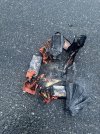
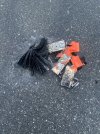
I tried piercing one with a screwdriver .
 

Attachments

  • IMG_3762.jpeg
    IMG_3762.jpeg
    2.9 MB · Views: 10
  • IMG_3763.jpeg
    IMG_3763.jpeg
    2.3 MB · Views: 10

New Posts

Members online

No members online now.

Forum statistics

Threads
21,651
Messages
248,877
Members
28,917
Latest member
cpassenheim