Hello Fellow Yuneec Pilot!
Join our free Yuneec community and remove this annoying banner!
Sign up

C23 help

Joined
Dec 16, 2024
Messages
497
Reaction score
250
Age
38
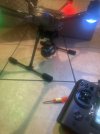
I have a c23 that had a very minor bump and broke a wire right at the cuplar or whatever u call that revolving bit. I replace the wire and all now powers on and connects with live feed, however I’ve lost gimbal control and compass calibration fails. I was extra careful not to damage the ribbon cable but hopefully this isn’t the fault. No beep codes . I also tried a brand new c23 out of the box, it also connects and gives live feed but also no gimble control and this one beeps, 2 long one short. Please god it be the connection on the hex itself instead of 2 faulty cameras , any ideas image.jpg
 
Last edited:
I have a c23 that had a very minor bump and broke a wire right at the cuplar or whatever u call that revolving bit. I replace the wire and all now powers on and connects with live feed, however I’ve lost gimbal control and compass calibration fails. I was extra careful not to damage the ribbon cable but hopefully this isn’t the fault. No beep codes . I also tried a brand new c23 out of the box, it also connects and gives live feed but also no gimble control and beeps, 2 long one short. Please god it be the connection on the hex itself instead of 2 faulty cameras , any ideas View attachment 32810
Also on a side note the one I replaced the slip ring connector on goes through it’s initialisation process and camera motors move bringing it to a level position, if u move it manually any direction it will return to where it initialised to . It’s like that setting where u can face the camera always front facing but I’ve tested the controller and all functions there. The brand new camera that also doesn’t have gimble control falls limp and beeps . Hopefully I can at least have one camera and a bit of learning along the way
 
The gimbal control and also the telemetry, request and commands for calibrations, FW versions are transmitted via the serial interface between Flight controller - Gimbal - Camera - Wifi.

In you case I'm pretty sure that the serial connection between drone and gimbal is broken. Please check and follow the wiring marked as mTx/PWM and mRx. Either connectors or wiring is broker or in bad case one of those wires got Vbatt by a shortcut and this killed the driver chips for the serial connection.
Because both cameras have this problem I think it is somewhere between the slipring and the mainboard of the drone. Check spring contacts of the camera mount first.
The WTFD project has good explanaitions for the different cases including wire colors, connector pinout and so on. --> See "Featured content".
 
The gimbal control and also the telemetry, request and commands for calibrations, FW versions are transmitted via the serial interface between Flight controller - Gimbal - Camera - Wifi.

In you case I'm pretty sure that the serial connection between drone and gimbal is broken. Please check and follow the wiring marked as mTx/PWM and mRx. Either connectors or wiring is broker or in bad case one of those wires got Vbatt by a shortcut and this killed the driver chips for the serial connection.
Because both cameras have this problem I think it is somewhere between the slipring and the mainboard of the drone. Check spring contacts of the camera mount first.
The WTFD project has good explanaitions for the different cases including wire colors, connector pinout and so on. --> See "Featured content".
So to rule out the pins on the hex I replaced the connector with a known working one, symptoms are still the same. So one camera is limp with beeping, still has picture, I tried a new decoder and still same . The other camera is not limp , has picture but u cannot control the gimble or perform gimble calibration, it sits level but only faces in one direction. Any other information I can provide. I have a working e90 as a parts camera so I can use parts from this if needs be. I’ve also got new ribbon cables but I don’t want to attempt this job again 😂. Maybe I should upload a video, I know it can be difficult to give advice from a newbies description 😅
 
The symptoms you describe are indicative of having power to the camera/gimbal system, but having issues with the Rx/Tx wires. By replacing the drone’s camera mount with a known good one and still having the same issue it leads me to ask if you replaced the internal wiring to the camera mount. If so, check the connector on the Mainboard and/or the traces leading away from it for damage.

Have you tried the working E90 to see if you are able to move it with the gimbal controls? Have you tried the cameras on another H+/H520 to see if they work?

The camera that levels out is likely good and will function properly once mounted to a fully functioning aircraft.

The camera that hangs limp most likely has internal issues not related to the aircraft problem.
 
The symptoms you describe are indicative of having power to the camera/gimbal system, but having issues with the Rx/Tx wires. By replacing the drone’s camera mount with a known good one and still having the same issue it leads me to ask if you replaced the internal wiring to the camera mount.

Have you tried the working E90 to see if you are able to move it with the gimbal controls? Have you tried the cameras on another H+/H520 to see if they work?

The camera that levels out is likely good and will function properly once mounted to a fully functioning aircraft.

The camera that hangs limp most likely has internal issues not related to the aircraft problem.
Yes I will try and e90 now as my next step, great suggestion. Yes I replaced the slip ring wire on the one that the camera levels out. It involves removing the WiFi board and the control board and I contemplated wether perhaps one of its connectors weren’t seated correctly, the one on the very bottom of the control board was what I suspected might have been disconnected because it’s a bit of a pain to get back in place, however there is power to the motors because it performs its initialisation process . If I get one working unit I will be more than pleased . Thanks you for the suggestions, I really appreciate it.

uneecpilots
nites
ice
veryday
xperts
ontributing
atience
nsight
ogic
ptions
ips
anity
 
Steve, when you replaced the drone’s camera mount with the spring loaded contacts, did you also replace the cable from the Mainboard to the camera mount? This may be where you are losing the Rx/Tx communication that controls gimbal movement.
 
Steve, when you replaced the drone’s camera mount with the spring loaded contacts, did you also replace the cable from the Mainboard to the camera mount? This may be where you are losing the Rx/Tx communication that controls gimbal movement.
No just the board, u might be onto something here, I was thinking maybe I should attach the c23 to my working h520 to see do I get gimble control back 🙂
 
  • Like
Reactions: Steve Carr
No just the board, u might be onto something here, I was thinking maybe I should attach the c23 to my working h520 to see do I get gimble control back 🙂
So bit of an update, I opened the hex and replaced the full wire , still the same, no gimble control. I also connected an e90 I had to the hplus and get picture but no gimble control , also tried compass calibration with the e90 fitted and it says compass calibration failed
 
Steve, when you replaced the drone’s camera mount with the spring loaded contacts, did you also replace the cable from the Mainboard to the camera mount? This may be where you are losing the Rx/Tx communication that controls gimbal movement.
turns out I just needed to rebind the drone, u were 100 percent correct about the loss of signal between the rx and tx, shame now I opened it 😂😂😂. Well at least now working, thank u so much, u steered me in the correct direction. So pleased 🤗🤗🤗
 
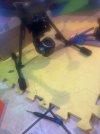
Does the camera face sideways like this because I screwed the mount on in the wrong orientation or does it correct itself after calibration, it should face to the switch side ?. That’s when u flick the pan mode switch to the top. I didn’t see any orientation between the camera and the mount
 

Attachments

  • image.jpg
    image.jpg
    1.6 MB · Views: 6
Does the camera face sideways like this because I screwed the mount on in the wrong orientation or does it correct itself after calibration, it should face to the switch side ?. That’s when u flick the pan mode switch to the top. I didn’t see any orientation between the camera and the mount
Yes, if you have the calibration firmware provided by @h-elsner, the front calibration can be changed.
"The elusive calibration software"
Otherwise, you need to undo the four motor screws and rotate the motor by 90 degrees to return them to the original orientation.
 

New Posts

Members online

No members online now.

Forum statistics

Threads
21,651
Messages
248,877
Members
28,917
Latest member
cpassenheim