Hello Fellow Yuneec Pilot!
Join our free Yuneec community and remove this annoying banner!
Sign up

GPS acquiring with CGO3 connected

Joined
Sep 23, 2025
Messages
7
Reaction score
0
Age
49
Location
NEW JERSEY
Hello all, like the title says
when my CGO3 camera is connected to my Q500 the st10 GPS status says "acquiring"
when i connect my CGO2 GPS status says "READY".
does anyone have a clue on why this is happening???
 
The camera is not normally involved with GPS acquisition. Please help us understand more of the background:
1.) Did you swap back and forth multiple times to confirm the difference?
2.) Were you in the same location at each attempt?
3.) Did you allow adequate connection time for each attempt?
4.) Did ANYTHING else change between the two attempts?
5.) How is the CGo3 connected to the drone? (Pigtail/belly plug vrs. hot shoe mount)
6.) Is the CGo3 stabilized and facing forward?
7.) Does the CGo3 respond to pitch control from the controller?
8.) Do you have an image on-screen for BOTH cameras?
9.) Is there any other indication of malfunction when the CGo3 is mounted?
 
The camera is not normally involved with GPS acquisition. Please help us understand more of the background:
1.) Did you swap back and forth multiple times to confirm the difference?
2.) Were you in the same location at each attempt?
3.) Did you allow adequate connection time for each attempt?
4.) Did ANYTHING else change between the two attempts?
5.) How is the CGo3 connected to the drone? (Pigtail/belly plug vrs. hot shoe mount)
6.) Is the CGo3 stabilized and facing forward?
7.) Does the CGo3 respond to pitch control from the controller?
8.) Do you have an image on-screen for BOTH cameras?
9.) Is there any other indication of malfunction when the CGo3 is mounted?
1. Yes i did swap multiple times same results everytime.
2. same location
3. yes
4. no
5. belly plug
6. yes the camera is stable and faces forward
7. yes
8. yes i have a image from both cameras
9. no
to add i had a small crash, just the props hitting the ground grass during a landing, but i have used the drone since the crash. several months later go to use it and it does this. i can not arm the props in this GPS acquiring state, when i disable the GPS via the st10+ i can arm the props and take off.
 
Last edited:
I remember in the past the Blade 350QX (a predecessor of the Q500) was shipped with a copper foil to shield the GO-PRO camera to avoid interference with the rest of the drone's electronics, whatever they have had in mind. This tells me that there is a dependency.

What could happen to increase the influence of the camera on GPS acquiring:
- oxide on connectors that may increase interference radiation of the switched power supply. Switched power supplies have a high proportion of harmonics due steep flanks at the switch MOSFETs.
- the way the power supply wires and the compass wiring goes have changed that may the same effect as above.
- connectors and wiring of GPS module as above.
- the compass is loose or no more proper fixed or misdirected.
- Interference suppress capacitors aged.
- Similar problems with capacitors, connectors and wiring in the camera itself.

There are hints in the internet to apply an additional capacitor on the main-board of the Q500 on top of the existing. I haven't done this but it could not hurt.
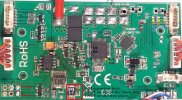
Add_capacitor.jpg

I'm nor sure if I covered all but electromagnetic compatibility (here between drone and camera) is a fragile system in all electronics.
 
I would do the following:
- unplug and plug all related connectors several times to remove oxide layers.
- change the way of wires so that it looks fine in some way (no rings/straight ways and good drilled wires).
- check the shield on the GPS module. There should be some copper foil.
- check if compass is OK. It is near the camera and reacts sensitively on possible problems.
 
That was not an expected answer, and may hold a clue (or not) depending on:
1.) Why are you using the belly plug when the CGo3 is mounted?
2.) Does your controller have a CGo3 selection on the Camera Select screen?
Why was that not an expected answer?
There is a connection that sits right behind the camera when mounted, the pig tail connector from the back of the camera plugs right into that. That is also the way the CGO2 camera connects as well.
And yes CGO3 selection is on the screen.
 
The
Why was that not an expected answer?
The Q500 4k came with a hotshoe type mount that mated with connectors on the top of the camera to make it easier when mounting. Most folks use it if it is present.

There were two reasons for the question:
1.) One was to determine if your drone was a Q500 instead of a Q500 4K, which might have suggested the controller was an ST10 instead of an ST10+.
This part no longer matters since you already mentioned the CGo3 is an included option on your controller and that was the end of that line of thought.
2.) The other was to pursue the possibility the hotshoe wiring and/or connections might be damaged, which was related to the line of thought laid out by @h-elsner.
This line of thought is much better discussed by @h-elsner's post.
 
  • Like
Reactions: Steve Carr
The

The Q500 4k came with a hotshoe type mount that mated with connectors on the top of the camera to make it easier when mounting. Most folks use it if it is present.

There were two reasons for the question:
1.) One was to determine if your drone was a Q500 instead of a Q500 4K, which might have suggested the controller was an ST10 instead of an ST10+.
This part no longer matters since you already mentioned the CGo3 is an included option on your controller and that was the end of that line of thought.
2.) The other was to pursue the possibility the hotshoe wiring and/or connections might be damaged, which was related to the line of thought laid out by @h-elsner.
This line of thought is much better discussed by @h-elsner's post.
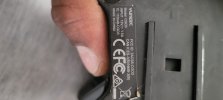
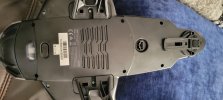
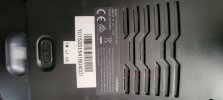
my controller is a ST10+, im not sure why i dont not have a hotshoe mount
 

Attachments

  • 1000127244.jpg
    1000127244.jpg
    954.3 KB · Views: 2
  • 1000127243.jpg
    1000127243.jpg
    1 MB · Views: 2
  • 1000127242.jpg
    1000127242.jpg
    958.2 KB · Views: 2
.......im not sure why i dont not have a hotshoe mount
If the mod did not occur between the last time the CGo3 worked and the first time it did not, it is probably not relevant.
You are probably going to be looking for a bad connection or other source of GPS interference associated with the CGo3 or the CGo3 pigtail.
 
If the mod did not occur between the last time the CGo3 worked and the first time it did not, it is probably not relevant.
You are probably going to be looking for a bad connection or other source of GPS interference associated with the CGo3 or the CGo3 pigtail.
no mods were made, so you have not had this issues??
 
no mods were made, so you have not had this issues??
Not sure which issue you mean.
If you mean the GPS issue, I don't remember too many interference related GPS issues in the Q500 series. I do remember many such issues in the Q500's smaller predecessor, the Blade 350QX. Very similar electronics, with a whole lot less distance between them.
If you mean the issue of a difference in the camera mount, I've worked with a good many Q500 and Q500 4K. I have not seen a Q500 4K that came from the factory without the hot shoe. I have seen mods that added the hot shoe to an original Q500. It would be easy to remove the hot shoe from a 4K, or install a 4K shell on an original Q500.
Are you the original owner? Did your kit come from the factory as-is?
The lower shell label on yours clearly says 4K. But the camera mount is the type from the original Q500, non-4K. There is no way to tell from the pictures if the extra bit of wiring to support the 4K mount is present inside the shell. However, there is not a lot of functional difference between the two versions of the drone. (Mainly in how the camera is powered and how the GUI/receiver is connected to the main board.) None of the model related differences sound very related to your GPS issue. The real difference between the kit versions was the camera.
The absence of a problem when you mount the CGo2 currently leans the thought trail more towards either the camera or the CGo3 pigtail.

1.) If you have access to another CGo3 and CGo3 pigtail, it would be great to try a different camera on yours to see if the issue goes away.

2.) If not, the absence of the contacts on the CGo3 in your picture may suggest the next step. You could pull the dampers and remove the gimbal board enclosure to see if the three black wires were properly removed and/or if the solder pads associated with the wires are damaged. If the dampers ever came out in a crash/hard landing and the camera was powered up again before properly removing or repairing the three black wires, the list of possible damage/symptoms pretty much approaches infinity.
CGo3 Removing the Three Black Wires

3.) Another/next reasonable next step would be to remove the top shell to ensure the heavy copper foil is protecting the GPS. Also to look for any damaged/crushed wires anywhere in the drone.

 
Last edited:
Not sure which issue you mean.
If you mean the GPS issue, I don't remember too many interference related GPS issues in the Q500 series. I do remember many such issues in the Q500's smaller predecessor, the Blade 350QX. Very similar electronics, with a whole lot less distance between them.
If you mean the issue of a difference in the camera mount, I've worked with a good many Q500 and Q500 4K. I have not seen a Q500 4K that came from the factory without the hot shoe. I have seen mods that added the hot shoe to an original Q500. It would be easy to remove the hot shoe from a 4K, or install a 4K shell on an original Q500.
Are you the original owner? Did your kit come from the factory as-is?
The lower shell label on yours clearly says 4K. But the camera mount is the type from the original Q500, non-4K. There is no way to tell from the pictures if the extra bit of wiring to support the 4K mount is present inside the shell. However, there is not a lot of functional difference between the two versions of the drone. (Mainly in how the camera is powered and how the GUI/receiver is connected to the main board.) None of the model related differences sound very related to your GPS issue. The real difference between the kit versions was the camera.
The absence of a problem when you mount the CGo2 currently leans the thought trail more towards either the camera or the CGo3 pigtail.

1.) If you have access to another CGo3 and CGo3 pigtail, it would be great to try a different camera on yours to see if the issue goes away.

2.) If not, the absence of the contacts on the CGo3 in your picture may suggest the next step. You could pull the dampers and remove the gimbal board enclosure to see if the three black wires were properly removed and/or if the solder pads associated with the wires are damaged. If the dampers ever came out in a crash/hard landing and the camera was powered up again before properly removing or repairing the three black wires, the list of possible damage/symptoms pretty much approaches infinity.
CGo3 Removing the Three Black Wires

3.) Another/next reasonable next step would be to remove the top shell to ensure the heavy copper foil is protecting the GPS. Also to look for any damaged/crushed wires anywhere in the drone.

i am not the original owner, in fact when i bought the kit it came with a CGO2 cam, and when doing research i realized this was suppose to come with a CGO3 so i bought a CGO3 with pig tails and i have done many flights with the CGO3 it worked fine, recorded in full 4k.
 
Not sure which issue you mean.
If you mean the GPS issue, I don't remember too many interference related GPS issues in the Q500 series. I do remember many such issues in the Q500's smaller predecessor, the Blade 350QX. Very similar electronics, with a whole lot less distance between them.
If you mean the issue of a difference in the camera mount, I've worked with a good many Q500 and Q500 4K. I have not seen a Q500 4K that came from the factory without the hot shoe. I have seen mods that added the hot shoe to an original Q500. It would be easy to remove the hot shoe from a 4K, or install a 4K shell on an original Q500.
Are you the original owner? Did your kit come from the factory as-is?
The lower shell label on yours clearly says 4K. But the camera mount is the type from the original Q500, non-4K. There is no way to tell from the pictures if the extra bit of wiring to support the 4K mount is present inside the shell. However, there is not a lot of functional difference between the two versions of the drone. (Mainly in how the camera is powered and how the GUI/receiver is connected to the main board.) None of the model related differences sound very related to your GPS issue. The real difference between the kit versions was the camera.
The absence of a problem when you mount the CGo2 currently leans the thought trail more towards either the camera or the CGo3 pigtail.

1.) If you have access to another CGo3 and CGo3 pigtail, it would be great to try a different camera on yours to see if the issue goes away.

2.) If not, the absence of the contacts on the CGo3 in your picture may suggest the next step. You could pull the dampers and remove the gimbal board enclosure to see if the three black wires were properly removed and/or if the solder pads associated with the wires are damaged. If the dampers ever came out in a crash/hard landing and the camera was powered up again before properly removing or repairing the three black wires, the list of possible damage/symptoms pretty much approaches infinity.
CGo3 Removing the Three Black Wires

3.) Another/next reasonable next step would be to remove the top shell to ensure the heavy copper foil is protecting the GPS. Also to look for any damaged/crushed wires anywhere in the drone.

what are the three black wires for?? is it for the hotshoe mount?
 
Yes. The three black wires were for the hot shoe contacts. They did the same job as the pig tail, just following a different path. There was a version of the CGo3 that came in white plastic. I believe some white ones had the hot shoe contacts and some did not. I also think all (or at least most) that came in black plastic originally had the hot shoe contacts.
Pretty sure your camera was modded at some point. Some few folks removed the three black wires preemptively to avoid problems (the wires sometimes changed a simple bumpy landing into a destroyed camera) . But most were removed following a "dampers-out" event of some magnitude.
All that said, your camera may have initially survived an event, but was degraded.
Possibly the degradation continued to progress until it failed.
Possibly one or more of the three black wires were left attached to the gimbal board (a failure waiting happen).
Or, possibly the absence of the contacts is not related to the GPS issue at all.

A good next step would be to swap out the camera for another CGo3 if one is available. Or go look at the wires/gimbal board if not.
 

New Posts

Members online

No members online now.

Forum statistics

Threads
21,651
Messages
248,878
Members
28,919
Latest member
vssnsw