Hello Fellow Yuneec Pilot!
Join our free Yuneec community and remove this annoying banner!
Sign up

Issue with CGO3+ gimbal after repair

Joined
Dec 20, 2023
Messages
9
Reaction score
1
Age
63
Hello! I live in southern Spain and I'm a drone enthusiast. I repair my Typhoon H and CGO3+ camera myself, but I've run into a problem I can't seem to solve. When I turn on the drone after connecting the ST16, the camera, once it's paired with the ST16, moves downwards. I can lower it further using the ST16's wheel, but it won't move upwards (it rotates without issue). When I turn on the drone by itself, without connecting the ST16, the camera stays in its normal position with the lens at its original level. Do you know what the problem could be, and if it is, is it with the camera or the ST16? Thank you very much in advance, and best regards from southern Spain!
 
Hello! I live in southern Spain and I'm a drone enthusiast. I repair my Typhoon H and CGO3+ camera myself, but I've run into a problem I can't seem to solve. When I turn on the drone after connecting the ST16, the camera, once it's paired with the ST16, moves downwards. I can lower it further using the ST16's wheel, but it won't move upwards (it rotates without issue). When I turn on the drone by itself, without connecting the ST16, the camera stays in its normal position with the lens at its original level. Do you know what the problem could be, and if it is, is it with the camera or the ST16? Thank you very much in advance, and best regards from southern Spain!
This sounds like a problem with the ST16, not the camera/gimbal.
  1. Use the ST16 "Hardware Monitor" to verify the actual pitch potentiometer (K2) is responding normally. If not, try to exercise the slider to clear any corrosion.
  2. If the Hardware Monitor looks normal, check the "Final Output Display". (double tap the battery icon to display). "CH07" should move up and down as you move the pitch slider. Slider "down"=Scale "up".
  3. If the hardware monitor responds normally and the "Final Output" does not, it indicates values in the "Channel Settings" are not set to factory standard. If moving the slider causes any other channel to move, or if moving any other control makes CH07 move, it is also indication of a potentially dangerous change in the Channel Settings.
If Channel settings are altered the safest way to correct is to do a factory reset of the controller, create a new Model, and bind to the new model.

Ensuring "advanced mode" is selected to "Off" will prevent other changes in the future.
 
This sounds like a problem with the ST16, not the camera/gimbal.
  1. Use the ST16 "Hardware Monitor" to verify the actual pitch potentiometer (K2) is responding normally. If not, try to exercise the slider to clear any corrosion.
  2. If the Hardware Monitor looks normal, check the "Final Output Display". (double tap the battery icon to display). "CH07" should move up and down as you move the pitch slider. Slider "down"=Scale "up".
  3. If the hardware monitor responds normally and the "Final Output" does not, it indicates values in the "Channel Settings" are not set to factory standard. If moving the slider causes any other channel to move, or if moving any other control makes CH07 move, it is also indication of a potentially dangerous change in the Channel Settings.
If Channel settings are altered the safest way to correct is to do a factory reset of the controller, create a new Model, and bind to the new model.

Ensuring "advanced mode" is selected to "Off" will prevent other changes in the future.
Hi, how are you? Everything you explained is correct; you're absolutely right about what I did and how you explained it. After trying to get information through AI (which couldn't solve the problem), as a Yuneec Typhoon H enthusiast, I've spent many hours testing with two CGO3+ units and three ST16s, as well as the Typhoon H480 RealSense, since I asked you. I finally discovered that the fault comes from potentiometer K2. I restored it to the factory settings, but not completely, since the ST16 firmware doesn't erase! What I don't know is how to fix the channel related to potentiometer K2. I'll carefully read what you explained about the incorrectly configured channel, as I'm not sure how to do it! On the other hand, I must say that your extensive experience, information, and knowledge about Yuneec are evident. I'm very grateful for your wise and quick response. Thanks again; it's a pleasure to talk to you, even through this medium! Best regards from Almería, Spain!
 
,,,,,,,I'll carefully read what you explained about the incorrectly configured channel, as I'm not sure how to do it! ......
It is best not to try reconfiguring the channel manually. However, there is a very good shortcut that not only fixes the channel you know about, it also fixes anything else that may be hidden in the settings.

Many have reported full success just by deleting the current typhoon H Model. The model includes the channel settings and any changes, so deleting the model gets rid of all the bad changes. You then create a new model using the Typhoon H standard, which includes the OEM channel settings with it.
However, I prefer to first do a full factory reset. That way, you not only get clean channel settings, it gets rid of any other issues that may not be immediately visible.

This document provides instructions for a full factory reset, including creation of a new Model and binding the new model to the Typhoon H and CGo3+. Unfortunately, it is in English, and I don't currently have access to a document translator. The guidance looks enormous. but that is a result of a lot of detail you may not need. The process actually only takes a few minutes.
"ST16 Factory Reset"
 
.... Unfortunately, it is in English, and I don't currently have access to a document translator....
This is a "Machine Translation by Google". I hope it works.
 

Attachments

  • Like
Reactions: DoomMeister
...I finally discovered that the fault comes from potentiometer K2. I restored it to the factory settings, but not completely, since the ST16 firmware doesn't erase! What I don't know is how to fix the channel related to potentiometer K2.
This creates three main possibilities for resolution to the problem:
  • If K2 channel settings have been altered, then the plan above is still valid.
  • If the K2 potentiometer itself is physically bad it will need to be cleaned or replaced.
  • If the problem showed up after performing a controller calibration, it could be related to a certain error that is often made during that calibration. Have you recently performed a controller calibration?
 
  • Like
Reactions: DoomMeister
It is best not to try reconfiguring the channel manually. However, there is a very good shortcut that not only fixes the channel you know about, it also fixes anything else that may be hidden in the settings.

Many have reported full success just by deleting the current typhoon H Model. The model includes the channel settings and any changes, so deleting the model gets rid of all the bad changes. You then create a new model using the Typhoon H standard, which includes the OEM channel settings with it.
However, I prefer to first do a full factory reset. That way, you not only get clean channel settings, it gets rid of any other issues that may not be immediately visible.

This document provides instructions for a full factory reset, including creation of a new Model and binding the new model to the Typhoon H and CGo3+. Unfortunately, it is in English, and I don't currently have access to a document translator. The guidance looks enormous. but that is a result of a lot of detail you may not need. The process actually only takes a few minutes.
"ST16 Factory Reset"
Hello, good day!
Could you send me the document you mentioned? I can translate it without any problem! My email address is [email protected]. And of course, I'm always grateful. Thank you very much and best regards!
 
  • Like
Reactions: DoomMeister
Hello, good day!
Could you send me the document you mentioned? I can translate it without any problem! My email address is [email protected]. And of course, I'm always grateful. Thank you very much and best regards!
Documents are attached above. Both English and Spanish. See posts 5 and 6. One is a link to OneDrive, the Spanish version is the document itself attached to post 6.
Also sent by email.
 
  • Like
Reactions: DoomMeister
It is best not to try reconfiguring the channel manually. However, there is a very good shortcut that not only fixes the channel you know about, it also fixes anything else that may be hidden in the settings.

Many have reported full success just by deleting the current typhoon H Model. The model includes the channel settings and any changes, so deleting the model gets rid of all the bad changes. You then create a new model using the Typhoon H standard, which includes the OEM channel settings with it.
However, I prefer to first do a full factory reset. That way, you not only get clean channel settings, it gets rid of any other issues that may not be immediately visible.

This document provides instructions for a full factory reset, including creation of a new Model and binding the new model to the Typhoon H and CGo3+. Unfortunately, it is in English, and I don't currently have access to a document translator. The guidance looks enormous. but that is a result of a lot of detail you may not need. The process actually only takes a few minutes.
"ST16 Factory Reset"
Hola ! Tengo una duda, porque además deísmo problema de la cámara que se amorra h
 
Hello!
Besides the problem with the CGO3+ where it hovers downwards when connecting the ST16, why does the drone's taillight flash orange instead of red when it tries to pair with the ST16? What's wrong with the Typhoon H?
This sounds like a problem with the ST16, not the camera/gimbal.
  1. Use the ST16 "Hardware Monitor" to verify the actual pitch potentiometer (K2) is responding normally. If not, try to exercise the slider to clear any corrosion.
  2. If the Hardware Monitor looks normal, check the "Final Output Display". (double tap the battery icon to display). "CH07" should move up and down as you move the pitch slider. Slider "down"=Scale "up".
  3. If the hardware monitor responds normally and the "Final Output" does not, it indicates values in the "Channel Settings" are not set to factory standard. If moving the slider causes any other channel to move, or if moving any other control makes CH07 move, it is also indication of a potentially dangerous change in the Channel Settings.
If Channel settings are altered the safest way to correct is to do a factory reset of the controller, create a new Model, and bind to the new model.

Ensuring "advanced mode" is selected to "Off" will prevent other changes in the future.
Hello!
Besides the problem with the CGO3+ where it hovers downwards when connecting the ST16, why does the drone's taillight flash orange instead of red when it tries to pair with the ST16? What's wrong with the Typhoon H?
 
Hello!
Besides the problem with the CGO3+ where it hovers downwards when connecting the ST16, why does the drone's taillight flash orange instead of red when it tries to pair with the ST16? What's wrong with the Typhoon H?

Hello!
Besides the problem with the CGO3+ where it hovers downwards when connecting the ST16, why does the drone's taillight flash orange instead of red when it tries to pair with the ST16? What's wrong with the Typhoon H?
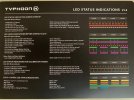
The rapid orange flash on the Status LED is the proper indication of the Typhoon H being in Bind mode for pairing with the ST16 or the Wizard Wand. See third line in the attached photo. IMG_2939.jpeg
 
  • Like
Reactions: WTFDproject

New Posts

Members online

Forum statistics

Threads
21,651
Messages
248,877
Members
28,917
Latest member
cpassenheim