Hello Fellow Yuneec Pilot!
Join our free Yuneec community and remove this annoying banner!
Sign up

ST16 controller does not show wifi (greyed out) on the screen.

Joined
May 8, 2021
Messages
6
Reaction score
1
Age
55
Hello,

After a period of not flying the H520, I decided to brush the cobwebs off and get it back into the air again.

The batteries are all charged up and the drone connected to the ST16 controller without an issue on day 1.

However, the next day on booting up the ST16 controller, the wifi symbol is greyed out. The screen itself works fine, and I can access the datapilot program/android settings with no issue. I've attempted to turn on the wifi in the android settings, but it doesn't want to connect. The wifi symbol is still greyed out.

I did a reboot of the system and reinstalled the appropriate software that was on the controller before, but still no luck!

Anybody have any ideas as I was going to donate the drone to my granddaughter's school, but only if I can resolve this issue.

Many thanks from Oz
 
..... the wifi symbol is greyed out. ......

"I did a reboot of the system"
Do you mean a restart of the controller or do you mean a full factory reset? A factory reset removes the existing bind between the H520 and the ST16S.

"Anybody have any ideas..."
It is normal for the Wifi to be grayed out unless the H520 is bound.
Have you tried to rebind the system?
The H520 normally binds via the camera. Do you have a camera mounted?

If needed:
The normal binding process is shown at about 1:33 into this video. The password is 1234567890
To view this content we will need your consent to set third party cookies.
For more detailed information, see our cookies page.

This one is a little clumsy and shortcuts the password part of the sequence, but there is more detail:
To view this content we will need your consent to set third party cookies.
For more detailed information, see our cookies page.
 
  • Like
Reactions: DoomMeister
Hi,
Thanks for your prompt response.
I did a full reinstall of the system on controller.
I will try your suggestions in a couple of days when I'm back home and let you know the outcome.
Thank you again.
"I did a reboot of the system"
Do you mean a restart of the controller or do you mean a full factory reset? A factory reset removes the existing bind between the H520 and the ST16S.

"Anybody have any ideas..."
It is normal for the Wifi to be grayed out unless the H520 is bound.
Have you tried to rebind the system?
The H520 normally binds via the camera. Do you have a camera mounted?

If needed:
The normal binding process is shown at about 1:33 into this video. The password is 1234567890
To view this content we will need your consent to set third party cookies.
For more detailed information, see our cookies page.

This one is a little clumsy and shortcuts the password part of the sequence, but there is more detail:
To view this content we will need your consent to set third party cookies.
For more detailed information, see our cookies page.
 
Hi again,

I have followed your instructions, but to no avail. The camera is correctly attached to the drone.

I just can't get the actual controller to connect to the home Wi-Fi network (no wi-fi network is being recognized), let alone the H520 (I have attached some photos).

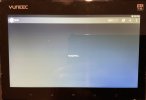
The ST16 controller via the android screen (settings), does not even allow me to turn the wi-fi button 0n and it remains greyed out after the "turning wi-fi on " message...

Thank again for any advice.
 

Attachments

  • 20260504_091429.jpg
    20260504_091429.jpg
    245.1 KB · Views: 6
  • 20260504_091513.jpg
    20260504_091513.jpg
    447.8 KB · Views: 8
  • 20260504_091758.jpg
    20260504_091758.jpg
    289.9 KB · Views: 8
  • 20260504_091821.jpg
    20260504_091821.jpg
    239.6 KB · Views: 8
  • 20260504_092935.jpg
    20260504_092935.jpg
    311 KB · Views: 8
Hi again,

I have followed your instructions, but to no avail. The camera is correctly attached to the drone.

I just can't get the actual controller to connect to the home Wi-Fi network (no wi-fi network is being recognized), let alone the H520 (I have attached some photos).

The ST16 controller via the android screen (settings), does not even allow me to turn the wi-fi button 0n and it remains greyed out after the "turning wi-fi on " message...

Thank again for any advice.
"The camera is correctly attached to the drone."
Please clarify if you mean the camera is correctly attached physically or if you mean the video is showing on screen.

"I just can't get the actual controller to connect to the home Wi-Fi network (no wi-fi network is being recognized), let alone the H520.."
The controller has two versions 2.4Ghz Wi-Fi. One is the 2.4Ghz home Wi-Fi associated with the Wi-Fi "on/off" button. The other is a backup drone control using the SR24 module. Will the drone respond to the alternate "Manual Bind without the camera"?
"
To view this content we will need your consent to set third party cookies.
For more detailed information, see our cookies page.
"

If the manual bind works, the best guess at this point would be the 5.8/2.4 Wi-Fi Module has failed. It may be difficult to find the module. And that is only one possible failure. This could turn into an expensive project looking for rarely available components trying to find the failure. A working used controller may be a better option.
 
Hi again,

I have followed your instructions, but to no avail. The camera is correctly attached to the drone.

I just can't get the actual controller to connect to the home Wi-Fi network (no wi-fi network is being recognized), let alone the H520 (I have attached some photos).

The ST16 controller via the android screen (settings), does not even allow me to turn the wi-fi button 0n and it remains greyed out after the "turning wi-fi on " message...

Thank again for any advice.
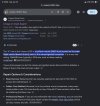
Yes I’ve noticed the WiFi under settings on the android menu won’t turn on when the module is burnt out. They are available on AliExpress for the h480 and I’ve tested one in a st16s and all works correctly. The only thing i noticed with the h480 WiFi module I installed was it didn’t have a heat shield , it can be clipped of the st16s module and installed on the st16 module, a bit of fresh thermal paste is advisable to help with heat dissipation to the heatsink. The st16s module is next to impossible to locate online. Install is very simple, about 15 minutes and there is a few videos available on YouTube. I followed @Steve Carr video on disassembly. Did u power on the ground station with the antennas removed by any chance
 
Yes I’ve noticed the WiFi under settings on the android menu won’t turn on when the module is burnt out. They are available on AliExpress for the h480 and I’ve tested one in a st16s and all works correctly. The only thing i noticed with the h480 WiFi module I installed was it didn’t have a heat shield , it can be clipped of the st16s module and installed on the st16 module, a bit of fresh thermal paste is advisable to help with heat dissipation to the heatsink. The st16s module is next to impossible to locate online. Install is very simple, about 15 minutes and there is a few videos available on YouTube. I followed @Steve Carr video on disassembly. Did u power on the ground station with the antennas removed by any chance
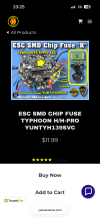
I just found this on AliExpress: | YUNEEC Typhoon H480 FPV Drone RC Quadcopter spare parts motor arm blades Tripod landing gear bracket body shell GPS module
 

Attachments

  • IMG_4206.png
    IMG_4206.png
    2.5 MB · Views: 4
  • Like
Reactions: Steve Carr
Hi again,

I have followed your instructions, but to no avail. The camera is correctly attached to the drone.

I just can't get the actual controller to connect to the home Wi-Fi network (no wi-fi network is being recognized), let alone the H520 (I have attached some photos).

The ST16 controller via the android screen (settings), does not even allow me to turn the wi-fi button 0n and it remains greyed out after the "turning wi-fi on " message...

Thank again for any advice.
Depending on ur location I have plenty of the st16s v2 WiFi modules available. The h520e I noticed also uses the same module. The h480 module from AliExpress is a good price and it will also work no issues. Plenty of options available
 
H480 WiFi module fitted to st16s.
Bit of a correction on the st16E module , this one actually appears to be v3 but is also labled st16s on the module. Just adding this incase someone comes across the thread in future. Regardless I’ve found they all work in any controller. Perhaps the WiFi technology improved over the years or perhaps yuneec reduced the amount of components on the board to reduce cost. U will notice the st16 module has an extra port not connected to anything
St16 st16s st16E module pictures attached . The lighter green one is from st16
 

Attachments

  • IMG_4209.jpeg
    IMG_4209.jpeg
    590.9 KB · Views: 5
  • IMG_4208.jpeg
    IMG_4208.jpeg
    439.7 KB · Views: 5
Last edited:
  • Like
Reactions: Steve Carr
Thank you for everybody's responses.

Batteries all charged up, still no connection (Wi-Fi still greyed out)
Antennas were removed, also no luck with binding the drone
@WTFDproject. I removed the camera to do a manual bind. No luck. No Wi-Fi symbol displayed
@Steven1988 I live in Sydney, Australia, so would like to touch base re: ST16 wifi module purchase
@netshear-absolutly no video feed due to nil binding of the camara when it was reinstalled

I think @Steven1988 is correct in saying the Wi-Fi module is probably cactus!!

I really appreciate all your help.
 
  • Like
Reactions: Steve Carr
Antennas were removed
Running this controller with antennas removed might be where ur issue arose from. I see alot mention the WiFi module burning out if powered on with them removed. I’ll send you another module no issues if ur happy to cover just postage cost. So the module is free and postage cost should be much less than buying one elsewhere. If you send me ur address via direct message I’ll get one out to you 😉
 
It’s normal for the WiFi to remain greyed out here until it’s connected to ur camera, when connected to ur camera it it will show signal strength. If connected to home WiFi is will show signal strength plus AP WiFi will appear underneath
 

Attachments

  • IMG_4213.jpeg
    IMG_4213.jpeg
    218.2 KB · Views: 3
It’s normal for the WiFi to remain greyed out here until it’s connected to ur camera, when connected to ur camera it it will show signal strength. If connected to home WiFi is will show signal strength plus AP WiFi will appear underneath
On the android menu here I noticed the same as u, it will not toggle on and give that message searching for WiFi.
 

Attachments

  • IMG_4214.jpeg
    IMG_4214.jpeg
    162.4 KB · Views: 6
  • IMG_4215.jpeg
    IMG_4215.jpeg
    283 KB · Views: 6

New Posts

Members online

Forum statistics

Threads
21,651
Messages
248,877
Members
28,917
Latest member
cpassenheim