Hello Fellow Yuneec Pilot!
Join our free Yuneec community and remove this annoying banner!
Sign up

New Kid Around

Joined
Jan 20, 2026
Messages
7
Reaction score
2
Age
65
Hi all my name is Sam. I live in Kingman Arizona. I signed up for the unique pilot platform as well as the emails sent to everything else. It’s a little slow evidently getting me situated and it’s still showing as a newbie. By the way, I just wanted to say hello and introduce myself to the group. I fly a YUNEEC Typhoon H. To date it is the best bird that I have purchased them in the process of trying to pull some updates as I do not believe the aircraft has been updated since 2017 maybe 2018. Anyway, if there are any suggestions or recommendations? Certainly, I would appreciate the note but specifically if anybody has any thoughts on the camera and gimbal software, is it better to install it to the aircraft first, or to the ground control station first? Nice meeting you all thanks for allowing me a moment of your time.
 
Hi all my name is Sam. I live in Kingman Arizona. I signed up for the unique pilot platform as well as the emails sent to everything else. It’s a little slow evidently getting me situated and it’s still showing as a newbie. By the way, I just wanted to say hello and introduce myself to the group. I fly a YUNEEC Typhoon H. To date it is the best bird that I have purchased them in the process of trying to pull some updates as I do not believe the aircraft has been updated since 2017 maybe 2018. Anyway, if there are any suggestions or recommendations? Certainly, I would appreciate the note but specifically if anybody has any thoughts on the camera and gimbal software, is it better to install it to the aircraft first, or to the ground control station first? Nice meeting you all thanks for allowing me a moment of your time.
If it ain’t broken don’t fix it. Sometimes u can get other problems by updating, at least in my experience
 
If it ain’t broken don’t fix it. Sometimes u can get other problems by updating, at least in my experience
That does seem to be the general consensus. However, I’m already down the rabbit hole. Any suggestions or recommendations would be greatly appreciated. Thanks so much for your honest response!
 
That does seem to be the general consensus. However, I’m already down the rabbit hole. Any suggestions or recommendations would be greatly appreciated. Thanks so much for your honest response!
Yes I’m exactly like yourself, I’ve often not went by the general consensus thinking newer is always better. Keep in mind the members with this consensus are very experienced, one thing I’ve learned the hard way is listen to their advice or at least consider it highly. The software should be available free on yuneecskins . Just ask urself this before proceeding, what will you gain with an update and is it worth going down that rabbit hole any further 🤣. Best of luck . Welcome to the group 😉
 
Welcome to YuneecPilots!

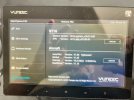
Power on the ST16 and the aircraft with camera mounted allowing everything to initialize. Now open System Settings and then select About Controller. Compare your versions to the following photo which is the latest and greatest for the Typhoon H.
IMG_1954.jpeg
Report any differences here and further guidance will be provided.
 
Welcome to YuneecPilots!

Power on the ST16 and the aircraft with camera mounted allowing everything to initialize. Now open System Settings and then select About Controller. Compare your versions to the following photo which is the latest and greatest for the Typhoon H.
View attachment 33156
Report any differences here and further guidance will be provided.
Is there anywhere where it gives a breakdown of what improvements take place on later versions. I’ve been reluctant to update my newest h plus model, I can’t say I’ve noticed anything different in the way it flys to other h plus models I’ve had previously. One thing that would be nice is a faster connection for video feed to the st16s. A previous model connected much faster. I’ve also read that the us version connects much quicker than the eu version if anyone can confirm this.
 
Compare your versions to the following photo which is the latest and greatest for the Typhoon H.

Report any differences here and further guidance will be provided.
Please be aware there are TWO latest versions for the gimbal firmware, because there are two different versions of the gimbal IMU. They are not always cross-compatible. The latest versions are V1.25 and V1.27. If you have version 1.25 or lower do NOT try to install version 1.27. If you already have either V1.25 or V1.27 there is no need to update the gimbal at all.

There are also two versions of latest "RealSense" firmware. I have no idea how compatible they are.
 
The latest versions are V1.25 and V1.27. If you have version 1.25 or lower do NOT try to install version 1.27. If you already have either V1.25 or V1.27 there is no need to update the gimbal at all.
Is there v1.27 available? I have never seen it as a standalone update. Have only seen it installed on CGO3+ cameras with the boxed IMU.
 
Welcome to YuneecPilots!

Power on the ST16 and the aircraft with camera mounted allowing everything to initialize. Now open System Settings and then select About Controller. Compare your versions to the following photo which is the latest and greatest for the Typhoon H.
View attachment 33156
Report any differences here and further guidance will be provided.
controller is good. aircraft is all version N/A. I just want say thanks for the assist gentlemen, regardless of how all this turns out I sincerely appreciate the help.
 
controller is good. aircraft is all version N/A. I just want say thanks for the assist gentlemen, regardless of how all this turns out I sincerely appreciate the help.
 
controller is good. aircraft is all version N/A. I just want say thanks for the assist gentlemen, regardless of how all this turns out I sincerely appreciate the help.
U probably have to power on ur typhoon h to show it’s software version, it sounds to me that ur not applicable (N/A) beside version is because its not currently communicating with the controller. Perhaps someone can confirm
 
Last edited:
  • Like
Reactions: steelcondor
Is there v1.27 available? I have never seen it as a standalone update. Have only seen it installed on CGO3+ cameras with the boxed IMU.
Maybe not. Yuneec often did not post the first version of new firmware. Most of what we have are updates to initially released firmware.
The Black box and V1.27 were sort of an anomaly in the system. It was a little like a new model due to the lack of firmware compatibility with the existing CGo3+ gimbal. Having two incompatible firmware versions associated with the same camera model seems an invitation to mistakes.
 
U probably have to power on ur typhoon h to show it’s software version, it sounds to me that ur not applicable (N/A) beside version is because its not currently communicating with the controller. Perhaps someone can confirm
Confirmed. The camera has to be mounted, working and bound to the controller.
 
  • Like
Reactions: Stephen1988
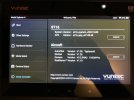
You were right Steven. Once I turned on the aircraft all fields populated. See attached photo.
What say you DoomMeister, project complete at this point. I think all that is left is to take the old girl or a test flight? What are y'all thinking?
(Upload-from-mobile-1769019586)IMG_0216.jpeg
 
You were right Steven. Once I turned on the aircraft all fields populated. See attached photo.
What say you DoomMeister, project complete at this point. I think all that is left is to take the old girl or a test flight? What are y'all thinking?
Happy flying 🤗
 
You were right Steven. Once I turned on the aircraft all fields populated. See attached photo.
What say you DoomMeister, project complete at this point. I think all that is left is to take the old girl or a test flight? What are y'all thinking?
O yes one more thing, check ur rc monitor first to see is everything working correctly
Correction hardware monitor on ur model. Check the sticks to see do they reach full travel and also when u let go of the sticks they return exactly to centre, they should return quickly, if slowly u might need to clean contacts. Hopefully all ok . U should be able to test all the buttons and sliders from this menu
 
Last edited:
You were right Steven. Once I turned on the aircraft all fields populated. See attached photo.
What say you DoomMeister, project complete at this point. I think all that is left is to take the old girl or a test flight? What are y'all thinking?
View attachment 33158
Firmware and software look good (I did say to power on the controller and aircraft/camera in my previous post as there has to be the WiFi connection from the camera to display info in the lower section of About Controller).

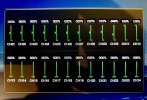
@Stephen1988 has a good suggestion to check the controls in Hardware Monitor under System Settings. Ensure the sticks reach full deflection and return to center as you move them both quickly and slowly. If that looks good place the Rate slider into the Rabbit (full forward) position then double tap the Volts icon to bring up the Final Output display.
IMG_0514.jpeg
Now move each stick full up/down and left/right and check that CH1 through CH4 all reach full extent while moving them.

Once the control movements are verified good, I would suggest removing the camera for the first couple of flights. The aircraft is fairly easy to repair should a crash occur, but the camera usually doesn’t fair so well and is difficult and expensive to repair.

For the first flight power on the controller and aircraft and let it sit for 12 to 15 minutes to attain enough satellites and update the GPS ephemeris. If you have GPS Ready, place the Mode switch to Angle mode (solid purple Status light w/white flash once every 3 seconds if ST16 also has good GPS fix), place Rate slider to Rabbit for takeoff and landings, arm motors, takeoff, hover at about 20 feet and test that stick controls are followed.

Once you get used to flying and have good controlled landings add the camera to the aircraft.
 
Last edited:
Please be aware there are TWO latest versions for the gimbal firmware, because there are two different versions of the gimbal IMU. They are not always cross-compatible. The latest versions are V1.25 and V1.27. If you have version 1.25 or lower do NOT try to install version 1.27. If you already have either V1.25 or V1.27 there is no need to update the gimbal at all.

There are also two versions of latest "RealSense" firmware. I have no idea how compatible they are.
I have explained this to a few people, sometimes leaving the firmware as is is better than trying to upgrade it. If you read some of the update notes a lot of the firmware update updates are minor patches.

If it works don’t try to fix it, as I say.
 

New Posts

Members online

Forum statistics

Threads
21,651
Messages
248,877
Members
28,917
Latest member
cpassenheim