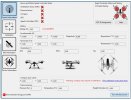
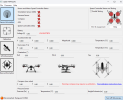
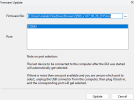
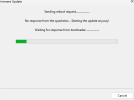
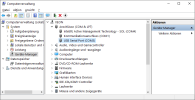
I'll send pics of the GUI after I get home tonight. I do recall when I turned on the GUI Preview there was some info shown.This is related to the "Firmware Update" feature of the GUI.
Are you seeing anything on the "Sensor Information" page?
View attachment 30958
With a battery fully charged, lights are normal per the cheat sheet guide. Pics below from trying to update through the connection USB/cable with the GUI.I'll send pics of the GUI after I get home tonight. I do recall when I turned on the GUI Preview there was some info shown.
Pics from trying to update through the connection USB/cable with the GUI.With a battery fully charged, lights are normal per the cheat sheet guide. Pics below from trying to update through the connection USB/cable with the GUI.
One small feat discovered but just looking, the camera is not working and the after I was able to bind only it to the controller. The drone still does not show up.
@WTFDproject and @h-elsner, a miracle happened last night before shutting down to go to bed.Pics from trying to update through the connection USB/cable with the GUI.
The GUI is the best chance to find issues. Continuing to work with @h-elsner to get a proper GUI connection is the priority.
With a battery fully charged, lights are normal per the cheat sheet guide.
This suggests the battery was low during previous discussions. With the battery that low, the results of the binding verification were questionable. It would also be a good idea to rerun the binding verification. Ensure to recheck the battery voltage at Step 1. If the battery is bad, it will come to full charge quickly but will fade away in a short time even if it is not in service.
the camera is not working and the after I was able to bind only it to the controller.
The relation between camera video and camera movement control is confusing. If you have an image on screen, the camera bind was successful, and the camera is working. If the camera does not respond to movement from the tilt slider, that is a gimbal problem, not a camera problem. The gimbal is part of the drone bind, not the camera bind.

Maybe not so much a miracle as that, this time, the battery had enough charge to actually broadcast the signal. Which brings up a caution.@WTFDproject and @h-elsner, a miracle happened.....After doing that I checked bind option and both the camera, and the drone binding showed up!
Update:Maybe not so much a miracle as that, this time, the battery had enough charge to actually broadcast the signal. Which brings up a caution.
If the battery had died that quickly on earlier attempts, actual flight might be a risk.
You really want to ensure you have a good battery with a full charge before attempting flight. And have a good plan for what to do if things go wrong.
I'll leave the 32gb SD in the controller. I have several new 128gb SD's available. If the camera supports it, I'll FAT32 one and insert it in there for storage. Thoughts?And don't forget to put a SD card in the slot below the ST10 battery. 4GB are more than enough. When the SD card is present the ST10 will store flight logs there. With the flight logs it is more easier to identify what's going wrong. We would have this seen in some seconds instead of guessing around for days.
It's not your fault not having it but you should clever enough to have it for the future.
To format the larger SD cards, I can use dos or Powershell for that.I leave a 32gb in mine. Don't need that much, but that's what I have around.
The larger card formats such as the exFat that is probably on your 128gb cannot be formatted to FAT32 using the normal windows format. I saw a couple of videos on YouTube for converting exFAT to FAT32 using downloadable programs. I've never used them and can't tell you much about it except they apparently exist. Maybe.
Good Morning Sir, Just the person I'm looking for. Three or four years ago. We talked about a problem I had with the camera on my Q500. After a crash. I sent the camera to you. Come to find out. It was my own stupidity. It turned out to be camera speed setting for the SD card I was using. Problem fixed.....Thank You!! However, soon afterward, I discovered that there was more damage then I thought. In a pre flight hover. It suddenly dipped forward, and a little left. And away it went!! I pulled the controls back. It finally landed! Put it back in the air, a couple time since. Same results! Run away! I haven't flown it since. My question, if I may ask? Am I looking at a motor or ESC issue....or deeper?? Thank You Sir! TomIs the camera a CGO2, a CGO3, a GO-PRO, something else?
Does everything seem to be working normally now?
If not, did you refresh the bind between controller and drone and between controller and camera after the reset of the controller?
Q500 to ST10 Binding Verification
Thank You Sir! I wasn't prepared for things to try. Q is in a storage unit. Will have to make a trip and pull it from storage. Thank You, in the mean time!Start and land with right slider on rabbit position.
First check with HW monitor if all sticks are centered and work properly. ST10 > Flight settings > Hardware monitor. Move the sticks and check if they go back to zero fast when you left it.
Download the GUI, there you can check the motors / ESCs.
Dropbox
www.dropbox.com
Download the flight logs from ST10 using the USB connection and let us inspect. Mayby we can see what happened. Note: Flight logs are only available when you have a SD card under the ST10 battery.
We use essential cookies to make this site work, and optional cookies to enhance your experience.