Hello Fellow Yuneec Pilot!
Join our free Yuneec community and remove this annoying banner!
Sign up

Reuse a CGO-ET for inspection without a drone

h-elsner

Premium Pilot
Joined
Mar 23, 2016
Messages
2,678
Reaction score
2,544
Location
Bavaria / Germany
Website
h-elsner.mooo.com
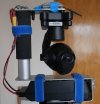
From some hardware with different problems I could manage to build a working CGO-ET (maybe a strange mix of firmware but it works). Got the stuff from my generous sponsor @Enrico Jorysch .
The idea is to put the camera on a tripod and control the gimbal with the ST16. How this works you can see in a short thermal video. Unzip the Thermal_stream.zip.

The description is here: http://h-elsner.mooo.com/pdf/Grip_CGO3P_control.pdf
The SW is here: esp32_CGOET_grip · main · h-elsner / Yuneec_ESP32 · GitLab

Test setup:
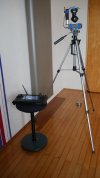
CGO-ET_tripod1_small.JPGCGO-ET_tripod2_small.JPG

I was already outside, checking my home and the neighbors home too.
 

Attachments

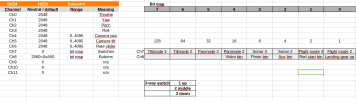
In this context, I discovered that the ST16S with Datapilot has a different channel assignment in messages sent to the SR24.

H520_channels.png

The good news is, that the sonar switch and the Rate slider (Rabbit - turtle) are in the channel data and can also be used for other purposes.
 
Last edited:
From some hardware with different problems I could manage to build a working CGO-ET (maybe a strange mix of firmware but it works). Got the stuff from my generous sponsor @Enrico Jorysch .
The idea is to put the camera on a tripod and control the gimbal with the ST16. How this works you can see in a short thermal video. Unzip the Thermal_stream.zip.

The description is here: http://h-elsner.mooo.com/pdf/Grip_CGO3P_control.pdf
The SW is here: esp32_CGOET_grip · main · h-elsner / Yuneec_ESP32 · GitLab

Test setup:
View attachment 33153View attachment 33154

I was already outside, checking my home and the neighbors home too.

Dear Helmut, I almost didn't recognize you in the video. :cool:
 
Amazing work, this is fantastic to see. If you are familiar with the X style cameras I would like to come up with a solution for an issue I’ve been running into.

I know the 520 can be used with an ESP8266 (specific to a guide I had been sent) to forward the mavlink packets over WiFi.
I tried reproducing using dronebridge and an ESP32, I see bytes being sent back and fourth but connecting from the ST16 and receiving telemetry is not working…
I attached the original PDF, if you have time to look into it, it would allow 520 to easily be used without a camera. Maybe the ST16 is only looking for 2.4ghz? I’ve heard you need to connect to the WiFi on PAD then open datapilot, have not tested this yet.
 

Attachments

In this context, I discovered that the ST16S with Datapilot has a different channel assignment in messages sent to the SR24.

View attachment 33155

The good news is, that the sonar switch and the Rate slider (Rabbit - turtle) are in the channel data and can also be used for other purposes.
I know this has been posted so many times, but have you found anything on the auxiliary button? I wonder if it was meant to be used in a future firmware release that never came. It’s really nice to see reverse engineering going on. That’s what will keep these drones flying!!
 
AUX button (or any other button) are easy to use to switch something.
Code fragment:

C++:
#define AUX_PIN 22
byte sr24buffer[44];  // Receive buffer for SR24 messages; contains all bytes of the message except the 2 magic bytes 0x55 (starts with length byte)

....

uint16_t ch8 = (sr24buffer[18] << 4) + (sr24buffer[19] >> 4); // read channel data from message buffer
if ((ch8 & 4) > 0) {                                          // AUX button pressed
  digitalWrite(AUX_PIN, HIGH);                                // Switch someting on
} else {
  digitalWrite(AUX_PIN, LOW);                                 // off
}

You could also use the button to toggle a switch.
Edit: Channel 8, not 7
 
Last edited:
In the past I did only work with CGO-ET (H520 version) and Flightmode app from H480. When I try to use the DataPilot from H520, the camera will not be detected without H520 flight controller as mediator between camera and DataPilot. I can control the gimbal but not the camera. A surprise was to see a wild mix of Yuneec specific MAVlink V1 messages (Magic byte 0xFE) and MAVlink V2 messages (Magic byte 0xFD like PX4 autopilot has).
The E50 on H520 has a similar behavior. But it is usable stand-alone once the camera type was detected.

Gimbal control:
E50: Gimbal control with different channel assignment compared to CGO3+ / CGO-ET.
Calibration with E90 tool like all cameras newer generation.
CGO-ET: Gimbal control and calibration like CGO3+ but baudrate 500000 instead of 115200.

Videostream:
E50: Videostream after WiFi connection.
CGO-ET: No thermal stream, only normal camera after WiFi connection.

Camera detection:
For both only with H520 flight controller. No settings or photo/video start/stop until camera was detected.
E50: Once camera detected, no flight controller is needed any more, settings/video still possible when H520 is off.
CGO-ET: Once camera detected thermal stream is visible, settings/video working. If H520 is off, thermal stream still available, but settings/video no more possible.

Messages from FC to gimbal/camera:
Both cameras have a mix of 0xFD and 0xFE messages.

Messages from gimbal/camera to FC:
E50: Only 0xFD messages
CGO-ET: A mix of 0xFD and 0xFE messages.

For now the CGO-ET is only usable stand-alone with Flightmode app from Typhoon H.
 
Now I found out what to do to get CGO-ET or E50 (and possibly other cameras of this family) to work with ST16S and DataPilot app from H520. For the CGO-ET this gives a bit more possibilities as with the Flightmode app from H480.
Sending heartbeat and ping messages alone did not help.
The trick is to send "something" back on param_request_list message. There is no information about camera in, but it seems that this is need to initiate the communication between DataPilot and camera itself without having a drone (flight controller) in the game.

 
Last edited:
Now the system detects itself if the DataPilot app is used or the FlightMode app from H480. That means the CGO-ET from H520 can be used with both apps.
The controller on the tripod is now able to use all cameras from Typhoon H and H520. Tested with CGO3+, CGO-ET and E50.
 
Last edited:
Here is a TLOG file from a camera session with CGO-ET on ESP32. There are much more messages between camera and DataPilot compared to that what my ESP32 sends to gimbal. No surprise but interesting.

I will try to add coordinates and altitude from ST16S to the TLOG file.
 

Attachments

  • Like
Reactions: Steve Carr
Here is a TLOG file from a camera session with CGO-ET on ESP32. There are much more messages between camera and DataPilot compared to that what my ESP32 sends to gimbal. No surprise but interesting.

I will try to add coordinates and altitude from ST16S to the TLOG file.
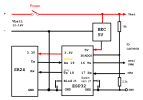
whats the pinout between esp32 and the camera? I am trying to use an esp32 as a dedicated device to help me do calibrations and uart connection in general.
 
Does that mean that the ST-16S, with CGO-ET, now displays the thermal and normal images as if it were connected to H520
correct me if im wrong but theyre also stored in datapilots internal storage too i believe, displaying the thermal videos requires some specific software/codec through
 
correct me if im wrong but theyre also stored in datapilots internal storage too i believe, displaying the thermal videos requires some specific software/codec through
I mean the DataPilot app on the ST16S. The ST16S is used to control the gimbal (with help from the ESP32) and provides the full functionality for the cameras (settings, video, start/stop recording, take photos).
With other words, the ST16S and the camera are doing their job and the ESP32 works as mediator for the gimbal with the SR24.
 
whats the pinout between esp32 and the camera? I am trying to use an esp32 as a dedicated device to help me do calibrations and uart connection in general.
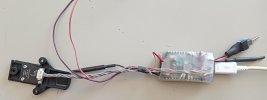
CGOET_H520_ESP32_1.pngESP32_grip2.jpg

You need power supply for the camera, 5V for the ESP32 and as interface to camera only ground, Rx, Tx.

I do not understand what a ESP32 shall do for calibration?
 
Last edited:
View attachment 33189View attachment 33190

You need power supply for the camera, 5V for the ESP32 and as interface to camera only ground, Rx, Tx.

I do not understand what a ESP32 shall do for calibration?
I was using the ESP32 with micropython to work as a serial monitor when first looking at your CGO3+ calibration software, ended up using a raspberry pi with better results
 
Last edited:
  • Like
Reactions: DoomMeister

New Posts

Members online

No members online now.

Forum statistics

Threads
21,651
Messages
248,878
Members
28,918
Latest member
thierry2