Hello Fellow Yuneec Pilot!
Join our free Yuneec community and remove this annoying banner!
Sign up

ST16 controller for H520 – faulty

Joined
Aug 15, 2021
Messages
66
Reaction score
26
Age
55
Hello.
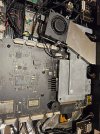
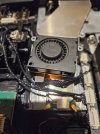
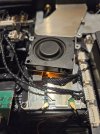
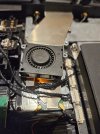
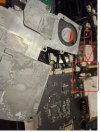
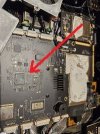
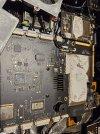
I’m having a problem with the controller for my H520 drone. Everything was working fine, but when I tried to update it, everything suddenly stopped working. When I switch it on, the Yuneec screen appears, then the screen goes black and that’s it. When I open it up, the fan starts spinning, but after a moment it stops and nothing else happens. Has something physically broken, or is the problem due to the update attempt? I’m sending some photos and would appreciate any advice on how to fix it.
 

Attachments

  • 20260322_203730 (Medium).jpg
    20260322_203730 (Medium).jpg
    249.6 KB · Views: 12
  • 20260322_203744 (Medium).jpg
    20260322_203744 (Medium).jpg
    164.2 KB · Views: 10
  • 20260322_203830 (Medium).jpg
    20260322_203830 (Medium).jpg
    258.8 KB · Views: 10
  • 20260322_204039 (Medium).jpg
    20260322_204039 (Medium).jpg
    159.5 KB · Views: 10
  • 20260322_204044 (Medium).jpg
    20260322_204044 (Medium).jpg
    159.9 KB · Views: 9
  • 20260322_204107 (Medium).jpg
    20260322_204107 (Medium).jpg
    161.7 KB · Views: 9
..... Everything was working fine, but when I tried to update it, everything suddenly stopped working. ....
What method did you use to run the update? SD cards? OTA?


...I’m sending some photos and would appreciate any advice on how to fix it.
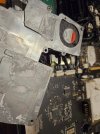
More detail of this area might be helpful. Does it look like damage when seen in real life?
ST16S.jpg
 
At first, I used WiFi as normal; after the failure, I tried using a card and then switched to a cable, but both methods failed because, as I wrote, the YUNEEC logo appears when I switch it on, but after a moment the fan stops and nothing happens. That mark looks to me like it’s paste that has come loose. How can I check the individual components, and where is all the data stored in the controller?
 
The question is: has a component responsible for the entire system – let’s say, like a hard drive in a computer – been damaged? If so, where is it located?
 
The question is: has a component responsible for the entire system – let’s say, like a hard drive in a computer – been damaged? If so, where is it located?
It is not possible to accurately guess a hardware failure without having the controller present. Given the circumstances it is far more likely there was a glitch during the attempted firmware update.
Some insight might be gained if we knew:
1.) What led to the decision to attempt an update?
2.) You mentioned the Yuneec Logo appears, but did not specify if it was the first Logo or the second.
It may be possible to force the controller into a mode that allows factory reset. Without knowing how far the start-up proceeds before failure, the possibility is questionable.
3.) Are you certain the controller battery is fully charged?
 
  • Like
Reactions: Stephen1988
1. Just checking if the latest software is installed
2. Only one logo appears and the controller goes completely silent, as if a circuit inside it has overheated, because you can’t hear any fan noise.
3. It is currently 90% charged.
How do I reset the controller to factory settings? What should I do if I can’t reset it to factory settings? I have some parts from a second controller.
 
  • Like
Reactions: WTFDproject
1. Just checking if the latest software is installed
2. Only one logo appears and the controller goes completely silent, as if a circuit inside it has overheated, because you can’t hear any fan noise.
3. It is currently 90% charged.
How do I reset the controller to factory settings? What should I do if I can’t reset it to factory settings? I have some parts from a second controller.
How do I reset the controller to factory settings?
You can try the "poison apple" approach (normally used to unlock a forgotten password). This method forces the controller into the android recovery screen.
I don't think it will work unless the start-up reaches the second logo, but it does no harm to try. (Google, DeepL and probably others provide free document translators that will work, although with some possible format issues. A cleaner translation will be provided if you tell me the best language to use.)
"ST16S Unlock for H520"

What should I do if I can’t reset it to factory settings? I have some parts from a second controller.

Given the unknown nature of the failure, it is something of a guess. The best guess is probably to start with the Main Board (large board in the lower center that has the battery connectors).
H520 Mainboard.jpg
 
I still thinking about the battery. 90% charged may be shown if the is no current demanded (no effective load). Battery voltage can break down in the moment the CPU is starting to demand power during boot up. Do you have a chance to try with another full charged battery?
 
  • Like
Reactions: WTFDproject
Unfortunately, the battery was fully charged (I swapped it for another one and the problem persisted), so I decided to replace the entire circuit board, as the fault was clearly somewhere on it, but I don’t have the tools to check. Thank you for your help.
 
  • Like
Reactions: h-elsner

New Posts

Members online

No members online now.

Forum statistics

Threads
21,651
Messages
248,877
Members
28,917
Latest member
cpassenheim