Hello Fellow Yuneec Pilot!
Join our free Yuneec community and remove this annoying banner!
Sign up

H520 no gimbal or camera power preventing binding

Joined
May 20, 2025
Messages
12
Reaction score
3
Age
66
I’ll try to keep this as simple as possible,
I purchased a clean used H520 drone with an ST16S and I’m unable to bind the two because the radio doesn’t see the H520 no matter what I do. I have been able to successfully update the radio using UpdatePilot going through multiple steps to finish it completely with no success seeing the H520. The seller swears he tested and flew this prior to selling it to me, he doesn’t sound like someone who would sell this knowing that it had these kind of issues.
I loaded DataPilot on my pc and was able to connect via the usb cable, everything seems ok except it cancels out of firmware updating without completing. I’m very fluent with Pixhawk protocol and understand how to update the firmware with this type of unit. At this point the only thing that I can think is updating the firmware but I haven’t been able to do so due to the lack of the factory processes failing at the last moment and yes I understand I have to unplug the cable and plug it back in to finalize the install. Yes I’ve tried the no camera flip upside down process, it makes to completion tones but doesn’t seem to have bound, no indication it happened other than the lights and tone. Oh the landing gear works either way.
I seem to remember seeing a way to download firmware onto my computer and transferring it to a micro card to load it but I seem to have lost the info. Can anyone please guide me to the proper file and process to load the current fiirmware to my H520 and also give me any other advice as to what I may be missing to get it to recognize the cameras.

Thanks in advance, Matt Hagen
 
I’ll try to keep this as simple as possible,
I purchased a clean used H520 drone with an ST16S and I’m unable to bind the two because the radio doesn’t see the H520 no matter what I do. I have been able to successfully update the radio using UpdatePilot going through multiple steps to finish it completely with no success seeing the H520. The seller swears he tested and flew this prior to selling it to me, he doesn’t sound like someone who would sell this knowing that it had these kind of issues.
I loaded DataPilot on my pc and was able to connect via the usb cable, everything seems ok except it cancels out of firmware updating without completing. I’m very fluent with Pixhawk protocol and understand how to update the firmware with this type of unit. At this point the only thing that I can think is updating the firmware but I haven’t been able to do so due to the lack of the factory processes failing at the last moment and yes I understand I have to unplug the cable and plug it back in to finalize the install. Yes I’ve tried the no camera flip upside down process, it makes to completion tones but doesn’t seem to have bound, no indication it happened other than the lights and tone. Oh the landing gear works either way.
I seem to remember seeing a way to download firmware onto my computer and transferring it to a micro card to load it but I seem to have lost the info. Can anyone please guide me to the proper file and process to load the current fiirmware to my H520 and also give me any other advice as to what I may be missing to get it to recognize the cameras.

Thanks in advance, Matt Hagen
In your description, you never mentioned the camera, other than stating you tried the "bind without a camera method". The camera is a critical part of the normal H520 update process.
  • Do you, in fact, have a working camera attached?

The H520 is based on PX4, but not fully compatible. It is generally mentioned not to take any PX4 actions via PC. Others can discuss this with more background, I'm just repeating things.
  • For those more familiar with PX4 and H520 than I, please describe the method you used to access via the USB and what actions you took. If you were using any APP, such as QgroundControl, it might be good to say which one.
 
Thanks for your reply, I have a known good CGOET that works on an H480 that I own, the H520 has no gimbal or camera power. I attempted to update using the firmware using the PC DataPilot process whereas you engage the firmware button, unplug the usb cable to the H520 and plug it back in. The screen response resulted stating it’s unable to complete the process.
I did not try QGroundControl because I read that it wasn’t compatible with the H520.
Using the ST16S I tapped the WiFi button as instructed then the Link Management button where a camera choice is supposed to show but there is just blank space where the camera choice is supposed to show. I tried this with the CGOET as well as an E30Z that I was able to test the gimbal on my H480 where it stands to attention when powered on, the camera is not compatible with the ST16 model so I couldn’t test it.
By binding without the camera method I meant the process whereas you remove the camera and turn the H520 upside down until the lights all turn yellow then using the “Manual Bind” choice in the vehicle screen it presents a tone that should indicate the vehicle is ready to fly without a camera attached. Nothing responds other than the landing gear when the unit is upside down to give the sonar sensors enough clearance preventing them from stopping the gear from working.
After everything this all drills down to no power to activate the gimbal or 5.8 transmitter for the camera and combined communication protocols.
Also I was able to use the PC DataPilot to completely calibrate the H520 as well.
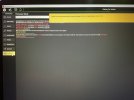
The only thing left to try is updating the firmware as is mentioned that it needs by a pop-up yellow box when plugged into my pc (see pic) and yes I removed the battery as instructed.
As a side note I was able to arm the H520 to fly with the pc cable connected using the pc DataPilotPlanner screen fly command so it seems the drone is doing almost everything it should but power the camera allowing the transmitter communication to do everything else.
 

Attachments

  • IMG_0902.jpeg
    IMG_0902.jpeg
    2.9 MB · Views: 7
Thanks for your reply, I have a known good CGOET that works on an H480 that I own, the H520 has no gimbal or camera power. I attempted to update using the firmware using the PC DataPilot process whereas you engage the firmware button, unplug the usb cable to the H520 and plug it back in. The screen response resulted stating it’s unable to complete the process.
I did not try QGroundControl because I read that it wasn’t compatible with the H520.
Using the ST16S I tapped the WiFi button as instructed then the Link Management button where a camera choice is supposed to show but there is just blank space where the camera choice is supposed to show. I tried this with the CGOET as well as an E30Z that I was able to test the gimbal on my H480 where it stands to attention when powered on, the camera is not compatible with the ST16 model so I couldn’t test it.
By binding without the camera method I meant the process whereas you remove the camera and turn the H520 upside down until the lights all turn yellow then using the “Manual Bind” choice in the vehicle screen it presents a tone that should indicate the vehicle is ready to fly without a camera attached. Nothing responds other than the landing gear when the unit is upside down to give the sonar sensors enough clearance preventing them from stopping the gear from working.
After everything this all drills down to no power to activate the gimbal or 5.8 transmitter for the camera and combined communication protocols.
Also I was able to use the PC DataPilot to completely calibrate the H520 as well.
The only thing left to try is updating the firmware as is mentioned that it needs by a pop-up yellow box when plugged into my pc (see pic) and yes I removed the battery as instructed.
As a side note I was able to arm the H520 to fly with the pc cable connected using the pc DataPilotPlanner screen fly command so it seems the drone is doing almost everything it should but power the camera allowing the transmitter communication to do everything else.

"I attempted to update using the firmware using the PC DataPilot process"
It is generally a really bad idea to run updates until you have the system running and can evaluate the actual need. It would be a much better idea to focus on power to the camera and getting a functional bind first.

"I tried this with the CGOET as well as an E30Z "
The CGoet for Typhoon H is not compatible with the H520. They look exactly the same, but the gimbal firmware, at least, is different. Since the two drone's flight control firmware is based on two different operting systems, it is possible it will not work for updates either. Other members would be better sources to clarify the differences and update functionalities.
Either way, neither can function if there is no camera power. Check the spring contacts on the drone part of the camera mount and check the camera fuse (K Fuse). See links below.

"By binding without the camera method I meant the process whereas..."
I am unfamiliar with the process shown in the screenshot you provided. It does not seem to be for binding the H520 drone. I think it's probably for other stuff. The screenshot seems to show "DataPilotPlanner" from a PC screen, not "DataPilot" from an ST16S. Pretty sure that's not gonna work.
You would normally use the Update Pilot connected to your Home WiFi for updates. But that requires a functioning camera to update the camera and the Autopilot.
The backup method is an SD card firmware update (see below), which unfortunately also requires a functioning camera. The E30Z might partially work, but the only guidance I know of (linked below) uses an E90 and firmware associated with E90. The E30Z may work with "Update Pilot" after you get the power back to the camera mount. Not sure.


Stuck Mount Contacts (same idea for CGo3, CG03+ and similar slide mounts)

HPlus K-Fuse.jpg HPlus, H520 K-Fuse locations are similar.

E90/H520 SD Card Firmware Upgrade (Requires power to the camera, and is based on E90 camera firmware)
 
Last edited:
  • Like
Reactions: Steve Carr
Thanks for your reply, I have a known good CGOET that works on an H480 that I own, the H520 has no gimbal or camera power. I attempted to update using the firmware using the PC DataPilot process whereas you engage the firmware button, unplug the usb cable to the H520 and plug it back in. The screen response resulted stating it’s unable to complete the process.
I did not try QGroundControl because I read that it wasn’t compatible with the H520.
Using the ST16S I tapped the WiFi button as instructed then the Link Management button where a camera choice is supposed to show but there is just blank space where the camera choice is supposed to show. I tried this with the CGOET as well as an E30Z that I was able to test the gimbal on my H480 where it stands to attention when powered on, the camera is not compatible with the ST16 model so I couldn’t test it.
By binding without the camera method I meant the process whereas you remove the camera and turn the H520 upside down until the lights all turn yellow then using the “Manual Bind” choice in the vehicle screen it presents a tone that should indicate the vehicle is ready to fly without a camera attached. Nothing responds other than the landing gear when the unit is upside down to give the sonar sensors enough clearance preventing them from stopping the gear from working.
After everything this all drills down to no power to activate the gimbal or 5.8 transmitter for the camera and combined communication protocols.
Also I was able to use the PC DataPilot to completely calibrate the H520 as well.
The only thing left to try is updating the firmware as is mentioned that it needs by a pop-up yellow box when plugged into my pc (see pic) and yes I removed the battery as instructed.
As a side note I was able to arm the H520 to fly with the pc cable connected using the pc DataPilotPlanner screen fly command so it seems the drone is doing almost everything it should but power the camera allowing the transmitter communication to do everything else.

This version of DataPilot is NOT for the H520, but for the H520-E.
This could cause problems if firmware is installed on the wrong drone.

Even if the wrong camera is connected, the gimbal should still function and the LED should light up. If this is not the case, either the fuse on the main board is defective, the connection cable is defective... you can use a multimeter to check the contacts to see if there is power... or the camera is defective.

First, you need to make sure the correct firmware is installed on the drone and the remote controller. The best thing to do is take a screenshot of the update screens.
 
Last edited:
@Enrico Jorysch you just confirmed my thoughts as I was reading through this thread. I recall the confusion when the H520e was first launched and there being different versions of DataPilot for the H520 and H520e due to the H520 using WiFi for camera communication and the H520e using OFDM for control of both aircraft and camera.
 

New Posts

Members online

Forum statistics

Threads
21,655
Messages
248,943
Members
28,927
Latest member
Cmsolar