Hello Fellow Yuneec Pilot!
Join our free Yuneec community and remove this annoying banner!
Sign up

Yuneec q500 4k engines do not work iç

Joined
Jan 17, 2026
Messages
42
Reaction score
1
Age
50
Location
Türkiye
Website
53r.com.tr
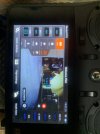
Hello. I made the charges, I press the red button and release it (2-3 seconds) but the engines do not work. It does not show any value in the volts section on the St 10 screen. The drone doesn't take off. I wonder how we will do it
 
Your image shows that the camera is bound to the controller, but the drone itself is NOT bound to the controller. If you know the normal binding process, just bind it.
If you need additional details you can follow the "Q500 binding verification" process. The verification process is many, many times longer, but it has the saving grace of a lot of extra information.
"Q500 Binding Verification"
 

Attachments

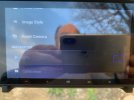
As seen in Reimde, it does not find any satellites and does not come to the remote control in other information. Calibration and gprs are not changed in passive state. But it looks like GPRS On. The camera and take photos where it is, but the engines don't work.
 
As seen in Reimde, it does not find any satellites and does not come to the remote control in other information. Calibration and gprs are not changed in passive state. But it looks like GPRS On. The camera and take photos where it is, but the engines don't work.
All this is consistent with a controller that is bound only to the camera. The problem will not resolve until you also select a "model" and bind the drone to the controller. It is two different bind processes.
 
I reset the factor, but the links don't come again. The camera gives an image. I wonder how we will connect with satellites. Can we disable the GPRS and start the engines and fly them?
 
Same procedure as in this video

To view this content we will need your consent to set third party cookies.
For more detailed information, see our cookies page.

Another (turn on subtitles and use auto translate to your native language)

To view this content we will need your consent to set third party cookies.
For more detailed information, see our cookies page.
 
Last edited:
When we reset the factor, isn't everything ready for s10+?
Hayır. Drone'u kumandayla eşleştirmeniz gerekiyor. Bunun için yukarıda verilen adım adım talimatları takip edebilir veya @DoomMeister tarafından paylaşılan videoyu izleyebilirsiniz.
Drone'u eşleştirmek yalnızca ekran yakalama ve kamera ayarları kontrollerini etkinleştirir.
Fabrika ayarlarına sıfırlama işlemi yalnızca eski ayarları siler.
İstediğiniz sonucu elde etmek için kontrol cihazını drone'a bağlamanız gerekir.
Fabrika ayarlarına sıfırlama işlemi yaptığınız için, kontrol cihazını drone'a bağlamak üzere videoyu izlemeden önce yeni bir model oluşturmanız ve bunu seçmeniz gerekecektir.

No. You must bind the drone to the controller. Either using the full written procedure above or the video as provided by @DoomMeister.
The video bind only gets video related control.
The Factory reset only clears old settings choices.
To get what you want, you must bind the controller to the drone.
Since you performed a factory reset, you will need to create a new model and select it before using the video to connect the controller to the drone.
 

New Posts

Members online

Forum statistics

Threads
21,651
Messages
248,877
Members
28,917
Latest member
cpassenheim