Hello Fellow Yuneec Pilot!
Join our free Yuneec community and remove this annoying banner!
Sign up

Yuneec Typhoon Q500 4K CGO Gimbal Connection Problem

When recording video, the gimbal noise interferes with the video too much. Is there a way to cut this noise out? Or how do you solve this problem? I'm attaching an example video.

To view this content we will need your consent to set third party cookies.
For more detailed information, see our cookies page.

Türkçe
Video Çekerken Gimbal Sesi çok fazla videoya karışıyor. Bu sesi kesmenin bir yolu varmı. Yada siz nasıl hallediyorsunuz bu sorunu. Örnek Video atıyorum.
 
I'm so happy! My rechargeable batteries just arrived, and after installing them, I was able to take a picture with my phone, albeit with some difficulty. However, when I press the photo capture button, it doesn't take a picture. How am I supposed to take a picture? :)
It stores the picture on the SD card. You then have to transfer it to your phone. That transfer may not work with the newer OS’es of both systems, but will definitely work by placing the SD card in the reader on your PC.

The apps for both iOS and Android are ancient in terms of smartphone apps, but the CGO3 and and the rest of the Yuneec prosumer line of products are legacy and no longer supported except by user groups like this forum. Older phones with OS’es from when the apps were designed still work properly and most can be found at bargain prices.
 
When recording video, the gimbal noise interferes with the video too much. Is there a way to cut this noise out? Or how do you solve this problem? I'm attaching an example video.

To view this content we will need your consent to set third party cookies.
For more detailed information, see our cookies page.
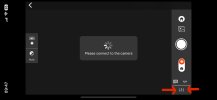
In the CGO app go to Settings at lower right (red arrows)
IMG_2929.jpeg
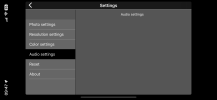
Then go to Audio settings and turn off the microphone. IMG_2930.png
I do not have the camera connected to the app, but you will be able to turn off the microphone.
 
  • Like
Reactions: DursunKaptan
In the CGO app go to Settings at lower right (red arrows)
View attachment 33303
Then go to Audio settings and turn off the microphone. View attachment 33304
I do not have the camera connected to the app, but you will be able to turn off the microphone.
When I turn it off, will the ambient and speech sounds also be muted? I just don't want the gimbal motor sound to be recorded. I want it to record normal ambient and human sounds. Also, how do I take pictures with this gimbal? It doesn't switch to picture mode when I tap the screen.


Türkçe
Peki şekilde kapattığım zaman Çevre ve konuşma sesleri de kapanmayacak m? Ben Sadece gimbal motor sesini almasını istemiyorum. Normal çevre ve insan seslerini kaydetsin yani. Birde Resim nasıl çekiliyor bu gimbal ile. Ekrana tıklayınca resim moduna geçmiyor bendeki.
 
When I turn it off, will the ambient and speech sounds also be muted?
No, there will be no sound.


I just don't want the gimbal motor sound to be recorded
That is not the gimbal motor you hear. It is the cooling fan that keeps the electronics from over heating. The fan can be turned off using a cgi command using the web browser on your phone, but it is not advisable to do so. Most people used a secondary microphone and recording device and join audio and video in post processing.
Also, how do I take pictures with this gimbal?
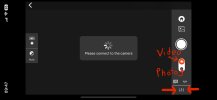
Use the soft switch on the right hand side shown as Video and Photo in this screenshot.
IMG_2929.jpeg
 
  • Like
Reactions: DursunKaptan

New Posts

Members online

Forum statistics

Threads
21,651
Messages
248,877
Members
28,918
Latest member
thierry2