Hello Fellow Yuneec Pilot!
Join our free Yuneec community and remove this annoying banner!
Sign up

E90x bootloop.

Sounds like no communication. Thoughts:
  • I have no idea what the required baud rate is, but since the same file worked on other cameras, it is probably correct.
  • I also have no idea what role the USB cord plays. I have no idea if anything in that circuit, either drone end or controller end could be at fault. If the same controller and USB cable were used for the successful updates, it would pretty well rule out those. (if not, try one of the sets that worked).
  • The camera is at least reading and writing to the SD card well enough to create the log file. That downplays the likelihood of a bad SD card slot.
  • The gimbal board has some function, albeit not normal. That also downplays (but does not rule out) the gimbal board.
If you were using a kit specific USB cord and controller on the failed update the next trouble shooting would be to either use the "Bad" set on a known good H520e (not a great idea) or use a known good controller and USB on the "Bad" camera (better idea).

If you were already using the same controller and USB, and since you have already tried the camera on a known good drone, then we are back to the assumption the issue is in the camera.
If the communication issue is in the camera, the purpose of the USB cord becomes important. It means we do not know whether the failure is created by the USB related circuit or by the SD card related circuit. A well-equipped factory backed shop could do better analysis. The x-mount will make connection to @h-elsner's calibration GUI impossible unless the actual drone will work as a calibration stand. I have no idea if that will work without destroying the H520e (a really "not good" idea unless someone knows something).
At our level, you will likely need to start swapping parts or mix/matching the major unit sections to find the issue.
The x-mount down to the gimbal board might be easier to swap, but unless someone can tell us what the USB cord does, it might not even be a player in the update process.
Splitting the camera at either the roll joint or the pitch joint would be next. In either case the lack of calibration will cause violent, erratic movement of the camera unless you control it with your hand until the update takes over and after the update finishes.
I did not find any update instruction in either the H520e-RTK manual or online. If you can post the steps you are following it would be great.
 
Sounds like no communication. Thoughts:
  • I have no idea what the required baud rate is, but since the same file worked on other cameras, it is probably correct.
  • I also have no idea what role the USB cord plays. I have no idea if anything in that circuit, either drone end or controller end could be at fault. If the same controller and USB cable were used for the successful updates, it would pretty well rule out those. (if not, try one of the sets that worked).
  • The camera is at least reading and writing to the SD card well enough to create the log file. That downplays the likelihood of a bad SD card slot.
  • The gimbal board has some function, albeit not normal. That also downplays (but does not rule out) the gimbal board.
If you were using a kit specific USB cord and controller on the failed update the next trouble shooting would be to either use the "Bad" set on a known good H520e (not a great idea) or use a known good controller and USB on the "Bad" camera (better idea).

If you were already using the same controller and USB, and since you have already tried the camera on a known good drone, then we are back to the assumption the issue is in the camera.
If the communication issue is in the camera, the purpose of the USB cord becomes important. It means we do not know whether the failure is created by the USB related circuit or by the SD card related circuit. A well-equipped factory backed shop could do better analysis. The x-mount will make connection to @h-elsner's calibration GUI impossible unless the actual drone will work as a calibration stand. I have no idea if that will work without destroying the H520e (a really "not good" idea unless someone knows something).
At our level, you will likely need to start swapping parts or mix/matching the major unit sections to find the issue.
The x-mount down to the gimbal board might be easier to swap, but unless someone can tell us what the USB cord does, it might not even be a player in the update process.
Splitting the camera at either the roll joint or the pitch joint would be next. In either case the lack of calibration will cause violent, erratic movement of the camera unless you control it with your hand until the update takes over and after the update finishes.
I did not find any update instruction in either the H520e-RTK manual or online. If you can post the steps you are following it would be great.
Thank u for all this explanation, not only does it take a while to write but also involves u having to think about all the different scenario and methods to resolve, really appreciate the time. I was contemplating trying a gimble calibration to see will it correct the pan forward as I think this won’t need sd card or wire, if this process fails it might suggest control board. The update fail was on the gimble update but that also needs the camera itself to write the software needed there and then pass that information back to the gimble, I’m completely speculating here as I don’t really understand how it all works, learning as I go. If gimble calibration fails it might suggest the issue with the gimble as that runs off the 2.4ghz rather than the 5ghz camera video feed , again speculating. Do u know if all else fails is the camera exactly the same on both the e90 and e90x, if so and the issue is there than that suggestion could be a good call, I’d much rather getting the e90x repaired even at the cost of an e90 parts camera. I’ll test the gimble calibration shortly
 
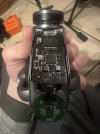
It looks like the connection between camera and gimbal is broken. That let me think about the famous ribbon cable.

The x-connector can also connected to USB and the calibration tool will work with it. @Enrico Jorysch tested this already. Maybe he can say how to connect to PC.
Yes this could be very likely , I’m thinking if one wire breaks on the ribbon it would partially work depending on what that wire is used for. I’m also suspicious of that wire between the x connector and mainboard , I took off the x connector and added one from a working camera incase it was a bent pin or dirty connector but still same result. The cable connected to this that runs into the camera looks the same as the 30pin connector from the gimble mount to the ofdm module , I’m curious if there is any sort of slip ring in there but with 30 wires and the limited movement of the e90x it may just be a cable , even a small amount of movement could make this a potential fail point. It’s very difficult to find and pictures or information online and I suspect most of the documented pictures about yuneec were added by members here on yuneecpilots. I’m just looking for an excuse to open it to fulfil my curiosity but being a bit cautious as I’m famous for taking things apart that never needed opened in the first place, my motto is if it not broken fix it till it is 😂. From taking apart the e10t and how delicate things are in these units I’m being a bit more cautious this time . My score sheet after these kind of things most often looks like this , electronics 1, me 0 , ziplock bags 5 😅
 
  • Love
Reactions: WTFDproject
.... Do u know if all else fails is the camera exactly the same on both the e90 and e90x....
I really don't know. There seems little reason for them to be different but that has never stopped Yuneec before. @Enrico Jorysch or @h-elsner might know.

If you go into this thing, take LOTS of pictures. Especially lots if you go into the top end.
 
I really don't know. There seems little reason for them to be different but that has never stopped Yuneec before. @Enrico Jorysch or @h-elsner might know.

If you go into this thing, take LOTS of pictures. Especially lots if you go into the top end
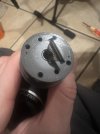
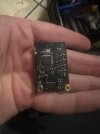
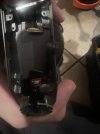
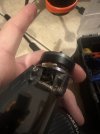
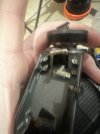
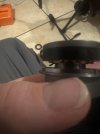
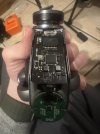
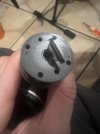
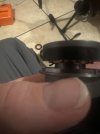
Nothing obvious inside but would help to have a microscope. I did notice a wire that didn’t go anywhere on the motor but the motor works fine so it might just be the end of the coil of copper. It does have a black liner on the outside. We will see not after reassembly will it function the same or catch fire. Also didn’t notice any slipring but it looks like the 30 pin connector might split in 2 with one end going to the WiFi board and one to the control board
 

Attachments

  • IMG_0683.jpeg
    IMG_0683.jpeg
    945.3 KB · Views: 8
  • IMG_0689.jpeg
    IMG_0689.jpeg
    949.2 KB · Views: 8
  • IMG_0688.jpeg
    IMG_0688.jpeg
    797.8 KB · Views: 8
  • IMG_0687.jpeg
    IMG_0687.jpeg
    903.6 KB · Views: 8
  • IMG_0686.jpeg
    IMG_0686.jpeg
    1 MB · Views: 8
  • IMG_0685.jpeg
    IMG_0685.jpeg
    887.4 KB · Views: 9
  • IMG_0684.jpeg
    IMG_0684.jpeg
    1 MB · Views: 8
  • IMG_0683.jpeg
    IMG_0683.jpeg
    945.3 KB · Views: 7
  • IMG_0685.jpeg
    IMG_0685.jpeg
    887.4 KB · Views: 7
  • IMG_0684.jpeg
    IMG_0684.jpeg
    1 MB · Views: 7
  • Like
Reactions: WTFDproject
Nothing obvious inside but would help to have a microscope. I did notice a wire that didn’t go anywhere on the motor but the motor works fine so it might just be the end of the coil of copper. It does have a black liner on the outside. We will see not after reassembly will it function the same or catch fire. Also didn’t notice any slipring but it looks like the 30 pin connector might split in 2 with one end going to the WiFi board and one to the control board
I also tried another controller again with another h520 wire and still gets the bootloop once data is transferred to the sd card. It’s definitely missing that handshake. Only other thing to note and probably not relevant is arms 1 and 6 are blinking green on both drones , I’m not sure was this due to the update on the rest of the settings or could it be because I’m indoors with no adequate gps. Also after update it says no fly zone status no unlock . I think technically here is outside any no fly zone, there is a hospital nearby with helicopter pad but I think this is more an advisory that a red no fly zone on the map and I’m maybe another 1km outside that zone. It’s also looking for operator id but doesn’t take it with its 16 digits , it needs 20 and it says 17 needs to be a certain character which u cant add from the controllers keyboard, maybe copy and paste for this would work if needed at all.
 
Nothing obvious inside but would help to have a microscope. I did notice a wire that didn’t go anywhere on the motor but the motor works fine so it might just be the end of the coil of copper. It does have a black liner on the outside. We will see not after reassembly will it function the same or catch fire. Also didn’t notice any slipring but it looks like the 30 pin connector might split in 2 with one end going to the WiFi board and one to the control board
"I did notice a wire that didn’t go anywhere on the motor"
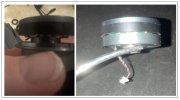
The motor in the image looks seriously pulled apart. At least compared to the E90 motor. I would greatly focus on that motor. Find a spare to compare. I will also post an image of an E90 motor from about the same angle in a few minutes. This may be as simple as a damaged motor.
Also, On the original E90, there would be three wires attached to the motor. The other end has a connector that plugged into the Yaw encoder board. Are they present?
 
The extra flange and differing diameter on your motor suggests the motor is not identical to the e90 version. But you should find a way to ensure your motor is as it should be. It really looks like it is pulled apart. Is the encoder magnet still in place?
motor compare 2.jpg
 
  • Like
Reactions: h-elsner
I also tried another controller again with another h520 wire and still gets the bootloop once data is transferred to the sd card. It’s definitely missing that handshake. Only other thing to note and probably not relevant is arms 1 and 6 are blinking green on both drones , I’m not sure was this due to the update on the rest of the settings or could it be because I’m indoors with no adequate gps. Also after update it says no fly zone status no unlock . I think technically here is outside any no fly zone, there is a hospital nearby with helicopter pad but I think this is more an advisory that a red no fly zone on the map and I’m maybe another 1km outside that zone. It’s also looking for operator id but doesn’t take it with its 16 digits , it needs 20 and it says 17 needs to be a certain character which u cant add from the controllers keyboard, maybe copy and paste for this would work if needed at all.
Those questions are beyond my reach. We should stay focused on getting the update before mixing in more issues anyway.
 
The extra flange and differing diameter on your motor suggests the motor is not identical to the e90 version. But you should find a way to ensure your motor is as it should be. It really looks like it is pulled apart. Is the encoder magnet still in place?
View attachment 32858
Yes it definitely does look odd compared to the one on the e90 however the lock ring that fits above this mounts flush with the top of the motor and the bottom sits in that ring at the bottom with a tiny easily lost ball bearing, this would suggest it hasn’t come apart , perhaps just a different design. That wire might need more investigation, however with the motor completely disconnected would it be able to complete a software update.
 
Yes it definitely does look odd compared to the one on the e90 however the lock ring that fits above this mounts flush with the top of the motor and the bottom sits in that ring at the bottom with a tiny easily lost ball bearing, this would suggest it hasn’t come apart , perhaps just a different design. That wire might need more investigation, however with the motor completely disconnected would it be able to complete a software update.
"the lock ring that fits above this mounts flush with the top of the motor and the bottom sits in that ring at the bottom with a tiny easily lost ball bearing"
That's gonna need pictures. No clue what the ring at the bottom is or why any bearings should be visible at all.
Is the encoder magnet in position? (The hemostat in the E90 picture is gripping the magnet.) On the E90, the lockring was between the magnet and the case.
 
Yes it definitely does look odd compared to the one on the e90 however the lock ring that fits above this mounts flush with the top of the motor and the bottom sits in that ring at the bottom with a tiny easily lost ball bearing, this would suggest it hasn’t come apart , perhaps just a different design. That wire might need more investigation, however with the motor completely disconnected would it be able to complete a software update.
"however the lock ring that fits above this mounts flush with the top of the motor"
On the E90, the snap ring is about a millimeter and a half away from the motor. And the shaft extends further to hold the magnet.

", however with the motor completely disconnected would it be able to complete a software update."
A damaged motor would likely be why it does not operate correctly with the existing firmware.
The inability to update could be related in that the same trauma that damaged the motor also damaged the OFDM wire harness or damaged ribbons/etc, in a different part of the unit.
But these are both speculations. We need to stay focused on resolving whether or not the motor is even damaged before we chase it downstream.
 
my motto is if it not broken fix it till it is
I believe we are brothers in spirit.

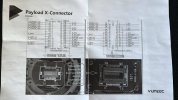
I forgot where I have found this but it is the best what I have seen regarding the X-connector. It offers a lot of possibilities for connections but not all are really used. I think E90x uses UART and possibly nothing else.

Yuneec_X-connector.jpg
 
I believe we are brothers in spirit.

I forgot where I have found this but it is the best what I have seen regarding the X-connector. It offers a lot of possibilities for connections but not all are really used. I think E90x uses UART and possibly nothing else.

View attachment 32859
I think it was myself who uploaded this image before owning a h520e, I still don’t really understand it, each pin I understand does something but what and how to test is beyond me, I don’t even have a multimeter 😂.
 
"the lock ring that fits above this mounts flush with the top of the motor and the bottom sits in that ring at the bottom with a tiny easily lost ball bearing"
That's gonna need pictures. No clue what the ring at the bottom is or why any bearings should be visible at all.
Is the encoder magnet in position? (The hemostat in the E90 picture is gripping the magnet.) On the E90, the lockring was between the magnet and the case.
I’ll need to get some more pictures of this with the locking ring or perhaps a video.
 
  • Like
Reactions: WTFDproject
"however the lock ring that fits above this mounts flush with the top of the motor"
On the E90, the snap ring is about a millimeter and a half away from the motor. And the shaft extends further to hold the magnet.

", however with the motor completely disconnected would it be able to complete a software update."
A damaged motor would likely be why it does not operate correctly with the existing firmware.
The inability to update could be related in that the same trauma that damaged the motor also damaged the OFDM wire harness or damaged ribbons/etc, in a different part of the unit.
But these are both speculations. We need to stay focused on resolving whether or not the motor is even damaged before we chase it downstream.
I could also take this top part of one of the working cameras , this would determine if all looks correct and if it also has that wire that appears not to be connected on the camera that won’t update. This is true about the motor that it could be related, it would also help explain the odd behaviour of the gimble. Even with old software it should still function correctly unless it’s mismatch between other software on the latest version and camera and gimble on old firmware. I was also reading online that NAND issue on the control board or corrupt firmware could cause the issue but also speculation. Even if it were soft bricked the NAND couldn’t be flashed as it appears to be a program available to certified repair shops only. The camera unit swap after the motor check might be next best option as I have the spare camera if the e90 is compatible. Replacing the mainboard from a working unit would also help establish a potential ribbon error but there is the risk of breaking a working camera. These things were definitely assembled by someone with a lot smaller hands that my big clumsy ones 😅
 
I could also take this top part of one of the working cameras , this would determine if all looks correct and if it also has that wire that appears not to be connected on the camera that won’t update. .....
Both are workable options.
Taking the motor out on one of the good cameras would be an immediately available option, but risk damage to the working camera.

Posting a couple of pictures from different angles of the potentially damaged motor might be slower waiting on a response from those that have seen the motors. But it would not risk the working unit.
 
Both are workable options.
Taking the motor out on one of the good cameras would be an immediately available option, but risk damage to the working camera.

Posting a couple of pictures from different angles of the potentially damaged motor might be slower waiting on a response from those that have seen the motors. But it would not risk the working unit.
Yes u are thinking along the same lines as myself, best not risking the working camera if possible. Although fortune favours the brave or could that be failure favours the brave 🤣. Definitely this motor on faulty camera warrants further investigation
 
  • Like
Reactions: WTFDproject

New Posts

Members online

Forum statistics

Threads
21,651
Messages
248,877
Members
28,917
Latest member
cpassenheim