Hello Fellow Yuneec Pilot!
Join our free Yuneec community and remove this annoying banner!
Sign up

ST16E no WiFi / no OFDM after firmware install – need help

Joined
Apr 3, 2026
Messages
18
Reaction score
12
Age
50
Hi everyone,
My Name is Ludo, I’m new to the forum.
I own a H520E with an ST16E controller. It was sold to me without any software or firmware installed.
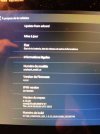
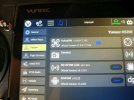
After installing Android v1.0.23 and DataPilot 2.2.53, I would now like to install wireless_ofdm_lc6500.
How should I proceed? Could someone guide me through the process?
Many thanks in advance for your help!
 

Attachments

  • image-1775420233823.jpg
    image-1775420233823.jpg
    199.7 KB · Views: 9
  • image-1775420211055.jpg
    image-1775420211055.jpg
    379.4 KB · Views: 10
  • image-1775420173238.jpg
    image-1775420173238.jpg
    365.2 KB · Views: 10
Good news,
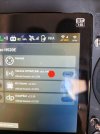
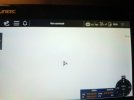
The OFDM firmware has been successfully installed on my controller. However, I am still unable to activate or detect any Wi-Fi networks.
Could you please advise on what to check next or whether this might indicate a hardware issue?
 
  • Like
Reactions: Steve Carr
Hi everyone,
My Name is Ludo, I’m new to the forum.
I own a H520E with an ST16E controller. It was sold to me without any software or firmware installed.
After installing Android v1.0.23 and DataPilot 2.2.53, I would now like to install wireless_ofdm_lc6500.
How should I proceed? Could someone guide me through the process?
Many thanks in advance for your help!
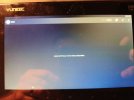
This second image , what happens when u try a toggle WiFi on, will it just not switch on. Have you used the controller with the 3 antennas disconnected? If so it could be a burnt out WiFi module
 
Good news,
The OFDM firmware has been successfully installed on my controller. However, I am still unable to activate or detect any Wi-Fi networks.
Could you please advise on what to check next or whether this might indicate a hardware issue?
You mentioned that the OFDM firmware was successfully installed, but you did not say whether you successfully completed the "OFDM module re-bind".
Please let us know if you attempted to reconnect the drone's OFDM module to the new controller firmware.
If you attempted the reconnection and the process failed, please describe what you observed.
If you have not yet attempted the reconnection, the attached multilingual guide may be helpful.

Vous avez indiqué que le micrologiciel OFDM avait été installé avec succès, mais vous n'avez pas précisé si vous aviez réussi à effectuer la « reconnexion du module OFDM ».
Veuillez nous indiquer si vous avez tenté de reconnecter le module OFDM du drone au nouveau micrologiciel.
Si vous avez tenté la reconnexion et que le processus a échoué, veuillez décrire ce que vous avez observé.
Si vous n'avez pas encore tenté la reconnexion, le guide multilingue ci-joint pourrait vous être utile.
Traduit avec DeepL.com (version gratuite)
 

Attachments

Hi,

Thank you very much to WTFDproject and Stephen1988 for your replies.

Today, without performing any additional actions, after powering on the ST16E today, both WiFi and OFDM modules initialized correctly. I was able to establish a stable OFDM link with the H520E.

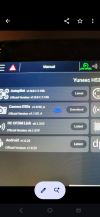
However, when attempting firmware updates via the ST16E, only the aircraft (H520E) update fails, while other components appear to function normally. The ST16E and H520E are currently connected via USB.

Do you have any recommendations regarding the correct update procedure for the aircraft, or whether USB connection is supported for this operation?

Thanks in advance.
 

Attachments

  • 6876.jpg
    6876.jpg
    306.9 KB · Views: 8
  • Like
Reactions: Stephen1988
This second image , what happens when u try a toggle WiFi on, will it just not switch on. Have you used the controller with the 3 antennas disconnected? If so it could be a burnt out WiFi module
When I was trying to enable WiFi, either the switch would not turn to "ON", or it would switch to "ON" but remain greyed out.
All three antennas were properly connected. I also opened the ST16E to verify that all internal antenna cables were correctly connected.
 
Hi,

Thank you very much to WTFDproject and Stephen1988 for your replies.

Today, without performing any additional actions, after powering on the ST16E today, both WiFi and OFDM modules initialized correctly. I was able to establish a stable OFDM link with the H520E.

However, when attempting firmware updates via the ST16E, only the aircraft (H520E) update fails, while other components appear to function normally. The ST16E and H520E are currently connected via USB.

Do you have any recommendations regarding the correct update procedure for the aircraft, or whether USB connection is supported for this operation?

Thanks in advance.
Are you using the original usb wire. Some wires only support charging and no data transfer. After u are updated to latest firmware u will get blinking green LEDs on arms 1 and 6, they will never go solid like that manual suggests. U will also get a message to add flyer id and no fly zone status no unlock, just something to be aware of.
 
Hi,

Thank you very much to WTFDproject and Stephen1988 for your replies.

Today, without performing any additional actions, after powering on the ST16E today, both WiFi and OFDM modules initialized correctly. I was able to establish a stable OFDM link with the H520E.

However, when attempting firmware updates via the ST16E, only the aircraft (H520E) update fails, while other components appear to function normally. The ST16E and H520E are currently connected via USB.

Do you have any recommendations regarding the correct update procedure for the aircraft, or whether USB connection is supported for this operation?

Thanks in advance.
what message do u get here when its failing .
 
Hi,

Thank you very much to WTFDproject and Stephen1988 for your replies.

Today, without performing any additional actions, after powering on the ST16E today, both WiFi and OFDM modules initialized correctly. I was able to establish a stable OFDM link with the H520E.

However, when attempting firmware updates via the ST16E, only the aircraft (H520E) update fails, while other components appear to function normally. The ST16E and H520E are currently connected via USB.

Do you have any recommendations regarding the correct update procedure for the aircraft, or whether USB connection is supported for this operation?

Thanks in advance.
Do u have a camera fitted to this model ur trying to update. I’m wondering does the ofdm update need a camera fitted with sd card installed to complete? Sd card 32gb or small formatted to fat32
 
Do u have a camera fitted to this model ur trying to update. I’m wondering does the ofdm update need a camera fitted with sd card installed to complete? Sd card 32gb or small formatted to fat32
No, I don’t have a camera. However, I just managed to install it using the USB connection. It took a lot of attempts, but I finally got it to work.
Indeed, I think that with an SD card in a camera, everything would have been faster.
Now, it’s the autopilot that won’t update. I’ll be patient and do the same as with the previous updates.
 
  • Like
Reactions: Stephen1988
No, I don’t have a camera. However, I just managed to install it using the USB connection. It took a lot of attempts, but I finally got it to work.
Indeed, I think that with an SD card in a camera, everything would have been faster.
Now, it’s the autopilot that won’t update. I’ll be patient and do the same as with the previous updates.
@Stephen1988 , will the H520e autopilot version display on the ST16e if no camera is mounted?
@LudoGA, if the autopilot version displays on the ST16e, what version does it show?
 
With the H520E using OFDM it shouldn’t need the camera mounted to communicate that info to the ST16E. The camera sends its info via the OFDM module in the aircraft.
 
With the H520E using OFDM it shouldn’t need the camera mounted to communicate that info to the ST16E. The camera sends its info via the OFDM module in the aircraft.
When u click download or update on the controller for the camera i think the file gets installed on the sd card in the camera or does the file gets installed in the st16e memory and sent across via the usb wire . I’m curious if it gets installed to the cameras sd card only does the ofdm modules file also get installed from the camera. It looks like in this occasion the ofdm did update with no camera installed
 
When u click download or update on the controller for the camera i think the file gets installed on the sd card in the camera or does the file gets installed in the st16e memory and sent across via the usb wire . I’m curious if it gets installed to the cameras sd card only does the ofdm modules file also get installed from the camera. It looks like in this occasion the ofdm did update with no camera installed
I managed to update the OFDM by using the USB cable between the ST16E and the H520E’s OFDM module.
However, I couldn’t manage to do it for the autopilot.
 
I can’t manage it. I’ll try to do this update using the camera.
Hopefully the autopilot will update now when the camera is installed. It should arrive today. One thing to note about this camera is if u update the software on the camera it will download the file and try to install it, however because the camera doesn’t know where its forward position is the update process won’t complete and the camera will keep rebooting. Ur 2 options are use it as is with the current camera software or diagnose and recalibrate whatever is responsible for it knowing its forward position, I think if u resolve that the camera firmware will then also install. I’m guessing it needs to initialise correctly while preforming an update . Looking forward to seeing can you resolve this one 😉
 

New Posts

Members online

Forum statistics

Threads
21,651
Messages
248,877
Members
28,917
Latest member
cpassenheim