Hello Fellow Yuneec Pilot!
Join our free Yuneec community and remove this annoying banner!
Sign up

Typhoon H Plus won’t start

Joined
Nov 10, 2025
Messages
4
Reaction score
0
Age
25
Hey Guys. I am a New member from the Netherlands. Nice to mee u all!

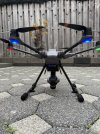
A few weeks ago I bought a Yuneec Typhoon H Plus with Intel realsense

today I tried my first TestFlight but i coudnt start the propellers and take off.

Can someone help me with a diagnose please ?

Status of the drone:

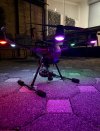
Back 2 leds: flashing blue
Left led: red, right led: green
Front 2 leds: flashing white

I someone can help me it means a lot to me, thank u !
 

Attachments

  • IMG_4010.jpeg
    IMG_4010.jpeg
    3.2 MB · Views: 19
  • IMG_4007.jpeg
    IMG_4007.jpeg
    1.4 MB · Views: 19
  • IMG_4024.jpeg
    IMG_4024.jpeg
    328.1 KB · Views: 19
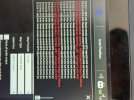
The GPS status of the drone looks good so far. But it says week remote GPS signal. The thing with the GPS is that it needs time to get a proper fix, especially it was longer not in use or mover to a far away place. The GPS needs to download correction data, known as Almanach. This may take up to 12 min because the data will be sent all 12 minutes only.

Bring the remote and the drone outside in a free area and let it sit for a while until it regains GPS data and get GPS fix in both, drone and remote. Then try again.
 
...A few weeks ago I bought a Yuneec Typhoon H Plus with Intel realsense
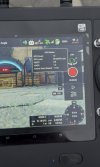
Your description says you have an H Plus Drone. Your screenshot is from an ST16S for H520 and indicates it is bound to an e90 camera (also for H520).
Please verify the drone is an HPlus. An HPlus drone is not going to work with an H520 controller unless you convert the controller to HPlus firmware. The e90 camera can be at least functional on an HPlus Drone and Controller.
 
The GPS status of the drone looks good so far. But it says week remote GPS signal. The thing with the GPS is that it needs time to get a proper fix, especially it was longer not in use or mover to a far away place. The GPS needs to download correction data, known as Almanach. This may take up to 12 min because the data will be sent all 12 minutes only.

Bring the remote and the drone outside in a free area and let it sit for a while until it regains GPS data and get GPS fix in both, drone and remote. Then try again.
Your description says you have an H Plus Drone. Your screenshot is from an ST16S for H520 and indicates it is bound to an e90 camera (also for H520).
Please verify the drone is an HPlus. An HPlus drone is not going to work with an H520 controller unless you convert the controller to HPlus firmware. The e90 camera can be at least functional on an HPlus Drone and Controller.
Thank u for ur reaction,

Currently back leds are purple instead of flashing blue ✅

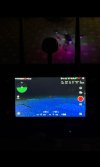
I downloaded the correct app for typhoon h plus and it seems problem is halfway solved.

controller operates correct with Camera & gimball ✅

But I still cannot start the motors by holding the red button for 3 sec. But when I select slide to takeoff on the screen it works.

But I can still not fully operate the Drone properly. When i take it off the Drone was not able to react properly on the controller. So i pushed return to home.

The problem is that if i turn on the controller. An old version of the app automaticly turns on. This app is the wrong one (like u told). But how can I switch this to the New app ? So if I start the device the right app opens. Otherwise I have to switch everytime manualy.

Tomorrow im gonna re calibrate the controller and Drone and going for a second test flight.

I Will Give more info soon.

THANKS for ur help!!
 

Attachments

  • IMG_4036.jpeg
    IMG_4036.jpeg
    656.2 KB · Views: 7
  • IMG_4035.jpeg
    IMG_4035.jpeg
    274.2 KB · Views: 8
How long has it been since the controller was in normal service on the H520?
Was the controller operating the H520 correctly?
Did you check the "RC Monitor" to ensure all control hardware is operating correctly?
Were you outside with lots of satellites acquired for both drone and controller?
If either the drone or the controller have been in storage too long, the GPS almanac may be out of date. Sitting outside with a clear view of the sky and powered on for about 30 minutes will allow acquisition of the latest almanac. The almanac is broadcast every 12(?) minutes. 30 minutes should be plenty of time for the system to catch a broadcast.

Operating more than one APP on a single controller has been done before, but not enough to prove it works without glitch.
  • You can fully convert the controller to an HPlus ST16S by following the guidance in ST16S H520 Conversion to HPlus.
  • If you want to continue with both APPs loaded, I would recommend ensuring you have loaded the controller APP Yuneec-App-Release.apk from Typhoon HPlus Build 822.
  • If you stay with both APPS installed, you might be able to select which of the two is the default to start by using "PAD/Settings/Home", but I doubt it. The H520 App seems to set itself as the home APP each time you power off.
 
  • Like
Reactions: h-elsner
The almanac is broadcast every 12(?) minutes.
Background info from https://novatel.com/support/known-solutions/gnss-ephemerides-and-almanacs

"GNSS almanacs and ephemerides both form the navigation message transmitted by each satellite. The navigation message consists of 5 subframes, where each frame is made up of 10 words and takes up 6 seconds to download. The navigation message frame structure is as follows:

subframes 1 -3: ephemerides
subframes 4-5: almanac --> full almanac requires 25 pages to completely download.

Thus one page of frames 1-5 takes 30 seconds to download. Since the almanac contains 25 pages, the total time required to download almanac is: 25 pages * 30 seconds/page = 750 seconds = 12.5 minutes. On the other hand, the ephemerides takes 6 seconds/subframe * 5 subframes = 30 seconds to download. Note that the almanac is the same for all satellites whereas the ephemeris is unique to each satellite."
 

New Posts

Members online

Forum statistics

Threads
21,651
Messages
248,877
Members
28,917
Latest member
cpassenheim