Hello Fellow Yuneec Pilot!
Join our free Yuneec community and remove this annoying banner!
Sign up

motors not armed and camera not connecting...need help!!

hi Stephen unfortunately the L1 camera has no shutter or any other kind of button...there are only the micro SD card port and a micro USB port...that's it

there is no pin hole for reset neighter...
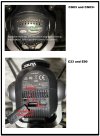
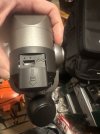
The reset buttons are under the two holes at the micro SD card port. They work exactly the same as on the C23/E90/CGo3, etc.
ION L1 RESETS.jpg Reset.jpg
 
... and i did press RESET in the camera connection panel...after that i was no more able to reconnect my camera

y...actually the camera is recognized but not paired, i get the green blinking led on the camera, i get the camera recognized in the seach menu, i can try to pair it, it asks me the password, i insert the usual password, it starts to try pairing and after some seconds appears a RED triangle with the ! in the center for some milliseconds then all goes back to unpaired caemra...i keep see the camera in the search panel but the pairing never ends succesfully

what can be the problem? i need to fix the camera issue ...
This is a dead-on perfect description of an L1 camera with an SD card inserted and using the WRONG PASSWORD.
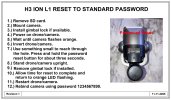
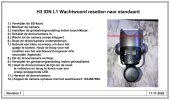
Have you tried resetting the password?
ION L1 PASSWORD RESET TO STANDARD.jpg H3 ION L1 WACHTWOORD TERUGZETTEN NAAR STANDAARD.jpg

Edit: Added image with reset instructions.
 
  • Like
Reactions: anaka
you can double check on your model if you find any reset button or similar.. just in case

do you know how to update the firmware? there is a usb port but i think I'll need a specific application for updates

I'd like to avoid considering a new camera.. but if it's necessary I'll keep in mind yours
I don’t know anything about the h3 , I’ll look now shortly. If it’s like some other models it can be done OTA (over the air ) with ur controller connected to the internet, however this does not work on all models as some don’t support updates OTA like the h480 and other models like the h plus that once had OTA updates is now no longer possible as yuneecs servers for that model might now be shut down. What will work is updating via sd card, u can download the files from Yuneecskins website free if they have this model there . U upload them onto the sd card and insert that into the camera. If someone is more familiar with the h3 they can better advise on this regard. U now have no image nor do u have any control on the drone , like arming? Is that correct. Can u switch between modes like RTL, angle and what ever the 3rd option is on ur model? The switch for this is the far right on top, my thinking here is if u see the colours change on the arms while switching modes is the drone is indeed binded to the controller. Maybe none of this works when camera isn’t connecting and then we are back to square one
 
Last edited:
This is a dead-on perfect description of an L1 camera with an SD card inserted and using the WRONG PASSWORD.
Is the password 1234567890 as standard on this one. If someone lodes a different password and u don’t know it can it be bypassed by resetting for example
 
Is the password 1234567890 as standard on this one. If someone lodes a different password and u don’t know it can it be bypassed by resetting for example
See edited post #22. Added L1 password reset instructions.
An abbreviated instruction is part of the ST16S menu. Using a CGo3 image! 😂

Please do not mess with firmware yet.
 
  • Like
Reactions: anaka
See edited post #22. Added L1 password reset instructions.
An abbreviated instruction is part of the ST16S menu. Using a CGo3 image! 😂

Please do not mess with firmware yet.
Yes I think I’ve well and truly learned my lesson with firmware, from now on it’s a last resort 🤣🤣🤣
 
  • Haha
Reactions: WTFDproject
Hi flying collegues ;)

..... i was ready to takeoff but when i did press hte start button i got the usual error sound with a weird message "battery connection problem" or something similar....
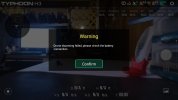
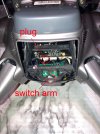
The first screenshot below is the message you get if you disconnect the battery latch sensor switch. If the battery is not secure, the drone will not start. The same is probably true if the sensor switch simply fails.
Assuming you got the same message, you could try to:
1.) Ensure the battery sensor switch is securely plugged into the mainboard.
2.) Exercise the switch. You can do this by inserting and removing the battery or by removing the battery and operating the switch by hand through the battery door.
3.) Spray some plastic safe contact cleaner on it through the battery bay and exercise it again.
4.) Replace the switch. @Enrico Jorysch might know if the H3 and H520e share the same battery detection switch. ("Pardon Our Interruption...")

Battery latch.jpg Switch2-50.jpg
 
Last edited:
  • Like
Reactions: anaka
Hi everybody

I'm happy to announce that all the issues are gone!

the password reset worked fine
the battery sensor now does it's job properly
finally i made it fly again!!

thank you all for the unpayable support! this is a great community and I'm super happy to be part of it!

last question... about the no fly zone limitations.
is this related to airports only?
i moved to Italy in those days and here is a maze of ancient places.. archeological sites.. airports and so on.. if the NFZ is airports based only I'm fine i don't want to unlock it
 
Last edited:
The first screenshot below is the message you get if you disconnect the battery latch sensor switch. If the battery is not secure, the drone will not start. The same is probably true if the sensor switch simply fails.
Assuming you got the same message, you could try to:
1.) Ensure the battery sensor switch is securely plugged into the mainboard.
2.) Exercise the switch. You can do this by inserting and removing the battery or by removing the battery and operating the switch by hand through the battery door.
3.) Spray some plastic safe contact cleaner on it through the battery bay and exercise it again.
4.) Replace the switch. @Enrico Jorysch might know if the H3 and H520e share the same battery detection switch. ("Pardon Our Interruption...")

View attachment 32899 View attachment 32900

Yes, the sensor for battery detection is identical in the H3 and H520E.
 
  • Like
Reactions: WTFDproject
Hi everybody

I'm happy to announce that all the tissues are gone!

the password reset worked fine
the battery sensor now does it's job properly
finally i made it fly again!!

thank you all for the unpayable support! this is a great community and I'm super happy to be part of it!

last question... about the no fly zone limitations.
is this related to airports only?
i moved to Italy in those days and here is a maze of ancient places.. archeological sites.. airports and so on.. if the NFZ is airports based only I'm fine i don't want to unlock it
Yes the NFZ’s are for major airports. Those that are Class B and some Class C or Class D as defined in the USA.
 
  • Like
Reactions: WTFDproject

New Posts

Members online

Forum statistics

Threads
21,651
Messages
248,878
Members
28,918
Latest member
thierry2