Hello Fellow Yuneec Pilot!
Join our free Yuneec community and remove this annoying banner!
Sign up

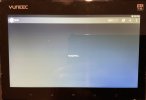
ST16 controller does not show wifi (greyed out) on the screen.

I replaced the 2.4 GHz board. Was this the correct component to repalce or do i need to replace the 5 + ghz board?
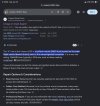
In my experience the greyed out WiFi was due to a burnt out WiFi module on several occasions. U said u replaced the 2.4ghz board ? Is this correct, the WiFi board is the 5ghz board as pictured above . Even with the drone powered off the WiFi should toggle on in the android menu and show other WiFi connections like home WiFi. That is provided the module is not burt out.
On that note has anyone determined what actually burns out on the WiFi module??? Perhaps I’ll need to remove the antenna and look with a thermal camera to see what heats up and burns out
 
Last edited:
Yes, I double checked all the connections.
Still not getting any Wi-Fi connection. When the controller attempts to bind with the camera, the binding process last only 1 second then stops without recognising the camera. I have also reseated the camera in case of a loose connection.
On the android interface, in the system settings under Wi-Fi, the system does not detect any Wi-Fi networks either!
I replaced the 2.4 GHz board. Was this the correct component to repalce or do i need to replace the 5 + ghz board?
"I replaced the 2.4 GHz board. Was this the correct component to repalce or do i need to replace the 5 + ghz board?"
No. The camera and drone both bind using the 5Ghz WiFi board.
 
Sorry to butt in but I’m having the same issue with the same ST16S transmitter. Is there any indication that the receiver boards aren’t the uniform across most ST16 transmitters other than the H520E of course due to its different protocols. If they are all uniform applications the standard ST16 can be found on EBay new for under $50 as a parts source.
 
Sorry to butt in but I’m having the same issue with the same ST16S transmitter. Is there any indication that the receiver boards aren’t the uniform across most ST16 transmitters other than the H520E of course due to its different protocols. If they are all uniform applications the standard ST16 can be found on EBay new for under $50 as a parts source.
"but I’m having the same issue with the same ST16S transmitter"
Does your camera show a power indicator light on front and come up to a stabilized position when powered on?

(from @Airborne Drone Solutions ) "The ST16 controller via the android screen (settings), does not even allow me to turn the wi-fi button 0n and it remains greyed out after the "turning wi-fi on " message..." See Post #5 above.
@Mcgyver , If you start the ST16S without the H520 and go to WiFi settings in the Android, can you turn WiFi on and off?
 
Last edited:
I’ve been unable to get that far as this came as a second radio with the H520 I’ve been posting about no gimbal or camera power. My next step is to check the K fuse but I won’t be able to do that until tomorrow or Monday. This post peaked my interest because I’m having exactly the same issue as the other poster.
Maybe you can answer my questions,
1. Are the transmitter receiver modules uniform across most ST16 transmitters except the H520E of course due to its different protocols.
2. Where can I get replacement K fuses?
3. Can I just jump the K fuse permanently or is that a bad idea?
Thanks again!!
 
Maybe you can answer my questions,
1. Are the transmitter receiver modules uniform across most ST16 transmitters except the H520E of course due to its different protocols.
2. Where can I get replacement K fuses?
3. Can I just jump the K fuse permanently or is that a bad idea?
Thanks again!!
There is different versions of the WiFi module in the st16 the st16s and st16E but I found them to be cross compatible , u can fit a WiFi module from a st16 into a st16s. The e model even has a WiFi module as it still uses WiFi for certain features.
Question 2 and 3, don’t just jump the fuse as if you get a short from say a faulty camera or a crash it will fry something else along that power rail, the fuse is there for that protection. If u can’t source a k fuse u could use a fuse of the same or very similar value if u solder it in place, ive also tried this as at the time I didn’t have a k fuse . It worked
 
  • Like
Reactions: Mcgyver
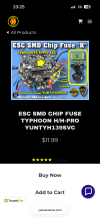
Thanks for your help, now all I have to do is find replacement fuses or spend $50 on EBay to buy a new one.
I happened to run across this doing a google search but the source for the fuses is a bit confusing.
 

Attachments

  • IMG_0906.jpeg
    IMG_0906.jpeg
    366.3 KB · Views: 1
I’ve been unable to get that far as this came as a second radio with the H520 I’ve been posting about no gimbal or camera power. My next step is to check the K fuse but I won’t be able to do that until tomorrow or Monday. This post peaked my interest because I’m having exactly the same issue as the other poster.
Maybe you can answer my questions,
1. Are the transmitter receiver modules uniform across most ST16 transmitters except the H520E of course due to its different protocols.
2. Where can I get replacement K fuses?
3. Can I just jump the K fuse permanently or is that a bad idea?
Thanks again!!
1. Are the transmitter receiver modules uniform across most ST16 transmitters except the H520E of course due to its different protocols.
Basically, yes. Functionally, Yes. There are some differences in heat shields and maybe even some component variations, but they all seem to mount the same and work the same.
2. Where can I get replacement K fuses?
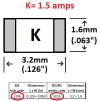
Ebay, but it is hard to get the right physical size. I will try to find some old notes and post the actual ID numbers later. "K" just means 1.5 amps. LOTS of variations.
3. Can I just jump the K fuse permanently or is that a bad idea?
Pretty much a bad idea. You expressed confidence the seller did not know of any issues, which leans suspicion towards something present in your setup. Best to stay cautious and use a fuse.
 
Thanks for your help, now all I have to do is find replacement fuses or spend $50 on EBay to buy a new one.
I happened to run across this doing a google search but the source for the fuses is a bit confusing.
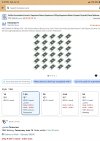
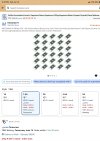
Can you still buy them here? U definitely can just use any fuse if u match the values , the one I fitted in the past wasn’t a nice flush mounted one like this but one with big legs, I snipped them short and got a friend to solder it on , worked a charm
 

Attachments

  • IMG_4560.png
    IMG_4560.png
    2.2 MB · Views: 4
  • Like
Reactions: Mcgyver
.....I will try to find some old notes and post the actual ID numbers later. "K" just means 1.5 amps. LOTS of variations.
.....
The "inch" and "metric" fuses are exactly the same, they just have different component codes. You can search using either code on Amazon or Ebay:
Inch code = 1206
Metric code = 3216
Check the size, amps, and look for "fast blow" fuses.

As mentioned by @Stephen1988, you can use other fuses if you can find something that fits and has the same ratings.

K Fuse 2.jpg
 
Last edited:
  • Like
Reactions: Mcgyver
Thanks for your help, now all I have to do is find replacement fuses or spend $50 on EBay to buy a new one.
I happened to run across this doing a google search but the source for the fuses is a bit confusing.

Can you still buy them here? U definitely can just use any fuse if u match the values , the one I fitted in the past wasn’t a nice flush mounted one like this but one with big legs, I snipped them short and got a friend to solder it on , worked a charm
If u did get a replacement fuse u could just hold it over the top of the other to see would power return to the camera, it would save u soldering off the old one just to test. A multimeter should tell you anyway if the old one is good or not
 
  • Like
Reactions: Mcgyver

Attachments

  • IMG_0907.jpeg
    IMG_0907.jpeg
    407.2 KB · Views: 0
The "inch" and "metric" fuses are exactly the same, they just have different component codes. You can search using either code on Amazon or Ebay:
Inch code = 1206
Metric code = 3216
Check the size, amps, and look for "fast blow" fuses.

As mentioned by @Stephen1988, you can use other fuses if you can find something that fits and has the same ratings.

View attachment 33615
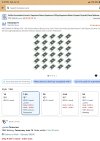
Thank you!! I found them on Amazon
 

Attachments

  • IMG_0907.jpeg
    IMG_0907.jpeg
    407.2 KB · Views: 2
  • Love
Reactions: Stephen1988
Can you still buy them here? U definitely can just use any fuse if u match the values , the one I fitted in the past wasn’t a nice flush mounted one like this but one with big legs, I snipped them short and got a friend to solder it on , worked a charm
I found them on Amazon
 

Attachments

  • IMG_0907.jpeg
    IMG_0907.jpeg
    407.2 KB · Views: 0
  • Like
Reactions: WTFDproject

Members online

Forum statistics

Threads
21,657
Messages
248,975
Members
28,928
Latest member
Vyduck